Basic vs Advanced Consent Mode: What’s the Difference?

Basic vs Advanced Consent Mode V2: Everything You Need to Know
We live in a data-driven world, but ensuring you can collect the data you need while navigating privacy regulations can be a difficult (and high stakes) balancing act. Google Consent Mode was created to help your data collection stay compliant but competitive.
Google offers Basic and Advanced Consent Mode, and the difference between them has a major impact on data quality, measurement accuracy, and compliance strategy.
This article breaks down what Google Consent Mode is, how Basic and Advanced modes work, and which approach makes sense for different businesses, before detailing how to switch between them and offering some valuable insights along the way.
What Is Google Consent Mode?
Google Consent Mode is a framework that allows Google tags (such as Google Analytics, Google Ads, and Floodlight) to adapt their behavior based on a user privacy consent choices, which are usually collected from user interactions with a consent banner.
Instead of tags being simply on or off, Consent Mode introduces a more flexible model where tags can:
- Adjust how they store cookies
- Decide whether to send full, limited, or modeled data
- Respect user consent while still supporting measurement and attribution
Consent Mode works by passing consent signals to Google tags, typically for:
- ad_storage (advertising cookies)
- analytics_storage (analytics cookies)
- ad_user_data (advertising user data)
- ad_personalization (advertising personalisation data)
How Google uses those signals depends on whether you’re running Basic or Advanced Consent Mode.
Basic Consent Mode: Consent First, Data Second
How Basic Consent Mode Works
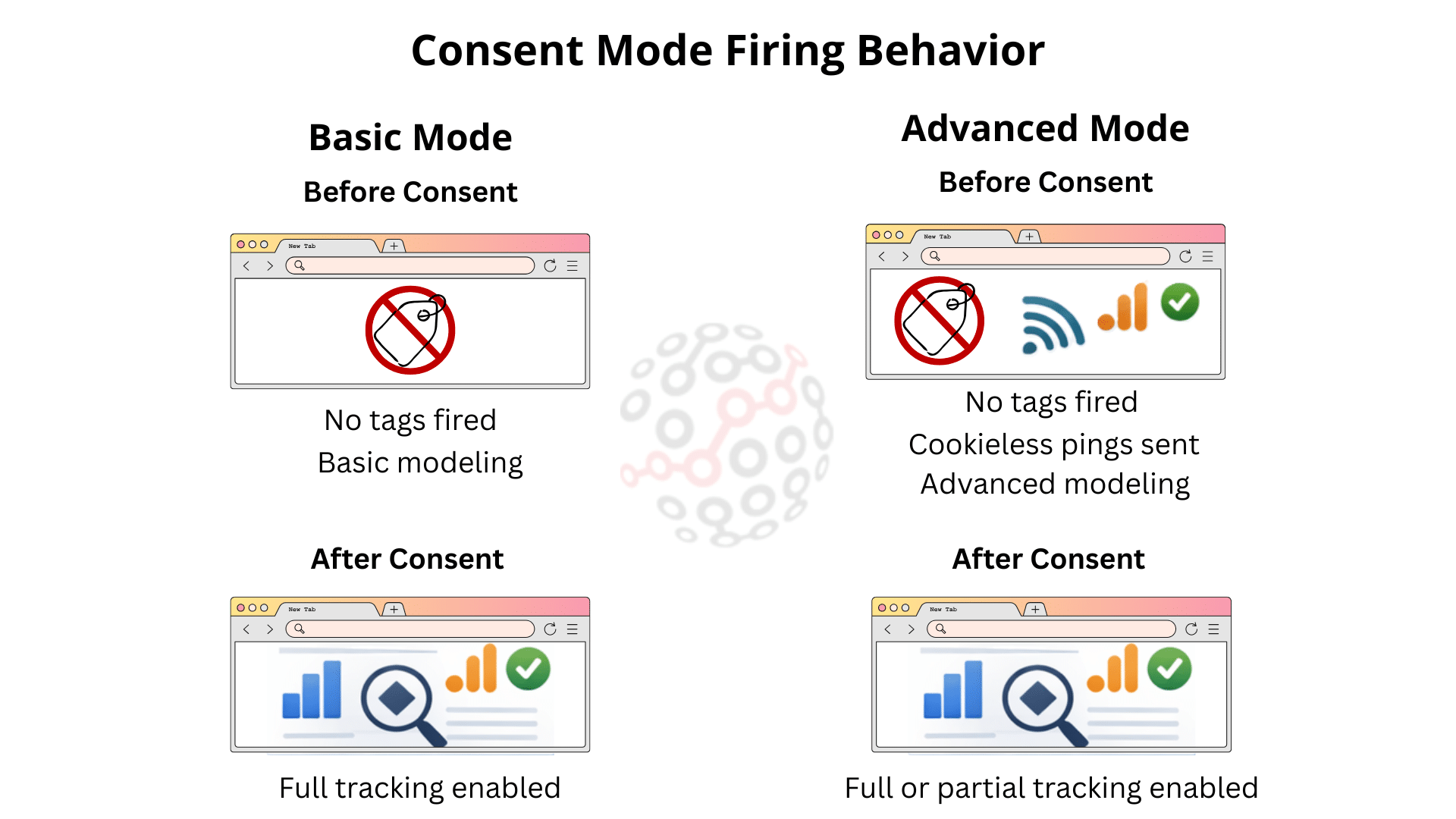
Basic Consent Mode is the most straightforward approach, offering users a binary choice between full acceptance or full denial, and Google tags behave accordingly:
- Before consent:
Google tags do not fire at all. No cookies are set, and no hits are sent to Google. - After consent is granted:
Google tags fire normally and begin collecting data using cookies.
In practice, this means:
- Users who decline consent are completely invisible to Google Analytics and Google Ads.
- Measurement only starts once a user actively accepts tracking.
It’s worth noting that basic Consent Mode does use some basic data modeling to attempt to compensate for data loss when a user does not grant consent, based on the users who have consented. This allows conversion modeling in Google Ads and Google Analytics, but it blocks behavioral modeling in Analytics.
Key Characteristics of Basic Consent Mode
- Tags are blocked until consent is given
- No data (not even anonymous pings) is sent before consent
- Simple to understand and implement
- Strong, conservative interpretation of consent
Pros of Basic Consent Mode
- Very clear from a legal and compliance perspective
- Minimal risk of sending any data before consent
- Easy to explain to legal teams and regulators
Cons of Basic Consent Mode
- Significant data loss (especially in regions with high opt-out rates)
- Conversion tracking becomes incomplete
- Attribution models suffer due to missing touchpoints
- Harder to optimize campaigns effectively
- Limited customisation (users can not selectively give consent to different cookies, and website owners cannot tailor consent options for different types of users)
Basic Consent Mode prioritises maximum caution, but often at the expense of significant insight.
Advanced Consent Mode: Privacy-Safe Modeling
How Advanced Consent Mode Works
Advanced Consent Mode takes a more nuanced approach.
- Before consent:
Google tags still fire, but in a restricted, data privacy-safe way.
Instead of cookies, Google receives anonymous, non-identifying signals (often called “pings”). - After consent is granted:
Tags transition to normal behavior and set cookies as usual.
These anonymous cookieless pings allow Google to:
- Understand that a visit or conversion occurred
- Model conversions and user behavior statistically
- Fill gaps caused by users who decline consent
No personally identifiable data is stored before consent, and cookies are not set.
Key Characteristics of Advanced Consent Mode
- Tags always fire, but adapt tag behavior based on their consent status
- No cookies before consent, but limited signals are sent
- Google uses advanced conversion and behavioral modeling
- Better data continuity without violating consent rules
Pros of Advanced Consent Mode
- Significantly improved data completeness
- More accurate conversion reporting
- Better campaign optimization and bidding
- Preserves trends and performance insights
- Better flexibility and control
- Still respects user consent choices
Cons of Advanced Consent Mode
- More complex to implement correctly
- Requires a well-configured CMP (Consent Management Platform)
- Modeled data may feel less “concrete” to some stakeholders
Advanced Consent Mode prioritises privacy-aware data collection.
If you’re looking for a CMP that’s easy to integrate with Consent Mode, we’d reccommend Cookiebot. We have an indepth article available on how to implement Consent Mode with Cookiebot, and a Cookiebot afilliate discount available here, with instructions on how to get a massive 40% off.
Basic vs Advanced Consent Mode: Side-by-Side Comparison
| Feature | Basic Consent Mode | Advanced Consent Mode |
| Tags fire before consent | ❌ No | ✅ Yes (restricted) |
| Cookies before consent | ❌ No | ❌ No |
| Anonymous pings sent | ❌ No | ✅ Yes |
| Conversion modeling | ❌ No | ✅ Yes |
| Data completeness | Low | High |
| Implementation complexity | Low | Medium–High |
| Best for | Maximum caution | Balanced compliance & insight |
Compliance: Are Both Modes Legal?
Both Basic and Advanced Consent Mode are designed to be compatible with major privacy regulations such as:
- GDPR
- ePrivacy Directive
- UK GDPR
- Digital Markets Act
- Consent frameworks like IAB TCF v2.2
The key distinction is how data is processed before consent:
- Basic Mode sends nothing at all
- Advanced Mode sends non-cookie, non-identifying signals
For Advanced Consent Mode to be compliant:
- Cookies must not be set before user consent preferences
- No personally identifiable information may be collected
- Consent signals must be accurate and updated in real time
MeasureMinds has developed a free app that scans you Google Tag Manager set-up and delivers a free report in under 2 mins. Check out Consent Mode Monitor to help ensure your complience with Consent Mode (now available as a chrome extension too).
Impact on Google Analytics and Google Ads
Google Analytics 4 (GA4)
- Basic Mode:
Sessions and events from non-consenting users are completely missing. - Advanced Mode:
GA4 uses modeling to estimate sessions, events, and conversions for unconsented users, improving trend accuracy.
Google Ads
- Basic Mode:
Conversion tracking gaps can reduce Smart Bidding performance. - Advanced Mode:
Modeled conversions help maintain bidding efficiency and attribution, even when users decline cookies.
In regions with strict privacy laws (e.g., the EU), the difference in reported performance between Basic and Advanced can be substantial.
Which Consent Mode Should You Choose?
Choose Basic Consent Mode if:
- You prefer simplicity over measurement accuracy
- You operate in low-traffic or low-conversion environments
- You are in early stages of compliance implementation
Choose Advanced Consent Mode if:
- You want to minimize data loss while staying compliant
- You use Google Ads Smart Bidding or performance campaigns
- You operate in regions with high opt-out rates and a low amount of consented users
For most business needs, Advanced Consent Mode offers the best balance between privacy and performance.
How do I switch between basic and advanced Google Consent Mode V2?
Switching modes is not a toggle in Google Analytics or Google Tag Manager – it’s a change in how consent signals are sent and how tags are allowed to execute.
Why would I want to switch Consent Modes?
Common Reasons to Switch from Basic to Advanced
Most organisations move from Basic to Advanced for one or more of these reasons:
- High cookie opt-out rates leading to large data collection gaps
- Poor conversion tracking accuracy in Google Ads
- Smart Bidding underperforming due to missing conversions
- Loss of visibility into user journeys and funnels
When Switching Back to Basic Makes Sense
Less commonly, website owners may switch from Advanced back to Basic, usually due to:
- Very conservative legal interpretations
- Regulatory feedback or internal risk decisions
- Misconfigured CMPs causing uncertainty about compliance
- Limited reliance on analytics or paid media data
What Switching Consent Modes Actually Involves
Switching between Basic and Advanced Consent Mode affects three core areas:
- Tag firing behavior
- Default consent configuration
- CMP integration
There is no change required inside GA4 or Google Ads interfaces – the change happens entirely in how consent is handled on your website.
Switching from Basic to Advanced Consent Mode
1. Change Default Consent Behavior
In Basic Consent Mode, tags are usually blocked until consent.
In Advanced Consent Mode, tags must always load, with consent set to denied by default.
This ensures:
- No cookies are set before consent
- Anonymous, non-identifying pings can still be sent
Conceptually, you move from:
“Don’t load tags until consent”
to
“Load tags, but restrict them until consent”
2. Update Your CMP Integration
Your Consent Management Platform must:
- Fire before Google tags
- Send consent states for:
- ad_storage
- analytics_storage
- ad_user_data
- ad_personalization
- Update consent immediately when a user makes a choice
Advanced Consent Mode depends on real-time, accurate consent signals. Without this, switching modes can create compliance or data issues.
3. Remove Tag Blocking Logic
Many Basic implementations rely on:
- Tag firing triggers based on consent
- CMP-controlled script blocking
- Conditional loading of Google tags
When switching to Advanced:
- Google tags should no longer be conditionally blocked
- User’s consent status should control behavior, not execution
This is one of the most common mistakes during a transition.
4. Validate Cookie and Network Behavior
After switching:
- Google tags should fire immediately on page load
- No cookies should be set before consent
- Cookies should appear only after consent is granted
- Network requests should show reduced data before consent
Testing is critical here to ensure the switch behaves as intended.
Switching from Advanced Back to Basic
If you need to revert to Basic Consent Mode:
- Reinstate tag blocking until consent is granted
- Ensure Google tags do not fire at all before consent
- Disable reliance on modeled data in reporting discussions
Be aware that switching back will reduce reported conversions and traffic, sometimes dramatically. This is expected behavior, not a tracking error.
Data and Reporting Considerations When Switching
Expect Reporting Changes
Switching modes – especially from Basic to Advanced – will affect:
- Conversion volumes
- Attribution paths
- Campaign performance trends
You may see an increase in modeled conversions after switching to Advanced. This does not mean tracking has become inflated; it means missing data is being statistically recovered.
Avoid Comparing “Before vs After” Naively
Because the measurement methodology changes, direct comparisons can be misleading. It’s best to:
- Annotate the switch date in GA4
- Communicate the change clearly to stakeholders
- Reset expectations for performance benchmarks
Best Practices for Switching Consent Modes
- Document your current setup before making changes
- Test in staging before deploying to production
- Use GTM preview, browser dev tools, and CMP logs
- Communicate the impact to reporting stakeholders
- Re-evaluate after launch to confirm expected outcomes
Switching consent modes can require some technical expertise. If you’d like some professional help, MeasureMinds are Google Tag Manager experts. We’ve handled countless complex set-ups for our enterprise clients. Contact us here.
Final Thoughts
Choosing between basic and advanced consent mode really comes down to whether you care about collecting data.
- Basic Consent Mode is simple, conservative, and safe, but comes with significant data blind spots.
- Advanced Consent Mode embraces privacy-first modeling, helping businesses maintain insight, optimise campaigns, respect user choice, and keep user trust.
As global privacy regulations evolve and third-party cookies continue to disappear, Advanced Consent Mode is increasingly becoming the standard.
Understanding the difference can mean the difference between flying blind and making informed, compliant decisions in a privacy-first digital world.
FAQs
How do I set up Google’s Consent Mode?
This depends on your setup and tech stack, such as your CMP, if you have your own consent banner that you maintain with consent mode apis, or if you’re setting it up for a website or app. MeasureMinds have several in depth articles available on their blog, including server-side considerations. For a more general overview, see this guide from Google on how to enable Google Consent Mode.
How can I check if I’ve implemented Consent Mode correctly?
MeasureMinds has built a fantastic free app. Check out Consent Mode Monitor.
- Enterprise SaaS SEO – Expert Strategies, Tools, & Playbooks - 31/03/2026
- How to Set Up and Implement Cookiebot by Usercentrics - 18/03/2026
- Top 5 OneTrust Alternatives for 2026 - 12/03/2026