Common Reasons Behind GA4 & E-commerce Platform Data Mismatch

Wondering why you have a Google Analytics 4 (GA4) & ecommerce data mismatch? In this article, we’ll help you
- Understand why your GA4 doesn’t match Ecommerce data.
- Understand how to avoid common mistakes so it is as accurate as possible.
- Understand how to use the data once it is more accurate.
This is a write-up of Alex Cruz’ talk at MeasureMinds’ monthly webinars. Here are his slides. Below is the recording on our YouTube channel.
Understanding why your data doesn’t match
You’re probably gathering different forms of data from multiple platforms to power ecommerce growth. Sometimes, there is an overlap between the sorts of data you collect. When overlapping data doesn’t match, it suggests a problem.
Before solving this problem, it’s important to ask yourself why you want to use two different platforms. Why can’t you just use Shopify, for example, for its traffic data? Similarly, why don’t you use GA4 for its revenue data?
Although there is overlap, each platform provides different levels of reliability and accuracy. Each also provides slightly different insights. Shopify will have KPIs that are not present in GA4, and vice-versa.
In a perfect world…
If you’re running an e-commerce brand, you’ll spend money via different platforms. Imagine you spend $75,000 evenly across Facebook, Google Ads, and TikTok to advertise your Shopify store.
To measure your success across these channels, you’d gather data in GA4 attributing the number of sales to each platform. At the same time, in Shopify, you’re collecting data about the sales of each product.
Although both sources tell a different story, sales figures should match. If GA4 says you made $250,000 from Facebook, Google, and TikTok traffic, your Shopify product sales should total the same amount.
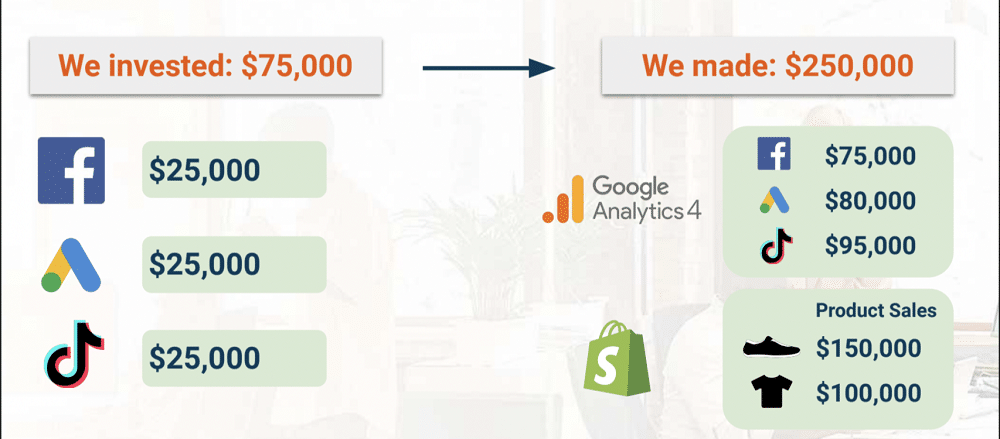
In a perfect world, this data might be synched up, but you’re likely seeing a discrepancy. If the problem of a GA4 & ecommerce data mismatch is familiar, don’t panic. Let’s walk through how you capture the data.
Data collection on GA4 vs Ecommerce platforms
Let’s explore how GA4 and ecommerce platforms such as Spotify capture data. Understanding the differences is key to getting data from each platform to match.
Data collection in GA4
People usually set up Google Analytics 4 using JavaScript code. This is often implemented on your website using Google Tag Manager (GTM). Every time a visitor arrives on your site, GTM data is loaded and captures information.
GA4 ecommerce data provides behavioural information about users and events on your website. This occurs at the browser level (often referred to as ‘clientside’). Your ecommerce platform, on the other hand, gathers data on the CMS level. This means that GA4 is collecting more data about the user journey.
There are some cons to GA4, though. It relies on your e-commerce platform to provide some data, whilst elements such as cookie blockers can impact data quality.
Data collection on your ecommerce platforms
Your ecommerce platform will provide detailed information on products, transactions, and users but lacks customer journey data. For example, it can’t tell you where a user came from. Ecommerce platforms also cannot provide cross-domain tracking.
6 Common mistakes and how to avoid them
Wondering why your data isn’t matching? You might be making one (or more) of the following mistakes.
1. Not using native integrations
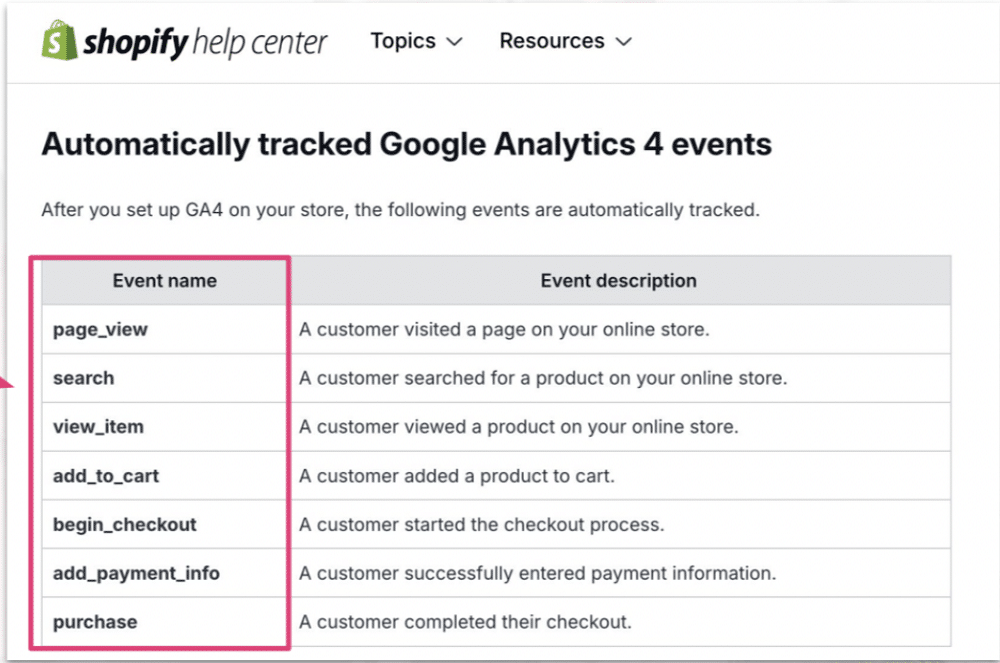
After much begging from the public, Shopify finally released a plugin to send enhanced ecommerce data to GA4. If somebody makes a purchase or adds a product to the cart, Shopify will send data to GA4.
Before this integration, many businesses sent this data via GTM. This approach was flawed and didn’t deliver the information that businesses wanted. So, if you haven’t yet installed the Shopify plugin, now is the time.
Important note: Tracking through the native integration might pull in some events (page_view, add_to_cart, etc). If you’re not careful, you may get some duplicate data. When installing basic GA tracking in Tag Manager, remove these events so they aren’t counted twice.
2. Relying on ecommerce platform marketing (traffic) data
Platforms like Shopify contain lots of data, do you need GA4? You’ll find many differences between insights found in Spotify and GA4. Here’s why each platform provides different results.
- Google has shifted towards GA4 events and has moved away from page views.
- There are differences in how sessions are defined and how bots are counted.
- Browser blocking: Some visitors might not allow cookies or JavaScript.
- Discrepancies might be introduced because of different reporting time zones.
- There are different methods of recording traffic. Details of recording mechanisms are proprietary information and are never shared.
Why is Google Analytics traffic more accurate?
Below are some of the reasons why GA4 traffic data is more accurate.
- Google owns YouTube, Google Ads, Gmail, and its search engine. With so many properties, it can leverage web behaviour in a broader term. Google can use this understanding of traffic to fill in the gaps when user tracking isn’t possible.
- GA4 contains some of the best bot filters. This means there’s less risk of inflated data due to inaccurate traffic readings.
- The platform tracks active users/sessions rather than hits providing greater depth into user journeys.
- Removes last touch direct/none in its attribution models.
- Google has made GDPR compliance much easier thanks to the GA4 onboarding process.
3. Not organising your ecommerce revenue channel data
Businesses that use modern e-commerce platforms often have additional revenue streams. You might sell on eBay, Facebook, and other sources.
When producing reports from different platforms, the sources of information may not be aligned. This results in a discrepancy between your various data feeds.
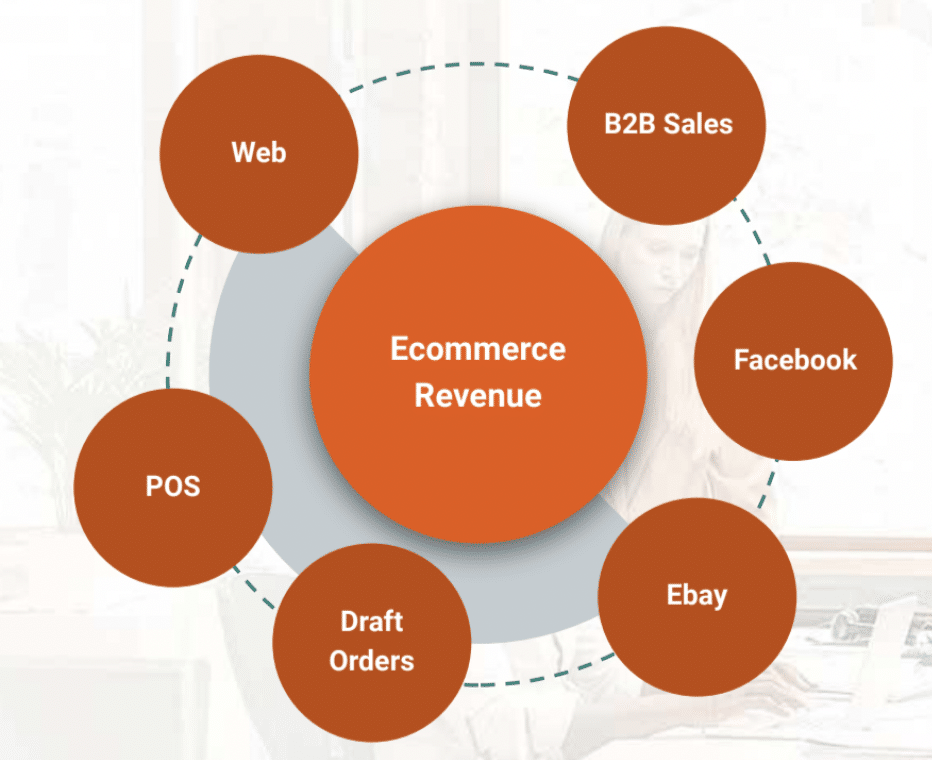
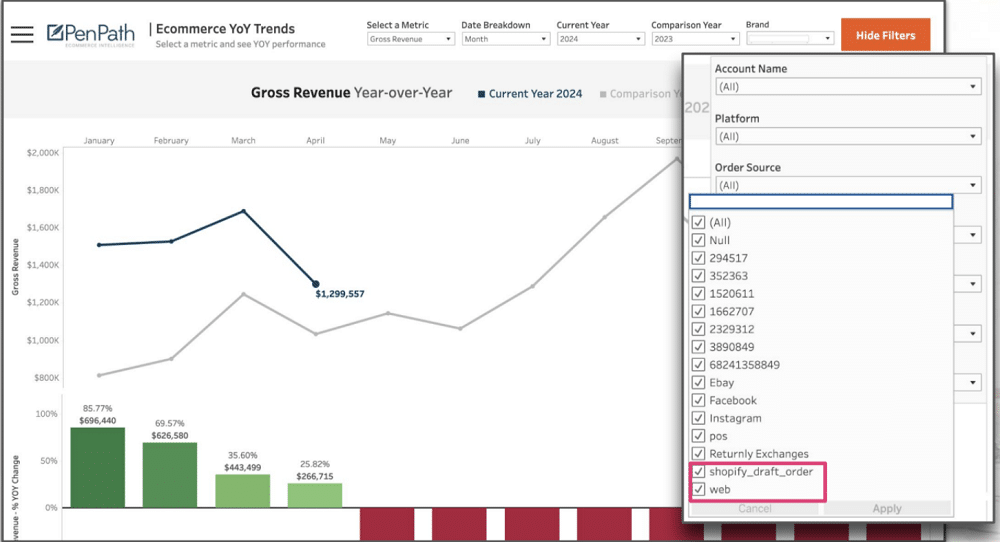
To solve this problem, you need to carefully select sources of data when configuring reports. This can be achieved using a tool like PenPath (or by creating a custom report on Shopify). You can select the order types you want to record so that you’re getting matching reports.
4. Not using UTMs or Auto Tagging
It’s important to use UTM parameters everywhere. But knowing what to include in your UTM can be tricky.
The prospecting tag is a strong place to start. Whether you’re working with an agency or running campaigns internally, you need to know how to attract new customers. Tagging all UTMs with prospecting will enable you to segment each campaign based on value.
Let’s imagine from GA4 you filter out prospecting and find that $100,000 was generated. You then head into Shopify and see that $150,000 total revenue was reported. You know that two-thirds of your revenue is attributed to your campaigns.
It’s also critical to include product names in your UTMs. This can inform you about the products bringing in the most value. Once you have the answer, you can run campaigns to promote the item.
5. Not auditing data: matching order IDs between Ecom. & GA4
One of the good things about GA4 is the inclusion of transaction IDs. These can be found in ‘Explore’ if GA4 has been integrated with your ecommerce platform. By creating a day’s time window, you can gain several important insights, including.
- How many transaction IDs were recorded on that day?
- How much revenue was received?
- How many transactions are appearing in Shopify and what was the revenue?
A Google Analytics audit can help you identify where transaction IDs are being lost and where you might expect to find more.
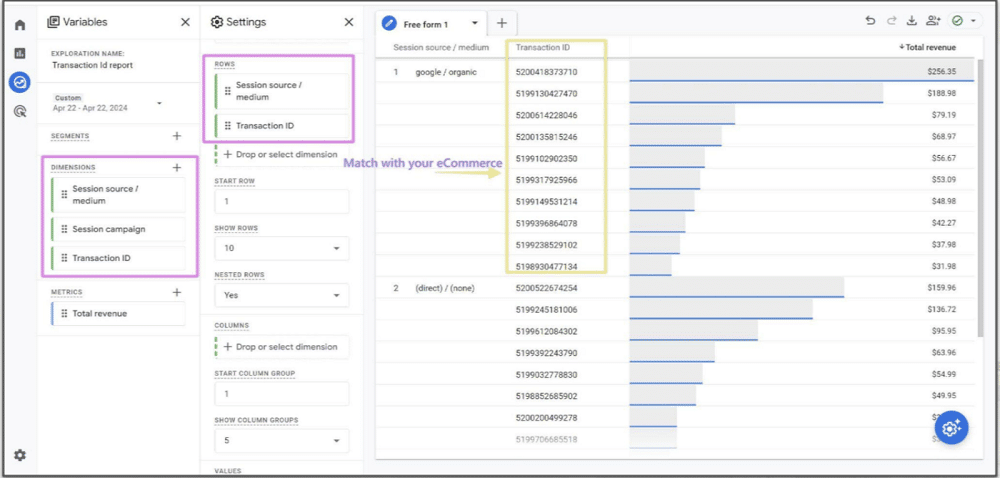
Steps to create audit report in Google Analytics 4:
- Go to ‘Explore’
- Under Variable:
- Add ‘Dimensions’ that you want to see in your reports
- Session Source/Medium
- Session Campaign
- Transaction Id
- Add ‘Metrics’ that you want to analyse in your reports
- Total Revenue
- Gross Purchase Revenue
- Purchase Revenue
- Shipping
- Tax
- Add ‘Dimensions’ that you want to see in your reports
- Under Settings:
○ Mark Nested Rows as ‘Yes’
○ In ‘Rows’: - Add Dimensions
○ In ‘Values’ - Add Metrics
6. Not triangulating between Ecom., GA4, and Paid Media
Your ecommerce platform should always be your source of truth for revenue data. For blended information, GA4 should be your first port of call. In between the two, you have data from your paid media platform.
Your sales journey might, for example, start with an ad on Meta. From here, customers can click on a link in your bio and be taken to your website, where they can complete the purchase. You need each piece of this journey to get the full picture. That’s why you should always utilise a technique called ‘triangulation’.
Triangulation in research means using multiple datasets, methods, theories, and/or investigators to address a research question. It’s a research strategy that can help you enhance the validity of your findings and mitigate any research biases in your work.
Key takeaways
Let’s wrap up by reflecting on some of the key points from this article. If you ever notice a GA4 & ecommerce data mismatch, remember the following.
- Use native GA4 integrations
- Leverage both ecommerce platform & GA4 data
- Organize your ecommerce revenue channel data
- Leverage UTMs or Auto Tagging
- Carry out a GA4 audit
- Triangulate your insights
About Alex Cruz
Alex Cruz is the CEO and Founder of PenPath, a leading e-commerce analytics platform that turns your data into helpful insights so that you can scale revenue and minimize marketing waste. His leadership experience spans both high-growth startups and Fortune 100 companies.