Privacy Attack Vectors: What are They & How to Defend Against Them

For many brands, privacy risk no longer sits only with regulators or internal compliance reviews. In the US, plaintiff firms and technical testers now examine websites for gaps in tracking, consent, and evidence.
That makes privacy attack vectors a practical business issue. Small implementation mistakes can lead to legal exposure, reputational pressure, and expensive clean-up.
That is also why early validation matters. Consent Mode Monitor gives teams a practical way to scan a domain or GTM container, identify missing or invalid consent signals, and fix common Consent Mode issues before they become larger measurement or governance problems.
What Is a Privacy Attack Vector?
A privacy attack vector is any weakness in a brand’s tracking, consent, or measurement setup that allows data collection beyond what users expect or what the business can properly defend against. Sometimes that weakness is obvious, such as persistent identifiers or personal data ending up in analytics.
The term also matters because the risk does not end when the data is collected. Weak consent records, stale CMP deployments, and poor internal evidence can all become part of the problem once a lawsuit begins.
In that sense, a privacy attack vector is not just the method of tracking. It is the point where tracking, governance, and proof stop lining up.
How Privacy Attack Vectors Expose Brands
Brands rarely face privacy risks due to a single dramatic mistake. More often, the trouble starts with ordinary website tools that collect too much, fire too early, or leave weak evidence behind. These are the patterns that keep showing up in audits, complaints, and lawsuits.
Persistent identifiers that defeat user choice
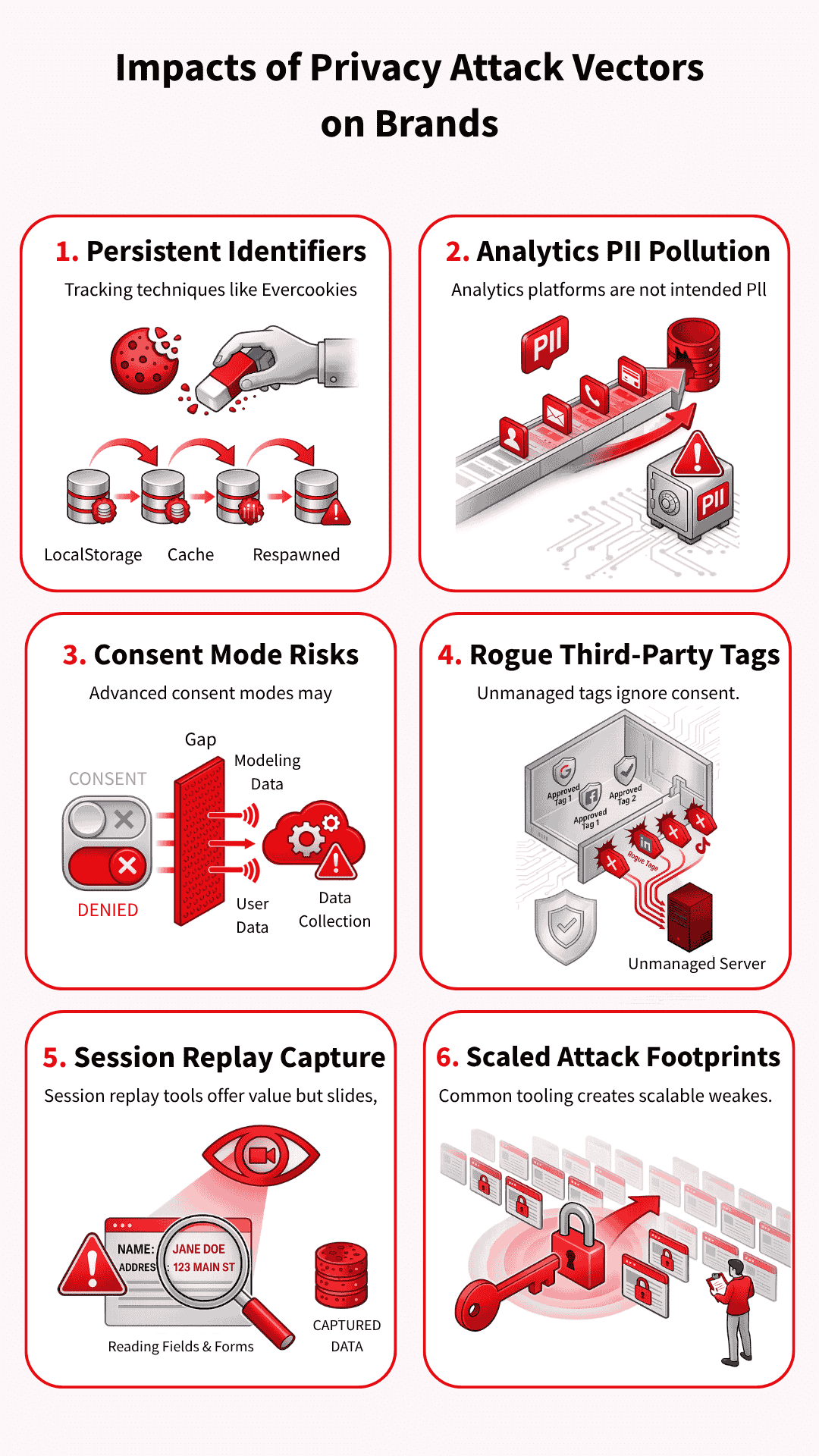
Some tracking methods persist even after a user clears cookies or resets their browser state. Evercookies (which store data in multiple locations to survive deletion), respawning techniques (which recreate deleted identifiers), and similar workarounds spread identifiers across multiple storage points and then rebuild them later.
That turns deletion into a nuisance rather than a real choice, which is exactly why these methods draw so much criticism.
PII and data pollution inside analytics tools
Analytics platforms are not built to hold names, email addresses, or other personal data in raw form. When that information slips into event parameters (the data sent with user actions), query strings (the part of a URL that carries information), or page paths (the specific parts of a website visited), the brand creates both privacy and analytics problems.
In the worst cases, polluted data can trigger account action, force deletion requests, and wipe out reporting that teams still need.
Consent mode signals after consent is denied
Advanced consent mode attracts attention because it does not simply switch measurement off when a user says no. Google uses consent-state and key-event pings to support modelling, helping marketers maintain reporting continuity.
The risk sits in the gap between what teams think a denial means and what the setup may still send for measurement purposes.
Many brands control their Google tags far more carefully than the rest of the stack. Then a Meta pixel, LinkedIn tag, share widget, or hardcoded script loads outside the main consent logic because nobody classified it properly or added the right blocking rule.
One forgotten tag can cause trouble, but the bigger problem is the lack of control over the entire chain of vendors and downstream calls.
Session replay tools that move from analytics into capture
Replay tools promise product insight, but they can quickly slide into data capture if teams trust the defaults and stop there. Search boxes, comment fields, on-site forms (places where users enter information on a website), and custom inputs (fields created for specific use cases) need direct review, even when a tool offers masking controls (settings that hide sensitive information).
Once a replay tool starts collecting more than the team expects, it stops looking like harmless analytics and starts looking far harder to defend.
Common tooling that makes scaled claims easier
Common tools create common footprints. When the same session replay script (which records user interactions for playback), CMP pattern (Consent Management Platform interface), or widget (pre-built website component) appears across thousands of sites, technical testers and plaintiff firms can repeatedly scan for the same weak spots.
That repeatability makes privacy claims easier to industrialise, especially when the evidence only needs to look plausible at first glance.
Why Consent and Tag Governance Break Down
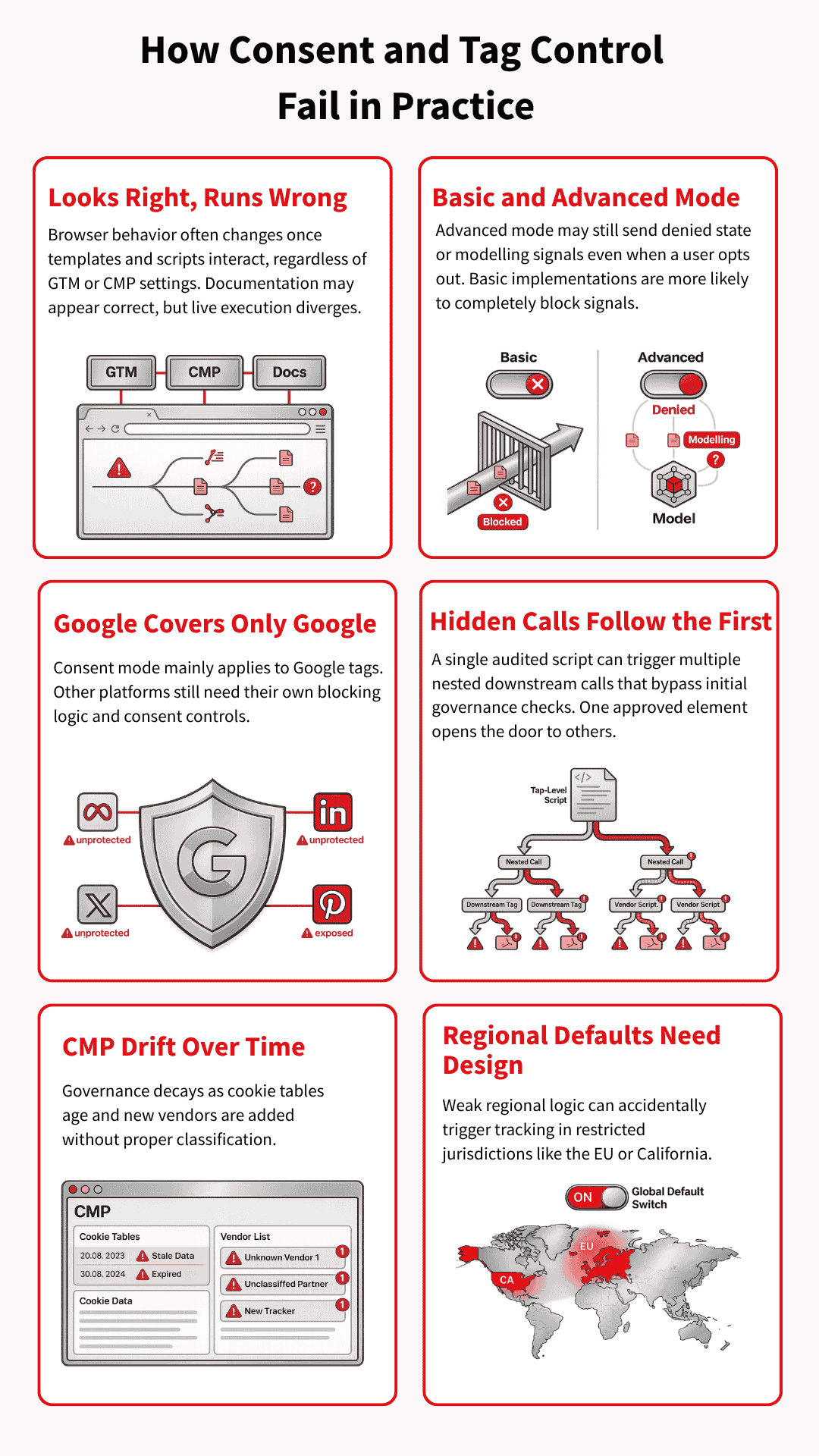
A set-up may look sensible in GTM, the CMP, and internal documentation, yet behave very differently once page templates, vendor scripts, and regional rules start interacting in the browser. That is why Tag & consent management governance failures often arise from ordinary implementation gaps rather than a single obviously reckless decision.
Basic and advanced consent modes carry different risks
Basic consent mode blocks Google tags until the user interacts with the banner, so nothing goes to Google beforehand. Advanced consent mode works differently: tags can load with denied defaults and still send consent-state or key event pings that support advanced modelling.
That extra measurement value explains its appeal, but it also raises a harder question: what happens after a user says no?
Google’s controls do not cover the whole stack
Consent mode is a Google framework, so it mainly governs Google tags. Meta, TikTok, LinkedIn, ShareThis, session replay tools, and other vendors still need their own consent categories, triggers, and blocking logic. Brands lose control when they assume Google’s framework covers tools it was never designed to govern.
Calls within calls create blind spots
Modern websites rarely load one clean layer of tags and stop there. They load embedded vendors, nested scripts, and in some cases containers inside other containers, which means one script can trigger several more downstream.
Teams often audit the visible layer and miss what fires after that first call.
CMP misconfiguration and outdated consent settings
A CMP can start in a good state and still fall out of date very quickly. Cookie tables get old, scanner runs never reach deployment, and small vendors slip in without proper classification.
That is why privacy failures often look less like legal misunderstandings and more like weak operational discipline.
Regional defaults need deliberate design
Consent defaults should not be treated as a single global setting. A brand may need denied-by-default behaviour in Europe or California, while using a different default elsewhere, depending on the legal position and the risk appetite.
If those regional rules are not carefully designed, the site can start tracking people in places where the setup was supposed to keep them out.
Technical Defensive Measures Against Privacy Attack Vectors
Once the weak points are clear, the next step is control. Brands reduce privacy exposure by tightening how tags fire, how consent is enforced, how data is minimised, and how changes are documented over time.
The goal is not to build a perfect stack. It is to make the stack easier to govern, test, and defend.
Pick one consent control method and use it properly
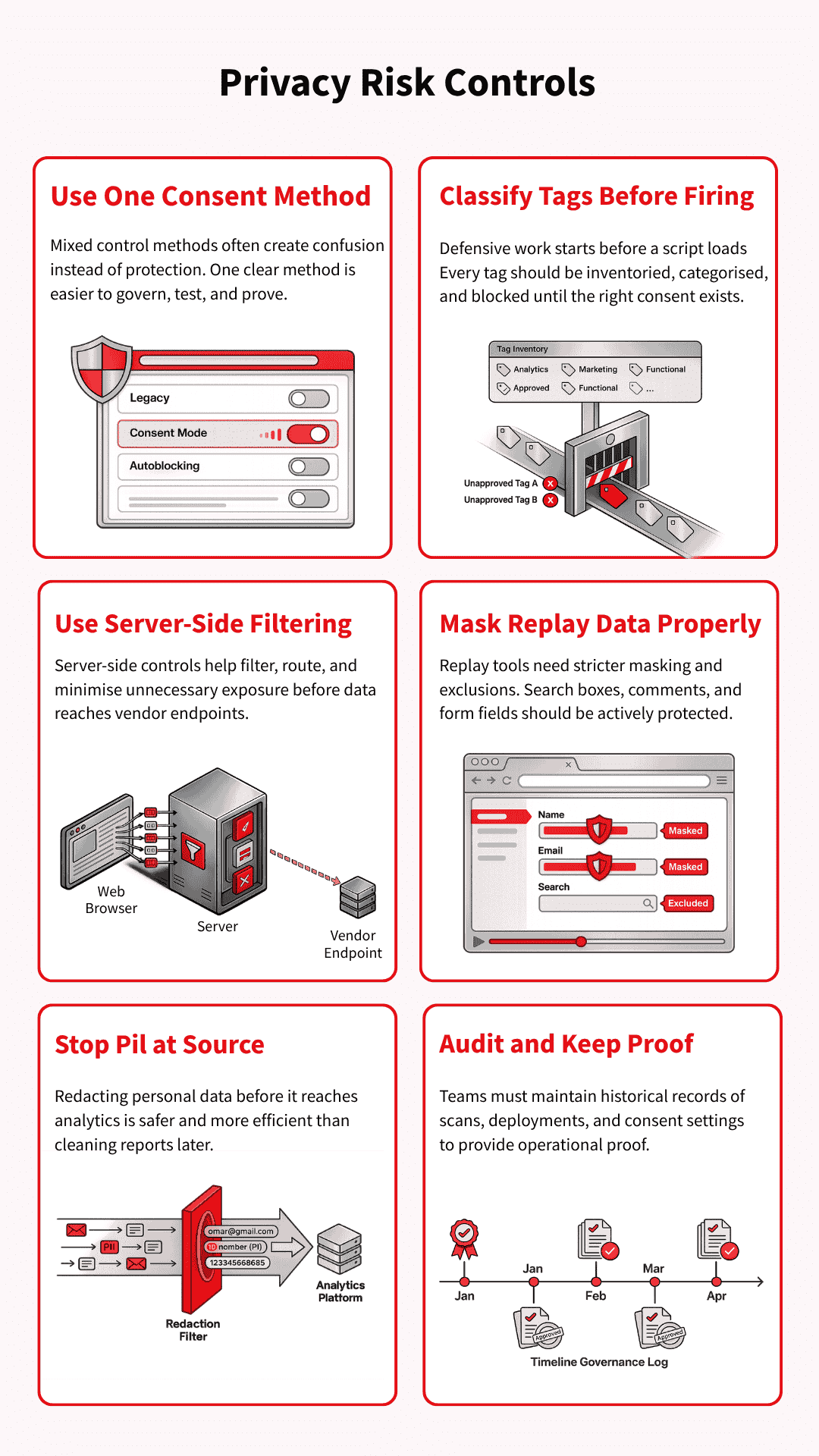
Mixed control methods commonly create confusion rather than protection. A team may combine legacy blocking rules, consent mode logic, and partial autoblocking, then struggle to prove what actually fires under each consent state.
One clear method, implemented and tested properly, is usually easier to govern than a layered setup nobody fully trusts.
Classify every tag and block before collection starts
Defensive work starts before a script fires. That means keeping a real inventory of tags, assigning each one to the correct consent category, and making sure triggers do not run early by default. If a vendor loads first and gets reviewed later, the control has already failed.
Use server-side controls to reduce unnecessary exposure
Server-side tag management can help reduce what leaves the browser and give teams tighter control over filtering, routing, and data collection. It can also support steps such as IP reduction or cleaner separation between site behaviour and vendor endpoints.
That said, server-side tagging does not eliminate privacy risks on its own, so it works best as part of a broader control model.
Use session replay tools with stricter masking and exclusions
Session replay tools need active configuration, not blind trust in default settings. Teams should review masking mode, exclude sensitive fields, and protect search boxes, comment areas, and form inputs that can reveal more than expected.
A session replay tool becomes easier to defend when the brand decides clearly what it will never collect.
Prevent PII before it reaches analytics
Once personal data reaches analytics, you can remove PII from an analytics platform like GA4. But the clean-up is slow, disruptive, and sometimes incomplete.
Brands are better off preventing it at source through safer data-layer design, GTM checks, parameter redaction, and testing of URLs and form flows that are likely to leak identifiers. Prevention is far cheaper than remediation after the data has already spread through reports and exports.
Audit on a schedule and keep proof of what changed
An audit only helps if it leaves evidence behind. Teams should keep records of scan dates, deployment dates, consent settings, tag changes, and vendor updates so they can show what the site was doing at a given point in time.
That record matters long before a lawsuit arrives, because it turns privacy governance into something concrete rather than something claimed after the fact.
Forensic Defences: Disputing Weak Privacy Claims
Once a complaint or demand letter arrives, the work changes. The question is no longer just what the site does in theory, but what actually happened in that visit and what the available records can prove.
That is where weak technical evidence, broken chronology, and missing consent records can start to undermine the story being claimed.
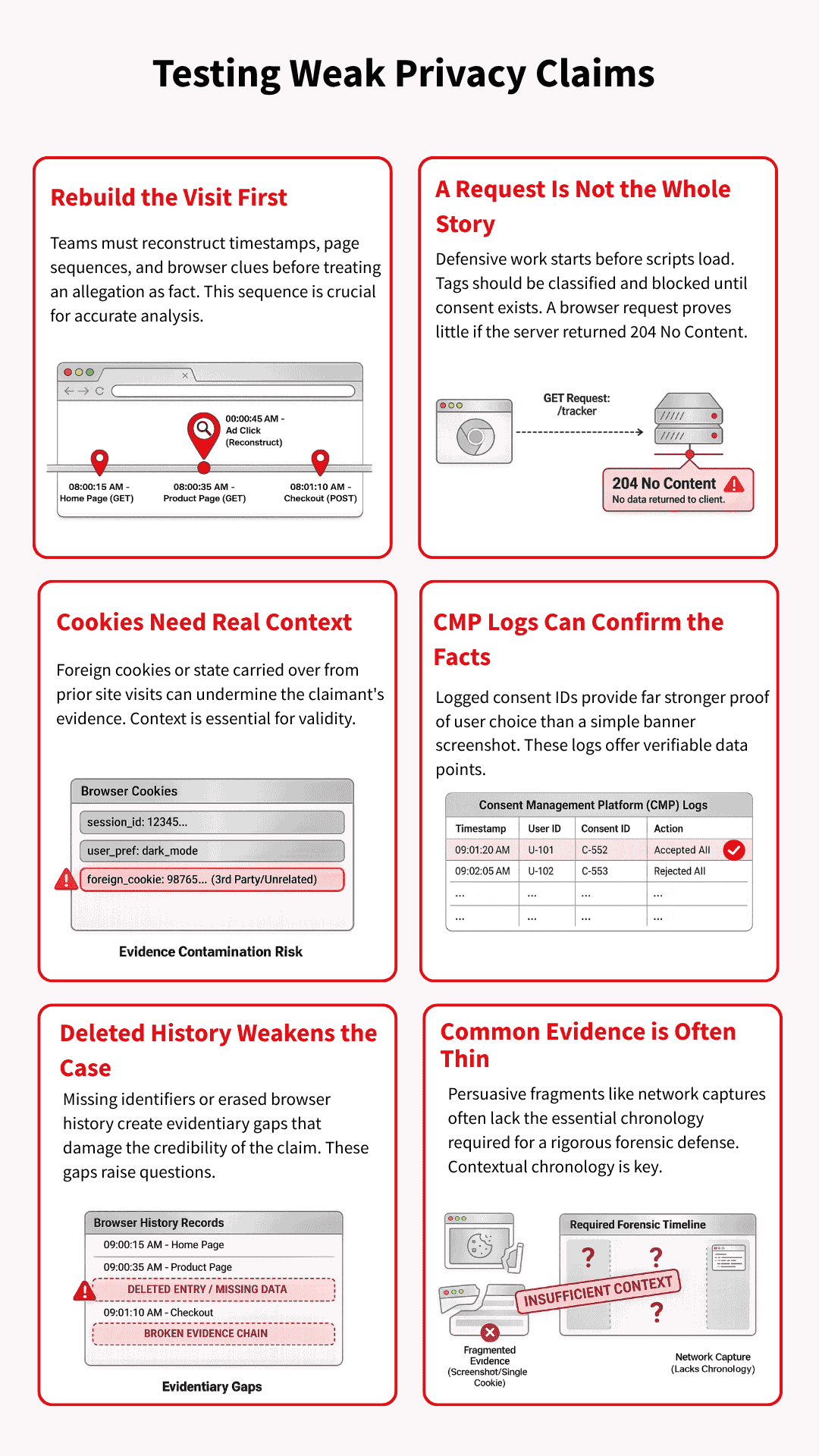
Rebuild the visit before reacting to the allegation
The first job is reconstruction, not panic. Teams need to line up timestamps, user-agent details, referral clues, consent events, and page sequence before treating the allegation as fact. A claim often appears stronger at first glance than it does after the visit path is properly rebuilt.
A 204 response may weaken the story being told
Some claims lean heavily on the fact that a request appeared in the browser, without giving enough weight to what happened next. If the server returned HTTP 204 No Content, it means the request was handled successfully, but no response content was sent.
In such a scenario, the technical record may tell a different story than the allegation suggests.
Cookie evidence is only useful if the journey that led to it makes sense. A prior visit to klaviyo.com, or the appearance of a OneTrust cookie on a site that does not use OneTrust, should raise questions about where the browser state really came from.
That kind of context can turn a neat accusation into a messier evidential problem.
Consent IDs and CMP logs can validate what happened
Good CMP records can do more than prove a banner was deployed. They can help show what choice was made, when it was made, and whether the later claim matches the stored consent history.
When those records exist and line up with the visit timeline, they give the brand something far more useful than a screenshot.
Deleted history can become a credibility problem
Evidence becomes weaker when key browser history, cookies, or local records are deleted. Deleted history and missing identifiers can make it much harder to validate a claimant’s account and test what can still be proved.
At that point, the dispute shifts from pure tracking theory to the reliability of the evidence itself.
Common evidence is often thinner than it looks
A screenshot, a cookie snapshot, or a network capture can look persuasive without proving very much on its own. Those fragments often lack chronology, consent status, prior visits, duplicate requests, or whether the browser was already carrying data from elsewhere.
Forensic discipline matters on both sides, because privacy claims can harden around assumptions long before the evidence is tested.
The Next Attack Surface: AI Agents, MCP, and Agentic Consent
Privacy attack vectors are starting to move into AI-led browsing and agentic workflows, but the core questions have not changed. Someone still needs to know what was collected, under which permission, and with what record.
The difference is that an agent may now be the one reading the banner, making the choice, or passing data into a wider system.
Agents that deny by default and get stuck in consent loops
An AI agent may not handle a cookie banner the way a normal user would. It may reject by default, fail to understand the options, or get trapped in consent-or-pay flows that were designed for humans rather than automated visitors.
That creates a fresh problem for both measurement and compliance, because the site now has to interpret behaviour from a browser that is acting on someone else’s behalf.
“Do not train” is still a missing consent control
Many consent set-ups still treat personalisation, advertising, and broader data use as if they fit neatly into the same buckets. That breaks down when AI training enters the picture, because training use raises a different question from ad targeting or analytics.
If a system reuses data for training without a clear user-level control, the gap becomes harder to defend later, especially when removal may be difficult or impossible.
MCP and agent governance create a new control layer
As agents start connecting to tools, files, systems, and workflows through protocols such as MCP, privacy controls will need to move closer to that access layer.
The issue is no longer only whether a tag fired in the browser. It is also whether an agent could reach a system, use a tool, or pass data onward without the right policy, permission, or audit trail in place.
Suggested visual: A diagram showing a user, an AI agent, a consent layer, an MCP server, and the analytics or advertising endpoints the agent can reach.
Conclusion
Privacy risk rarely comes from one tool in isolation. It grows in the gaps between consent settings, tag behaviour, replay controls, vendor governance, and the records a brand keeps when something goes wrong.
Brands that close those gaps early do not just reduce legal exposure. They also give themselves a much stronger technical and evidential position if their set-up is ever challenged.
- Autoblock vs Google Consent Mode Categories: Pros & Cons - 22/04/2026
- Privacy Attack Vectors: What are They & How to Defend Against Them - 10/04/2026
- What are the Different Types of Consent? - 11/02/2026