Top 11 Consent Mode Mistakes to Avoid

With more and more users rejecting cookies, consent mode modelling helps us to fill the data gap and get a fuller picture. Let’s explore this handy tool in more detail and look at some common consent mode mistakes.
This is a webinar write-up of Phil Pearce’s talk at GTM4ward V2. Find his slides here and a YouTube recording of his session below:
What is consent mode modelling?
Consent model modelling is designed to fill the data gap resulting from users who do not provide cookie consent. When you hear the term modelling, always think of upscaling.
The image below illustrates how this works. As you can see, data has been gathered from 80% of users who have provided consent. This information has been used to upscale the remaining 20% of users.
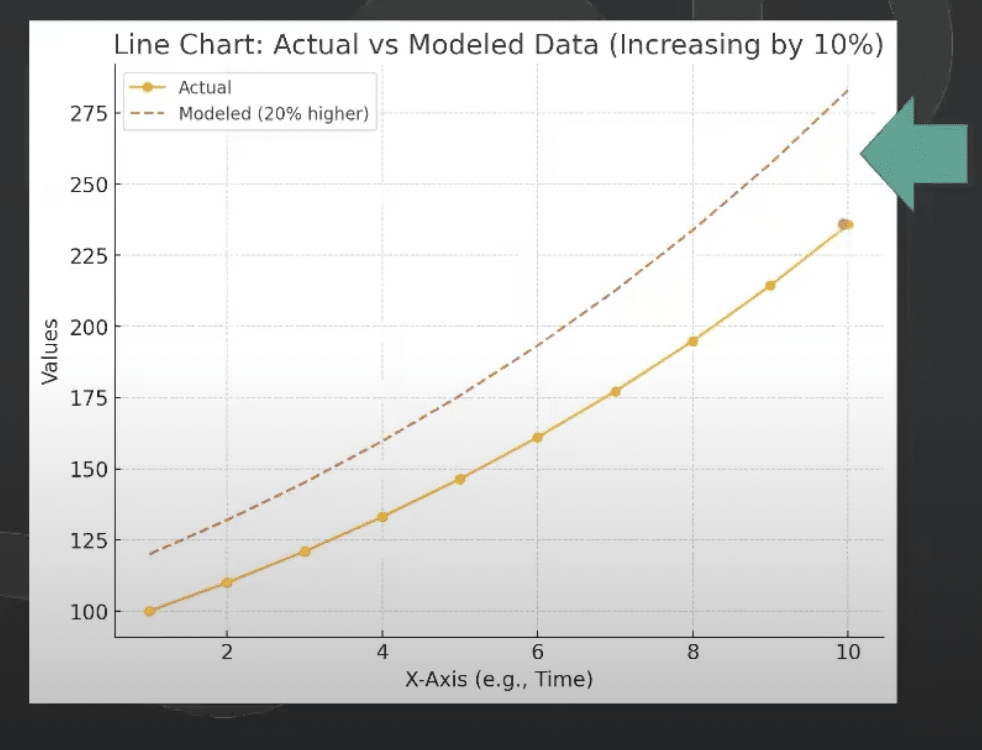
Through modelling, we can establish accurate benchmarking. This enables us to produce accurate comparisons over time.
Why is consent mode needed?
There has been an increase in user’s withholding consent over time. This is due to increased data privacy awareness and more websites using cookie banners.
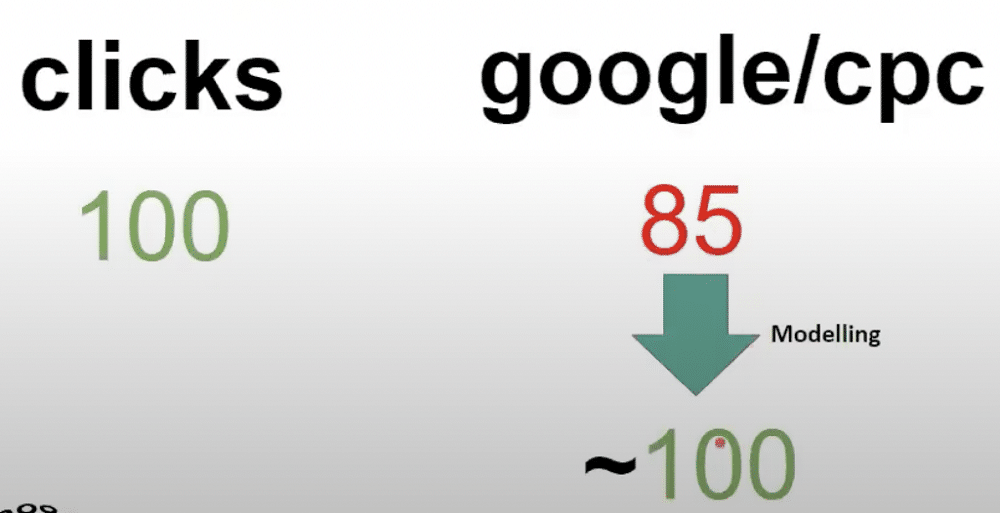
The issue becomes clear when comparing Google ad clicks vs CPC sessions. As you can see below, from 100 clicks we only have data on 85 CPC sessions. This is where consent mode modelling comes into its own.
Another justification for consent mode is changes to IOS. When IOS 14 was released, Facebook had to allow users to ‘opt-in’ to data collection. Previously, it was up to users to opt-out if they didn’t want their information being collected. This had a massive impact on data quality and a big reduction in data and traffic collection.
The same issue applied to the ICO when they carried out a methodology change. The company changed its cookie banner to an ‘opt-in’ mode, impacting data collection.
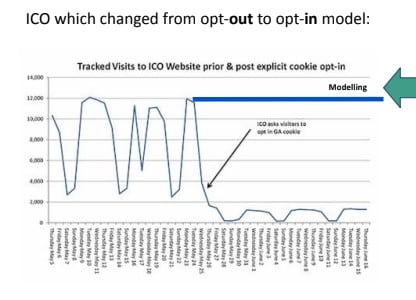
The goal of modelling is to return data collection to where it was before these measures were introduced.
Consent mode V1 vs V2
From the 7th of May 2024, changes were introduced to the Digital Marketing Act. This meant that consent management platforms (CMPs) had to add two fields to their cookie banner. These were:
- ad_personlization= allow downstream remarketing usage.
- ad_user_data= allows email or mobile numbers in downstream usage.
Unfortunately, even the most compliant CMPs use GTM templates, which makes it difficult to push changes to add new fields. As you can see below, doing so could even cause a breaking change.
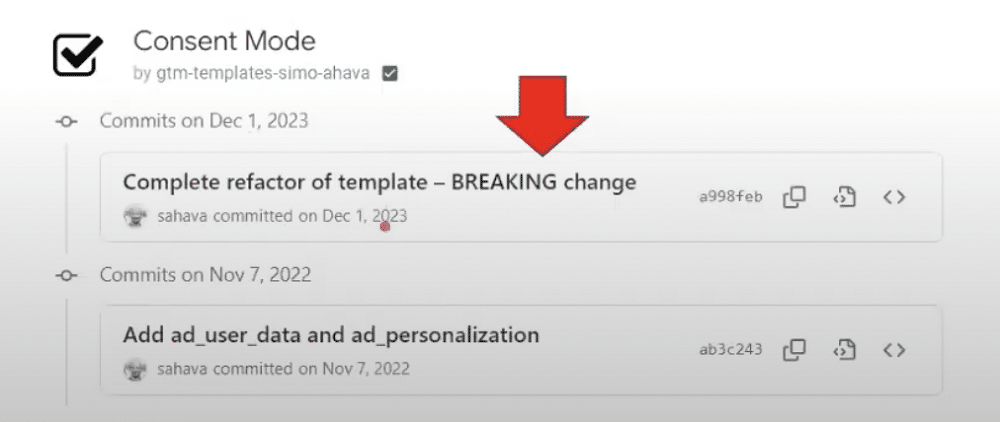
This left CMPs with a dilemma. Do they potentially roll out a breaking change OR map the existing ad_storage field to the two new fields? Predictably, CMPs chose the latter option. In essence, this means that mostly nothing has changed between consent mode V1 & V2.
There is, however, one exception. Users should update their community templates to make sure they have included the two new fields.
What is basic vs advanced consent mode?
The basic consent mode uses industry benchmarks for upscaling. Usually, this means that fewer conversions and sessions are upscaled and modelled. Advanced mode looks at data from your website and uses deny pings to upscale data.
Reasons why you might not use advanced mode…
With advanced mode more data will be modelled and the numbers will look better. So why wouldn’t you use it? Here are some of the top issues that might stop you from using advanced more.
- Your in-house DPO doesn’t allow you to use the cookieless pings needed for advanced mode.
- You operate in France, Italy, Netherlands, or Austria, where GA4 is marked as illegal by regulators.
- It’s unclear whether collecting IP addresses is allowed in California. It’s illegal to collect IPs for sale and targeting (Consent mode doesn’t do this).
- You operate a small website with low amounts of traffic and don’t have enough traffic to trigger modelling.
11 Consent mode mistakes to avoid
If you get the go-ahead from your DPO and you have enough traffic, you can use advanced mode. This means you’ll have the ability to enable upscaling. Unfortunately, though, there are also several areas that can go wrong. With that in mind, let’s explore some common consent mode mistakes.
1. Use CMP templates rather than custom HTML
You are much less likely to break a template than you are to break custom HTML. Below is an example of our CookieBot container. This is a recipe that contains the CookieBot template. From within we can edit templates however we’d like.
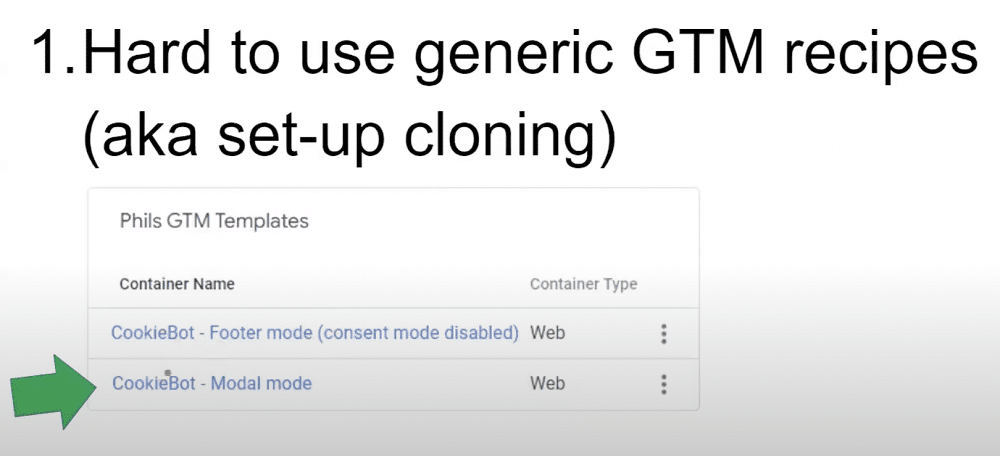
The risk of using custom HTML is that you might be missing the two new consent mode fields. This can have knock-on effects on conversions and remarketing.
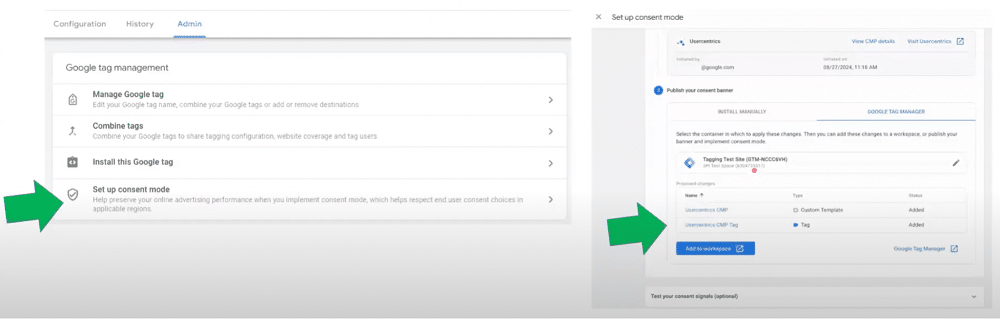
Google is encouraging new setups to use GTM templates. The image below shows the Google Ads interface. If you head to the Google Tag settings, you can choose ‘Set up consent mode’. This will set up an account on Usercentrics whilst adding a GTM template.
2. Using autoblock
Autoblock is a technology for classifying JavaScript files in bulk. Unfortunately, this tool is extremely bad for website speeds. It also stops consent mode pings from working. So, if you want to use advanced mode, you cannot use autoblock. A better approach is to utilise consent mode categories, as this approach is cleaner and better for JavaScript execution.
If you ever see ‘AutoBlock.js’ on your site, this probably means you’re using autoblock. So, if you see this, switch it off!

3. Mixing legacy blocking rules with consent mode categories
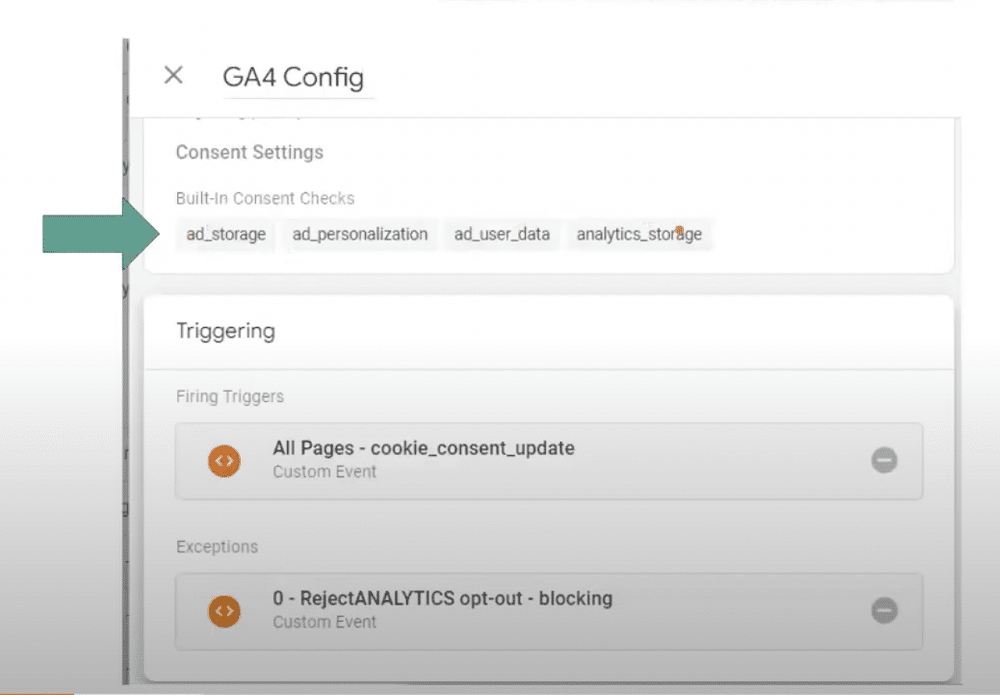
The top section of the below image shows the native consent mode categories. At the bottom is the rejectAnalytics legacy method. This prevents consent mode pings from being sent. It must be removed if you want consent mode to function as it should.
4. Using the wrong event_name trigger
This is an extremely common consent mode mistake. For instance, a tag might be firing on all pages when it should be firing after a CMP has read the cookies and there has been a consent update event.
There is no standard event name that GTM users must use. Thanks to this, each CMP has chosen a different naming scheme. Some examples are:
- cookie_consent_update (used for implementing consent mode with Cookiebot)
- OneTrustGroupsUpdated
- CookieScriptCategory-*
5. Not enabling default consent
There are now two ways to set a default tag within GTM. Firstly, the older method is shown below. This can be included within the global header or by the CMP template.
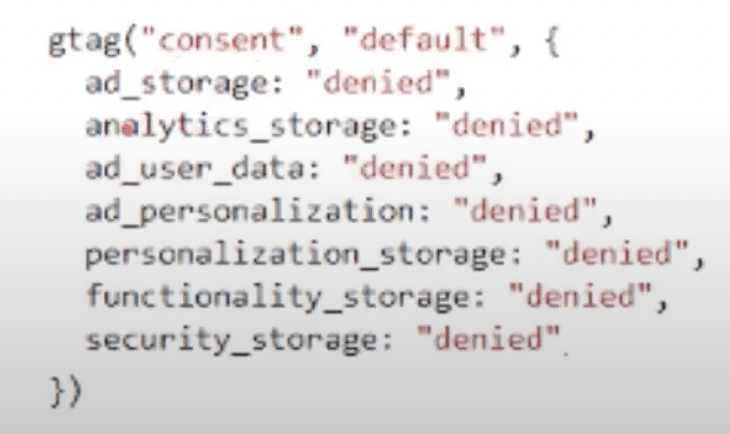
The newer method is to specify defaults within the GA4 tag. From here, you can set IP regions
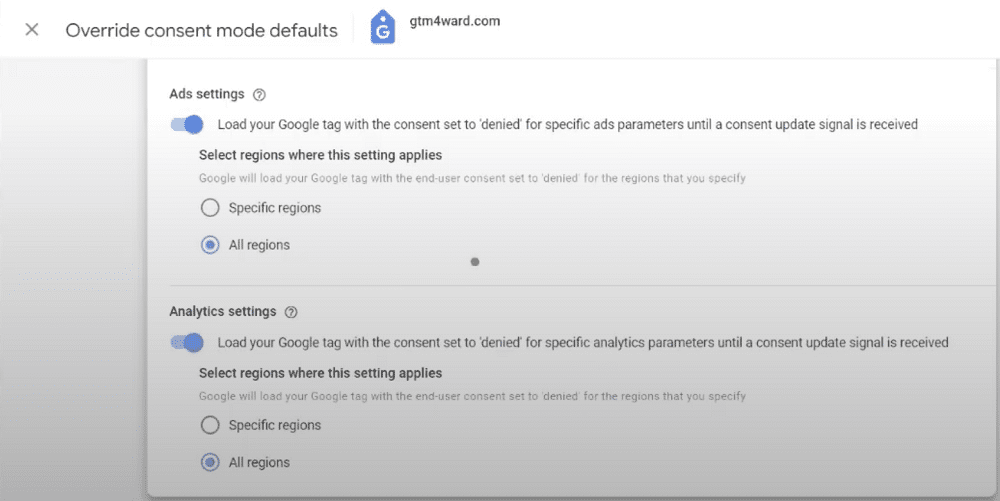
It’s best not to use this new method as it doesn’t account for race conditions. For example, if you have a Facebook tag that fires before the Google Tag, you’ll encounter issues. This method also does not account for legal jurisdictions e.g. the European Union.
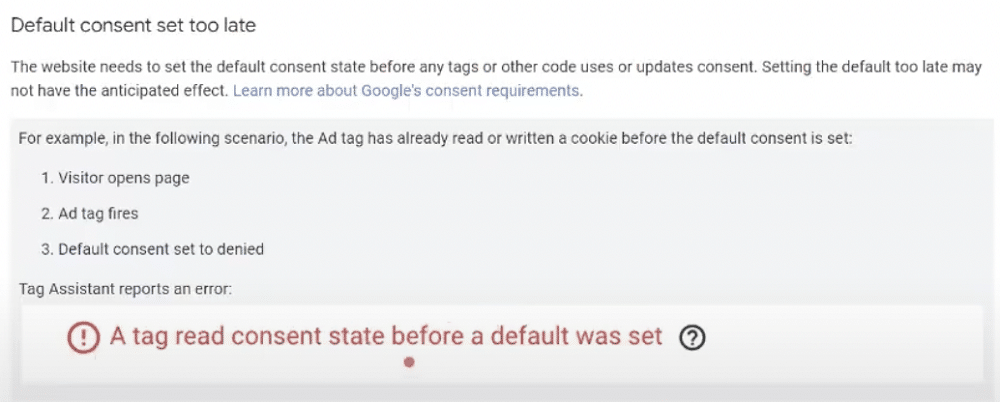
Remember, you must have the default consent declared before an update, otherwise, it won’t work. The default should be set in the header and then the update. If you get the order wrong, you’ll receive the warning shown below.
Remember that with certain CMPs you’ll need to enable consent mode within a template and switch it on within the TMS.
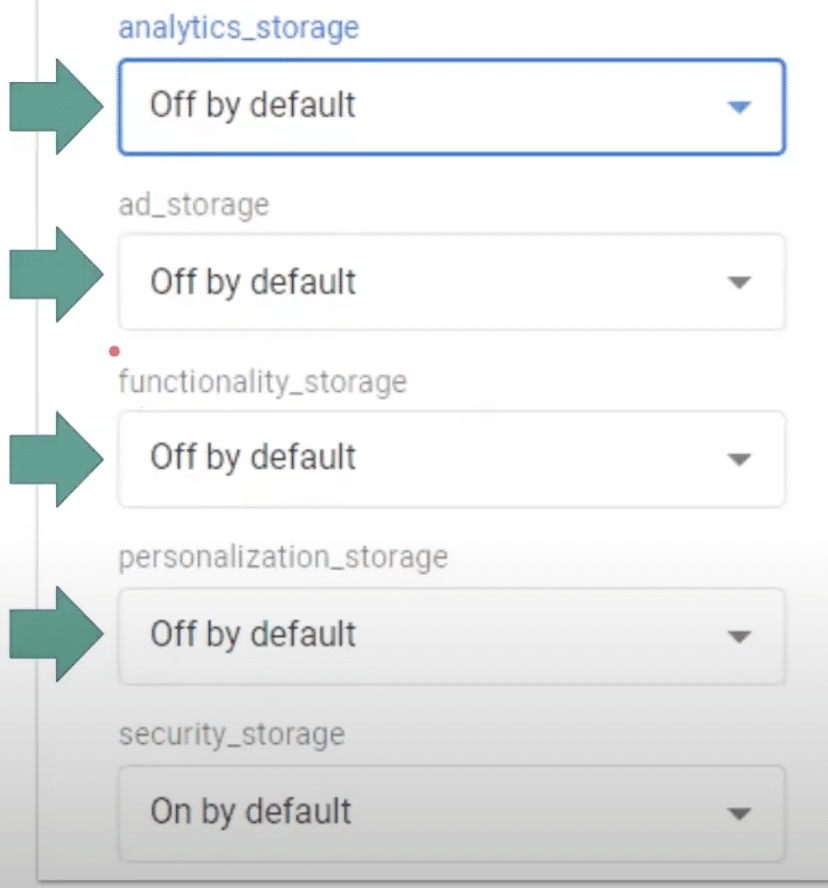
OneTrust asks users within their templates if they’d like to turn defaults on. For instance, if you’d like to use consent mode modelling or ads storage, you’d want defaults to be enabled.
Sadly, they phrase this question in an unusual way. Instead of selecting ‘On by default’ to activate a setting, they should ‘choose off by default’. In this instance ‘on’ means deny, and ‘off’ means granted.
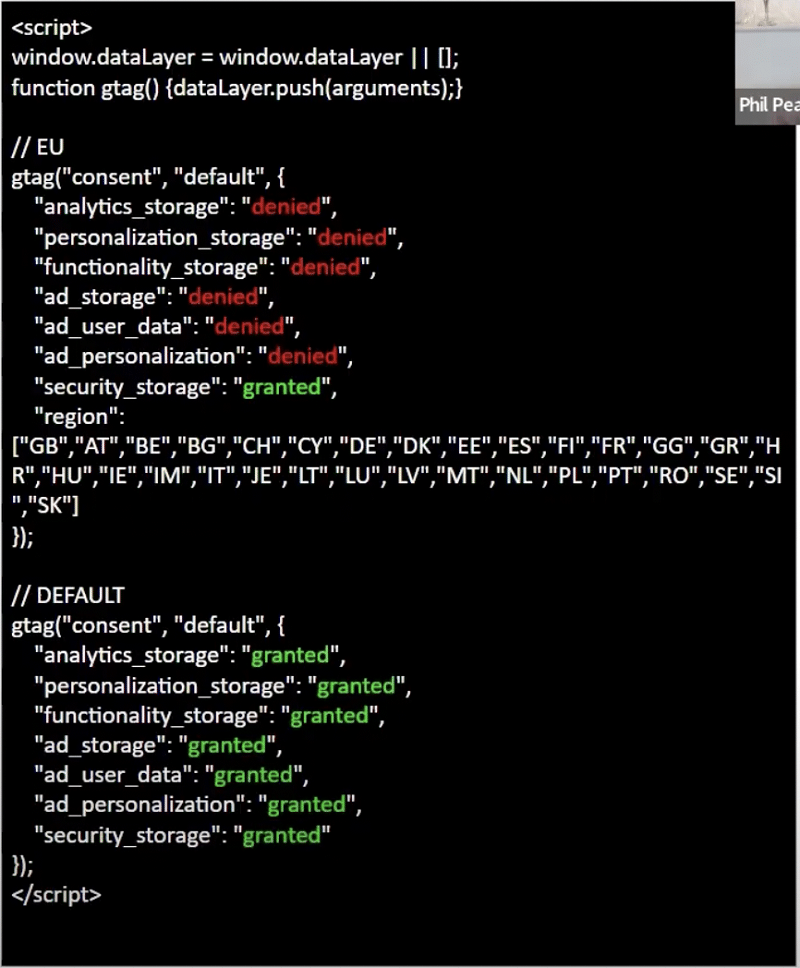
7. Getting the order of the GEO-IP list wrong
The image below shows the EU list at the bottom, with the default above. Unfortunately, this won’t work – the default must kick in before the individual countries.
8. Selecting the wrong verification in basic mode
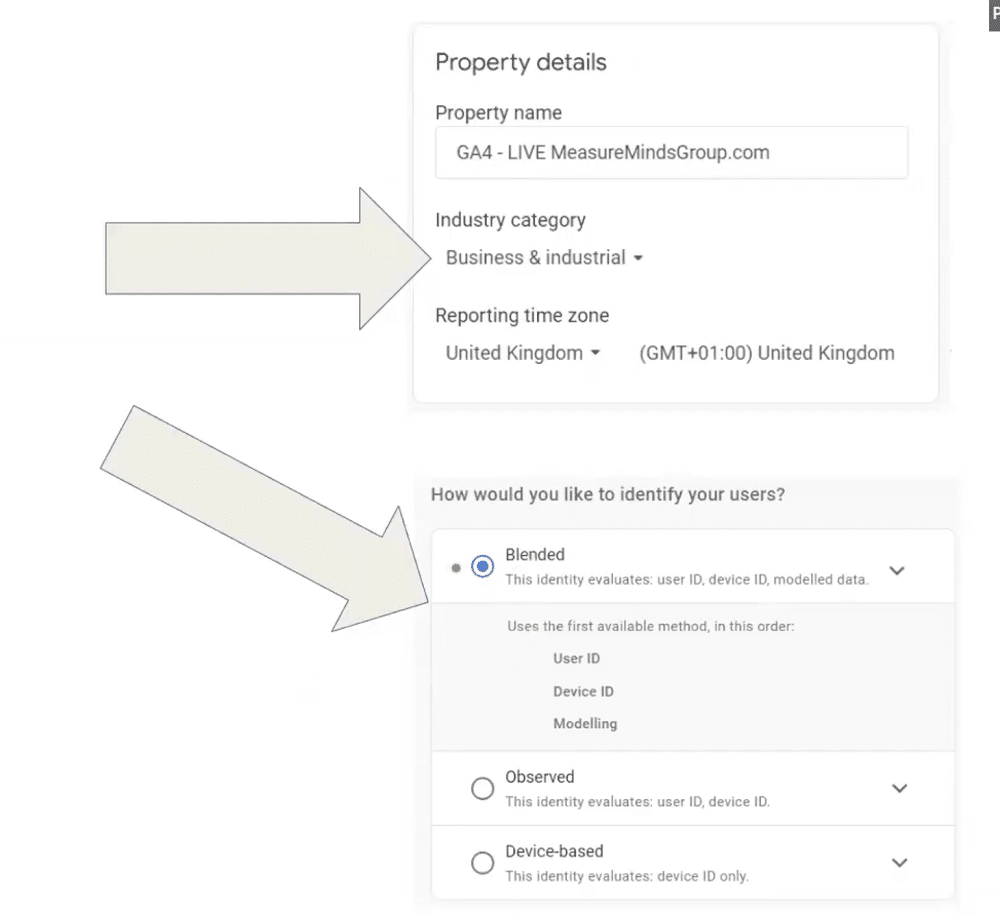
The industry category you select for basic mode is very important. Consent mode will use this data to calculate what your average conversion rate should be for sessions. As you can see, below, some industries have drastically different average conversion rates.
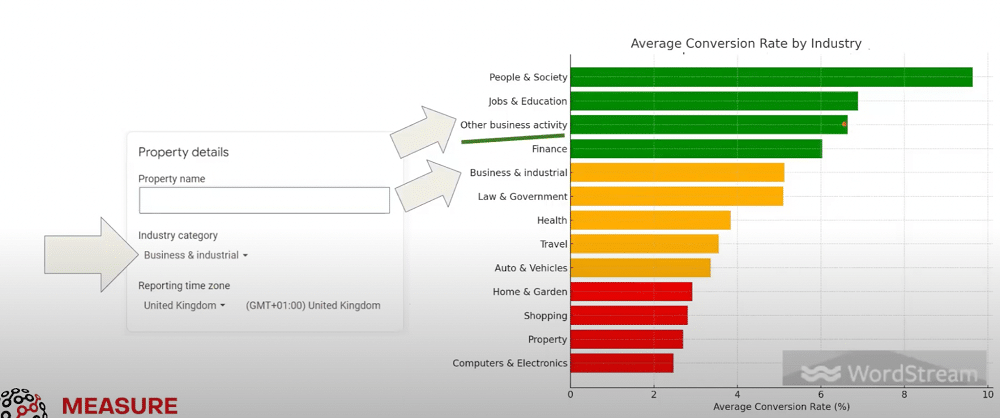
For instance, if you switch from ‘Business & Industrial’ to ‘Other Business Services’, the results would look better.
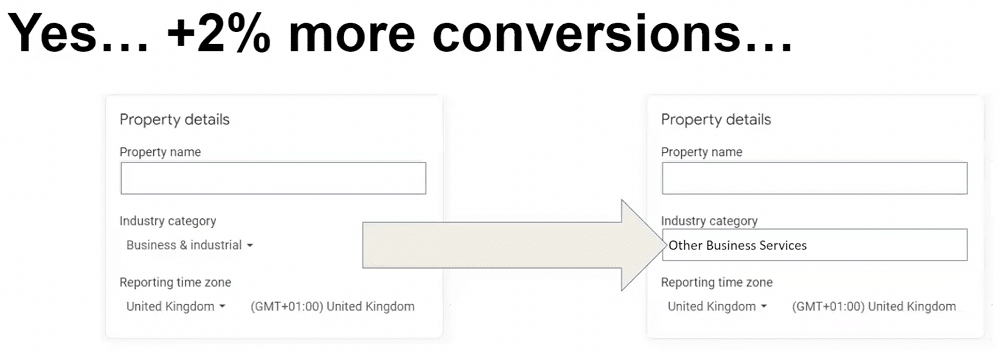
Note: It’s unethical to change this setting without seeking client permission. It’s also best to avoid the ‘healthcare’ category, as this disables GA4 remarketing.
It’s important to place all tags in the correct category. Otherwise, they will fire without user consent. Google has categorised Google tags automatically to protect itself from the 10% global revenue fine. Google hasn’t, however, covered other non-Google Tags, such as Facebook, TikTok, and LinkedIn. It’s down for you to categorise these tags yourself.
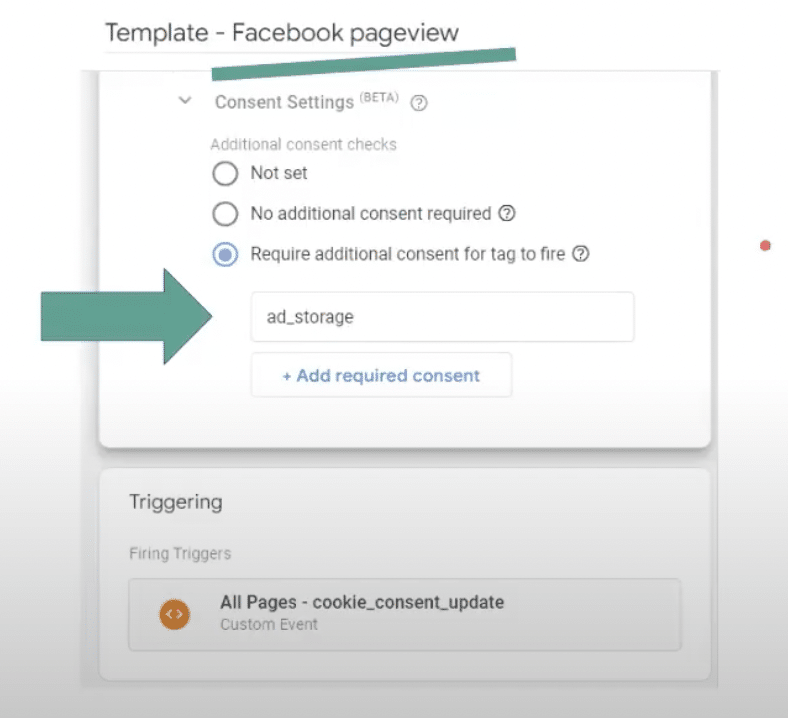
Google has also forgotten to mark call tracking as a native consent field (there is a possibility they may introduce consent mode modelling for phone call conversions).
10. Forgetting to activate Big consent mode modelling
Bing consent mode is very easy to activate and will significantly improve your numbers. To activate this, go to your native Bing page view tag and tick the boxes beneath ‘Consent settings’. As long as this is triggered at the right time on consent updates, you shouldn’t run into any problems.
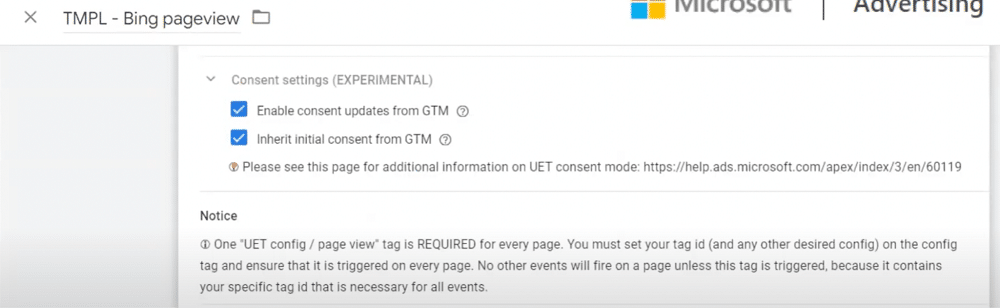
11. Not checking consent validation
The image below shows preview mode, one of the most useful GTM features. Here, we’re checking if a default and an update are working in the correct order. It’s important to verify this to ensure consent is set up correctly.
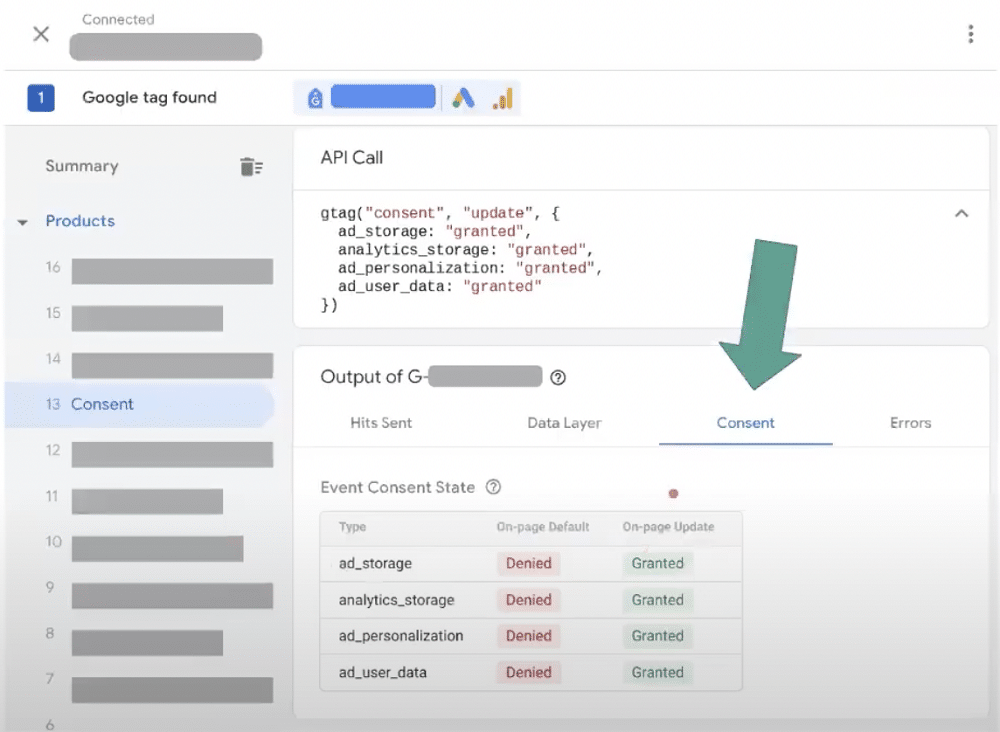
Additionally, it’s important to turn on ad personalization. If this is not activated correctly, you’ll receive the GA4 warning shown below.
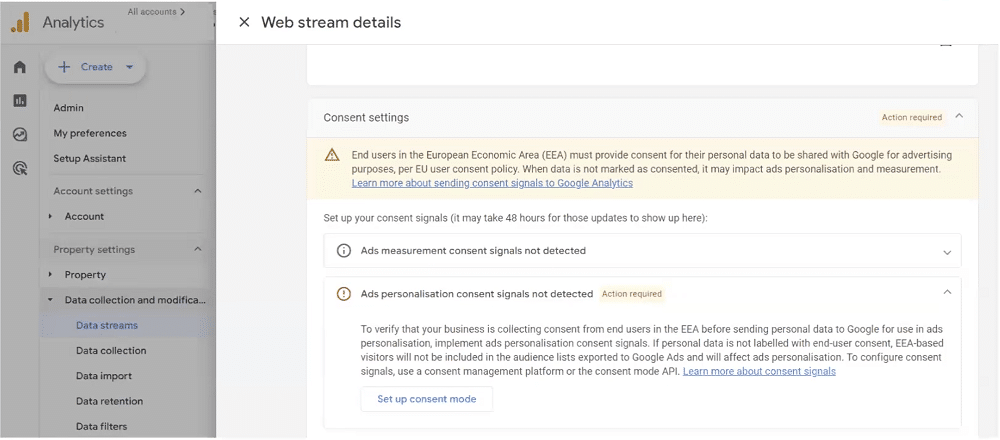
The cost of consent mistakes
There are multiple costs associated with compliance mistakes. The most obvious are fines linked with legislation. Under GDPR, there is a maximum fine of 4% of a company’s global revenue. Under CCPA, businesses are fined $5,000 per user.
In the United States, class action lawyers can make money from these offences. If you live in California, you run a particularly high risk of being caught out. Regardless of where you operate, it’s worth compiling a compliance checklist.
Alongside these monetary costs, there are other impacts to consider. These are:
- Negative PR & brand damage.
- Your Google Ads account may be banned.
- Remarketing importing will be disabled.
- Under bidding on PPC.
- Under-reporting on both PPC and SEO.
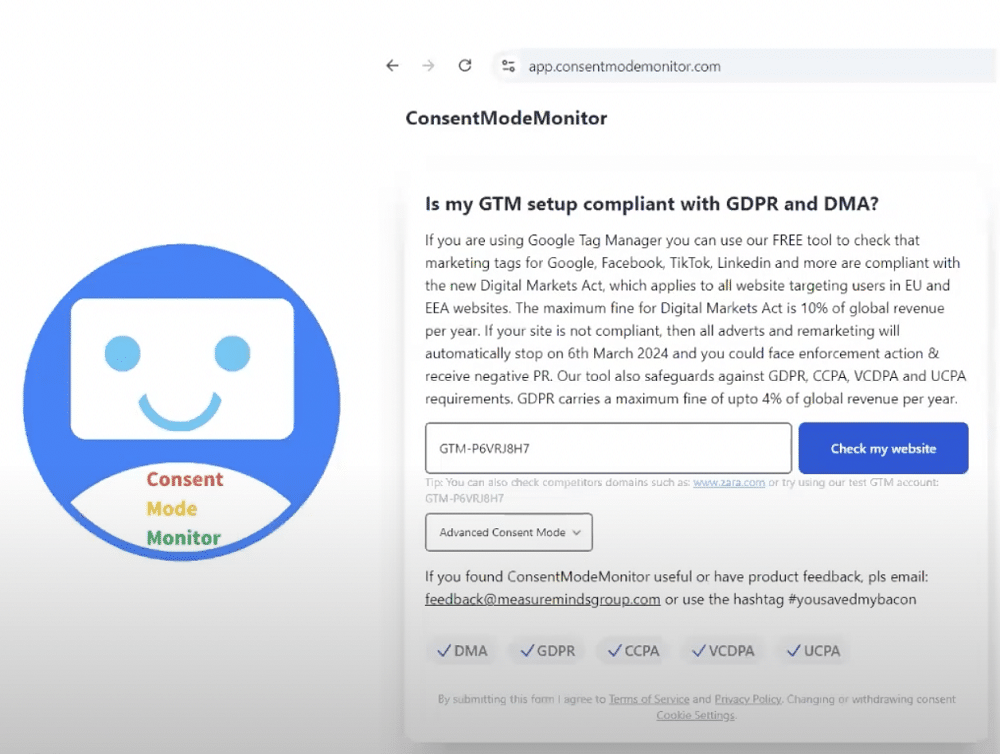
Free validation: ConsentModeMonitor.com
Measureminds has created a free validation tool that can scan your website without authentication. We’ve recently added a ‘one-click fix’ functionality. This will correct any tags that are missing consent (a LinkedIn tag, Facebook tag, etc).
The tool will be $99 per month, and it will be available on a 30-day rolling contract for unlimited scans and multiple domains. You can even use promo code GTM4WARD for a 30% discount.
Don’t leave it to chance!
How many of these common mistakes apply to you? As we’ve explored, the cost of some of these errors can be high. It’s best not to leave it to chance. Why not go through our list one by one and make sure you’ve plugged any gaps?