How US Companies Can Avoid Data Privacy Fines

There is a minefield of data laws impacting organisations that operate online in the US. To avoid hefty fines, businesses must be extremely careful about their data collection practices. With that in mind, here are some tips for lowering the risk of non-compliance.
Legal disclaimer: This article is not intended as a legal document. Always seek professional advice if you’re unsure about your use of cookies!
Differences between EU (Opt-in) vs US (Opt-out)
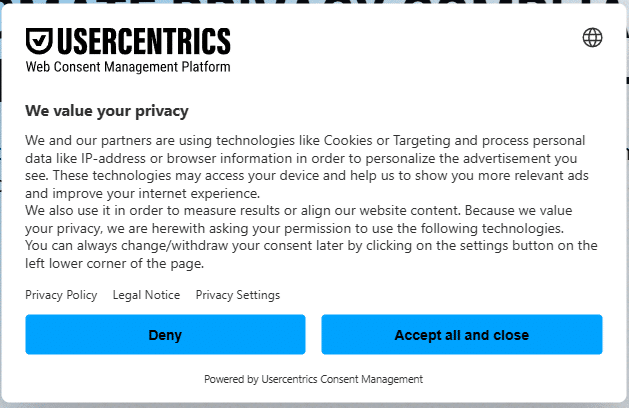
The image below shows a common example of an EU cookie banner. This Usercentrics modal banner contains options for users to ‘deny’ or ‘accept’. There’s no exit button; a user must select an option before they can navigate the website.
In the EU, data collection is disabled until a user provides consent.
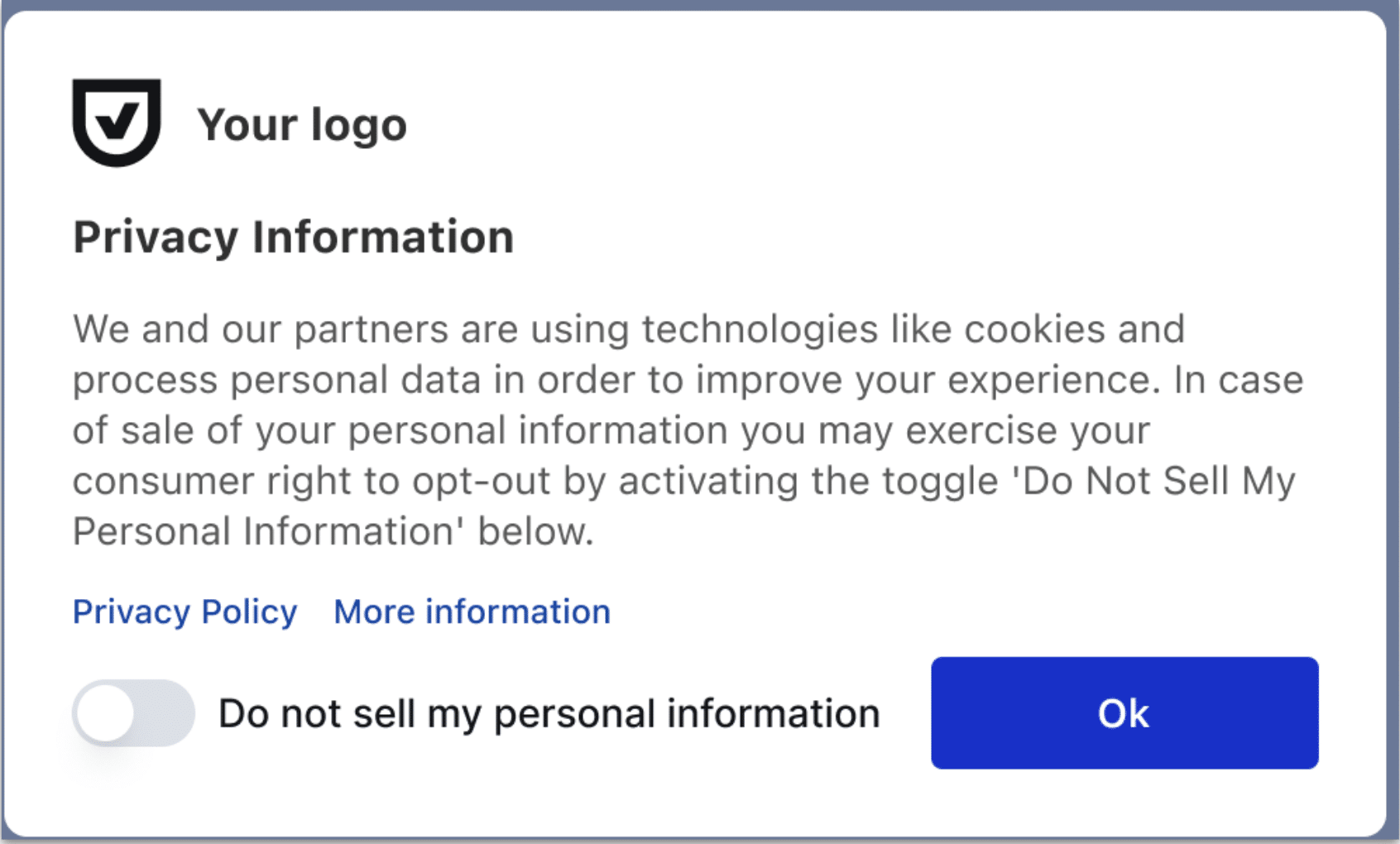
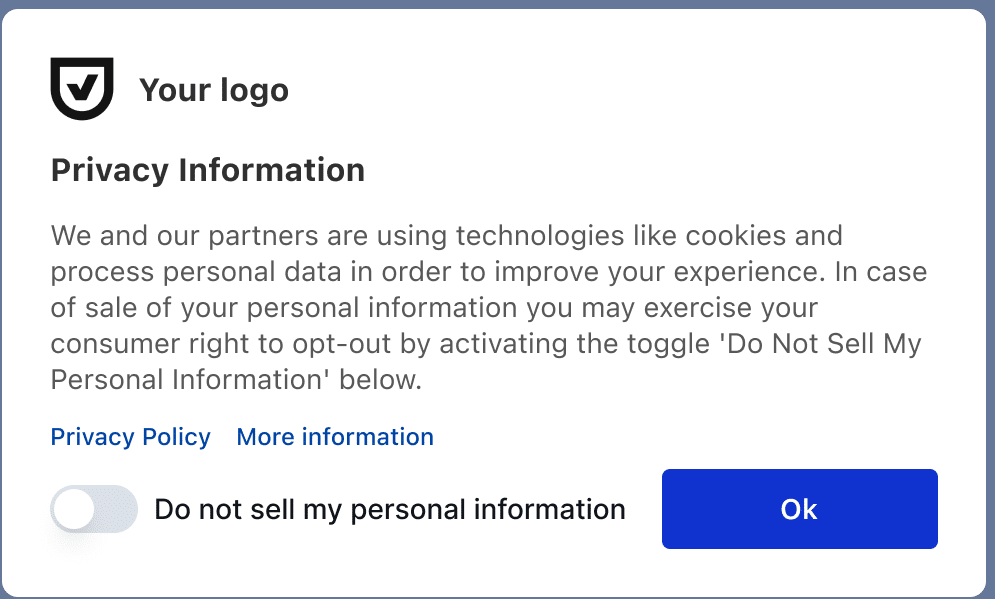
The next image shows an example from a US site. You’ll notice a floating banner that only fills the bottom part of the screen.
There’s no option for accepting or denying cookies; instead, there’s a choice for users to opt out of the sale of their personal information. This option sends a targeting opt-out and an analytics opt-out. Unlike in the EU, these settings are usually disabled by default.
Checking the default consent on your site
If you’re unsure about the default consent settings on your website, you can easily check. Take a look at the code on your site. If you’re in the EU, the default for ‘analytics_storage’, ‘ad_storage’, ‘ad_user_data’, and ‘ad_personalization’ should be set to ‘denied’.
In the US, default settings for each category would generally be set to ‘granted’, but with historic retraction.
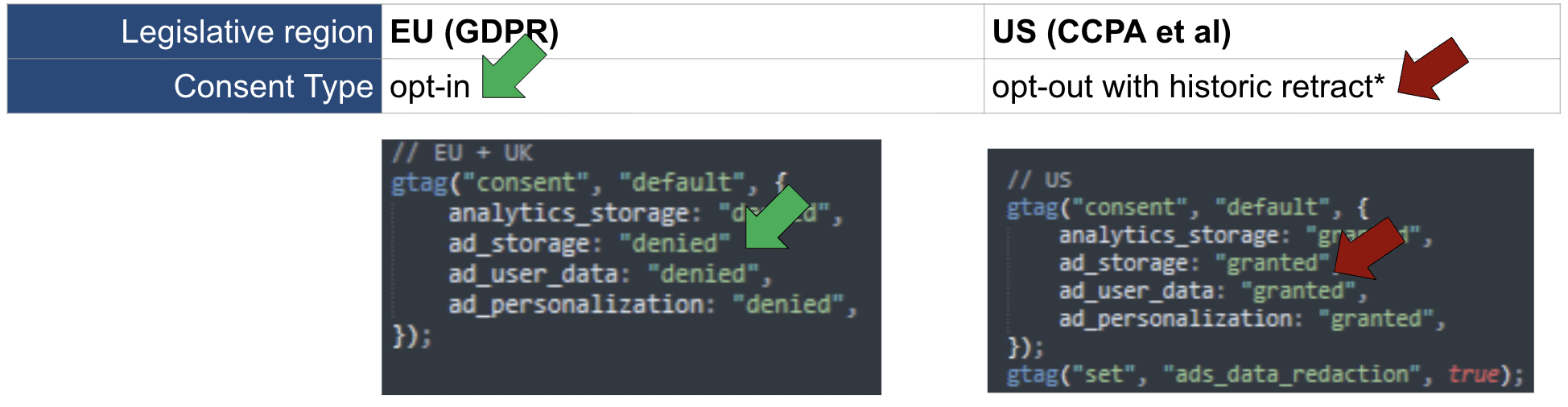
Data controllers in California need to be doubly aware. To stay compliant with the California Consumer Privacy Act (CCPA), it’s safer to set ‘deny’ as the default. We’ll cover this in more detail later.
Potential fines
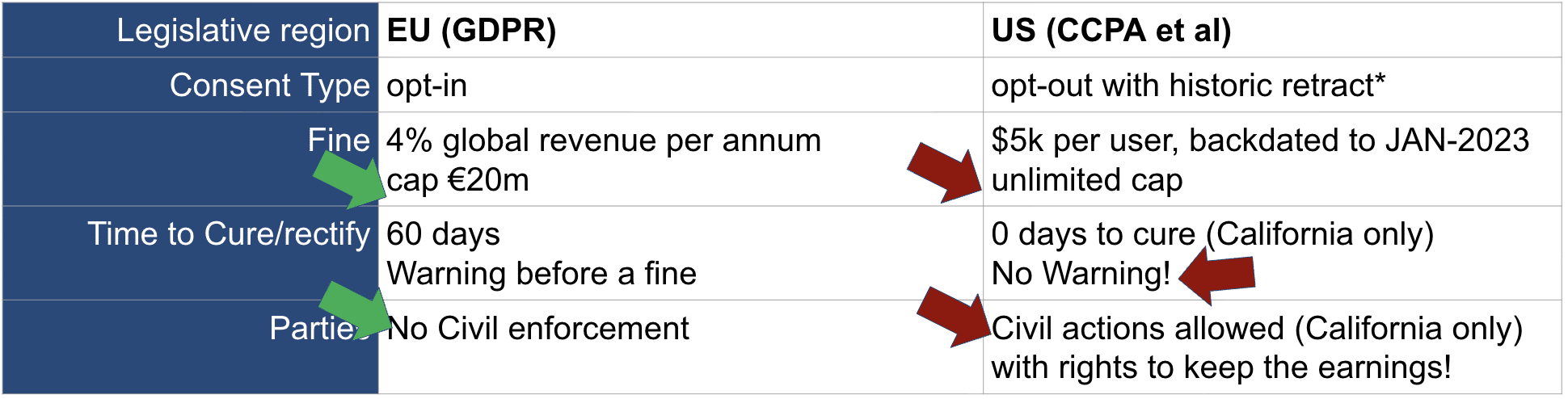
The maximum fine for breaching the EU’s GDPR is 4% of a company’s global turnover. The fine is capped at €1 million. In the US, companies are fined $5 thousand for each user – there is an unlimited cap.
Companies based in the EU also have much more wiggle room to correct non-compliance. Organisations receive a 60-day warning before receiving a fine. Businesses based in California receive zero cure period and can be charged without any warning.
Lastly, in the EU, there is no civil enforcement. In California, however, civil actions can occur. This means that class action lawyers are motivated to identify companies at fault. They will actively seek non-compliance.
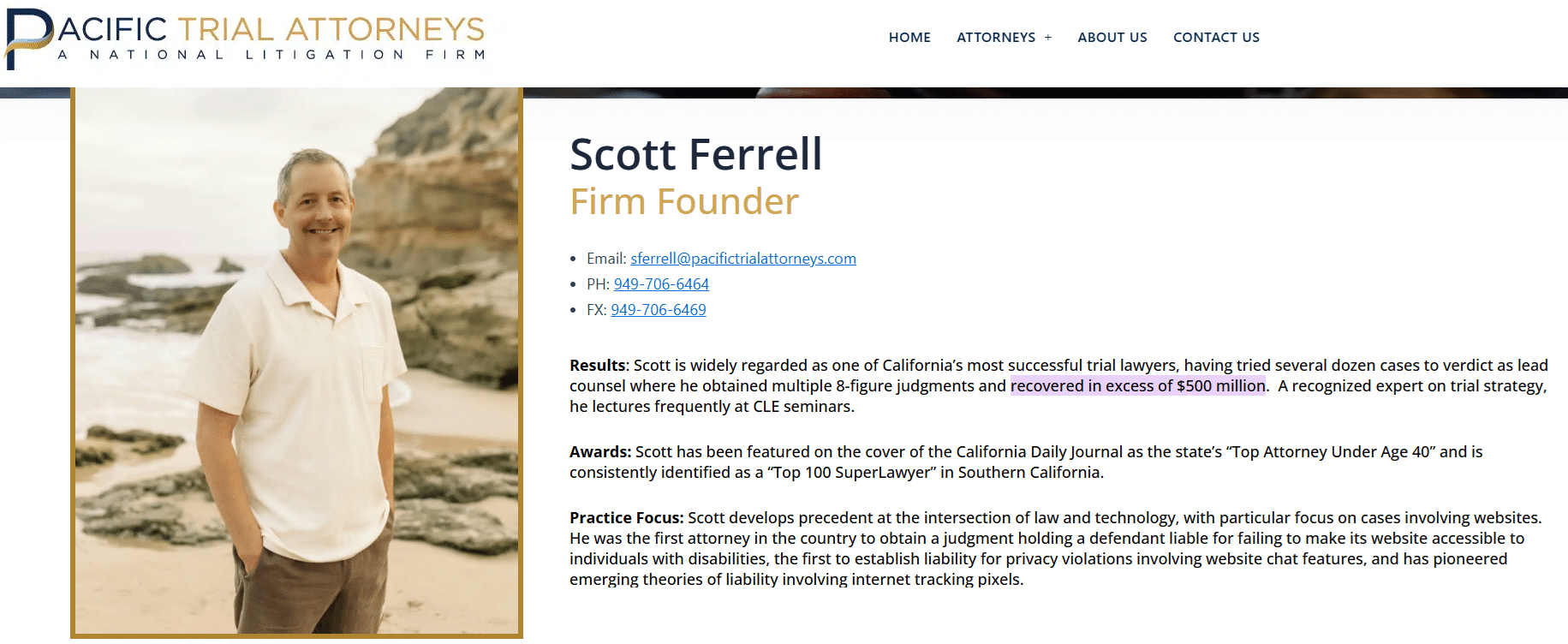
To give a sense of scale, the California-based attorney seen below has sent 1240 summons over the past 2 years. Including demand letters (which are not publicly listed), this single law firm has recovered an excess of $500 million.
In the EU, regulators move very slowly. In Sweden, for instance, the national regulator was taken to court for failure to enforce the law.
Notable fines and settlements
The telecommunications company AT&T was hit with a $177 million class action settlement. The organisation was charged $7,000 per user due to multiple data breaches.
Other notable fines included:
- AspenDental: $18.7m Class Action settlement (2025)
- GameStop: $4.5m Class Action settlement (2024)
- Healthline: $1.6m CCPA fine (2025)
- TractorSupply: $1.4m CCPA fine (2025)
- Sephora: $1.2m CCPA fine (2022)
- Honda: $0.6m CCPA fine (2025)
- Todd Snyder $0.4K CCPA fine (2025)
What other legislation should I be aware of ?
Outside of GDPR and CCPA, there are at least 11 other global data privacy laws. It’s recommended to set your cookie banner to use a GeoIP region and add logic to ensure compliance with individual countries’ regulations.
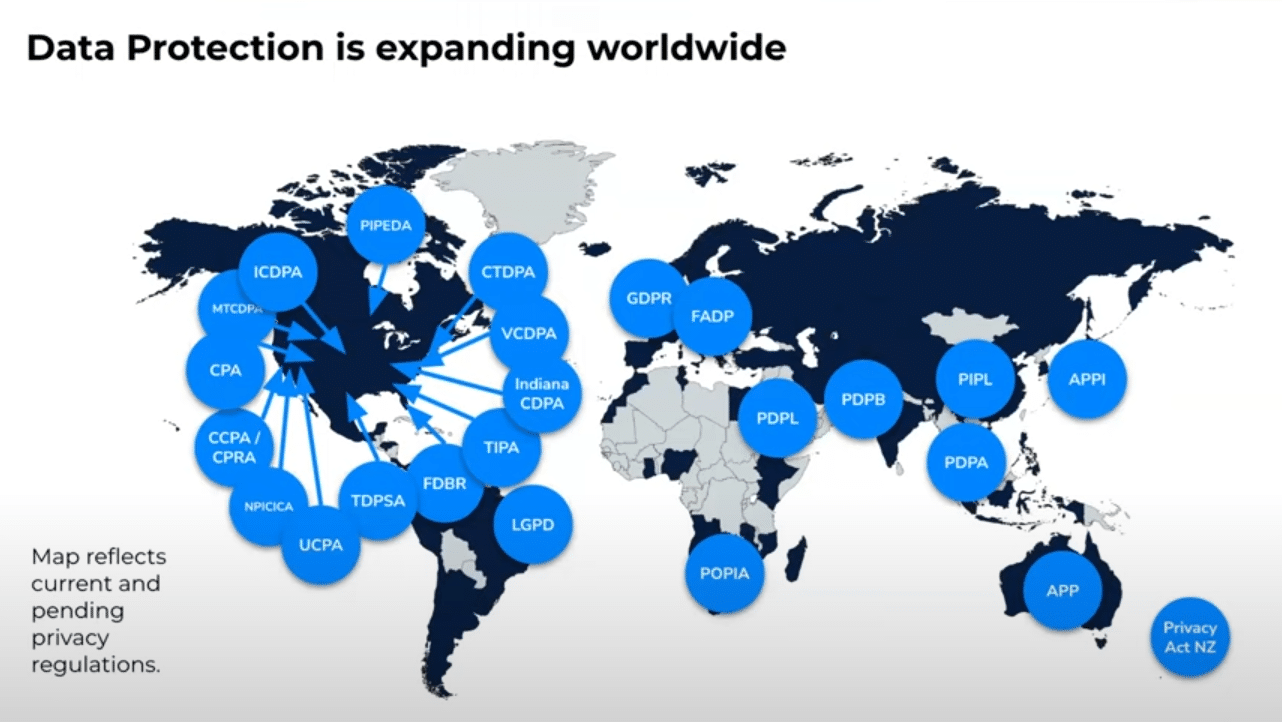
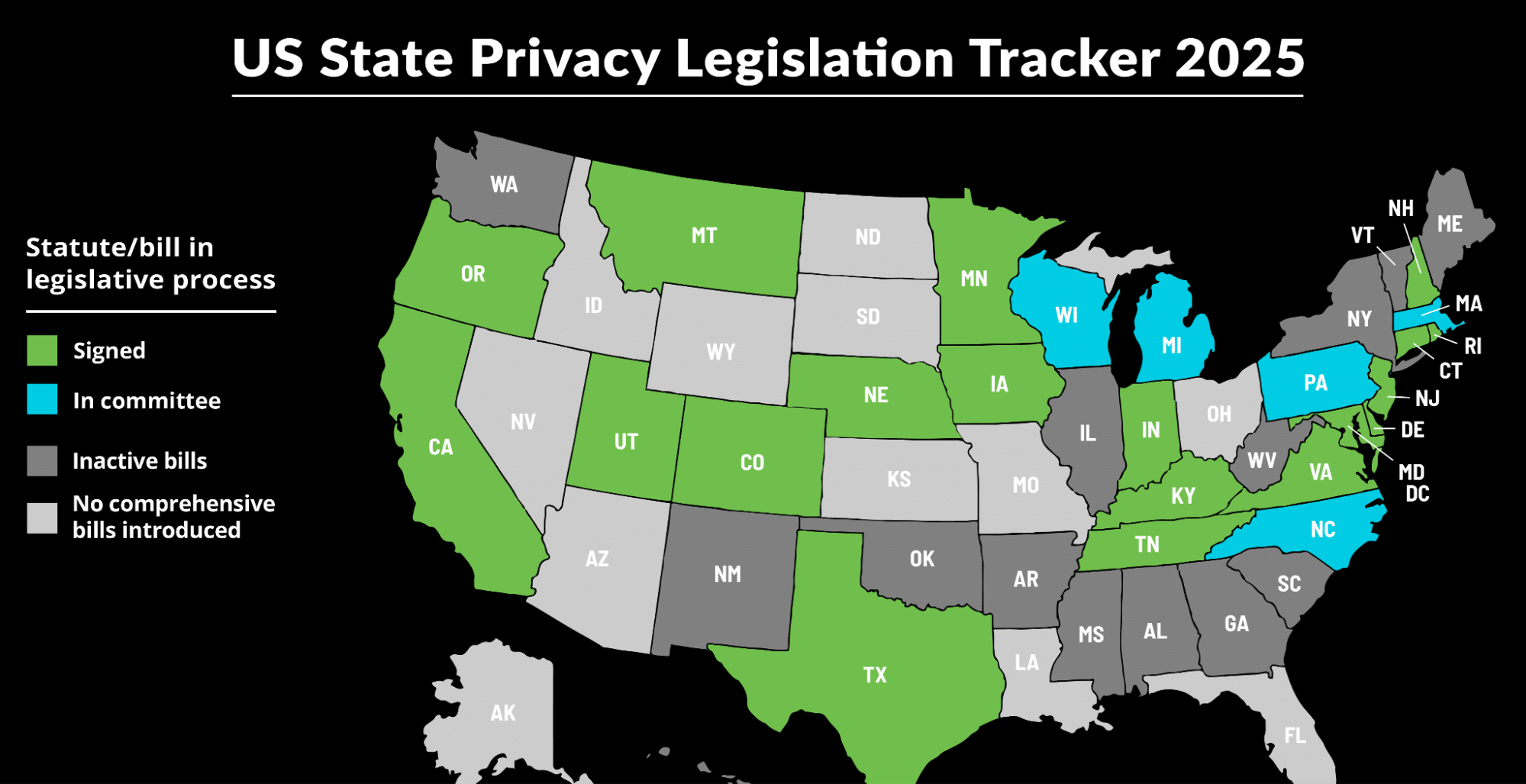
The United States itself is even more fragmented. At the state level, there are 21 data privacy laws, each with varying requirements.
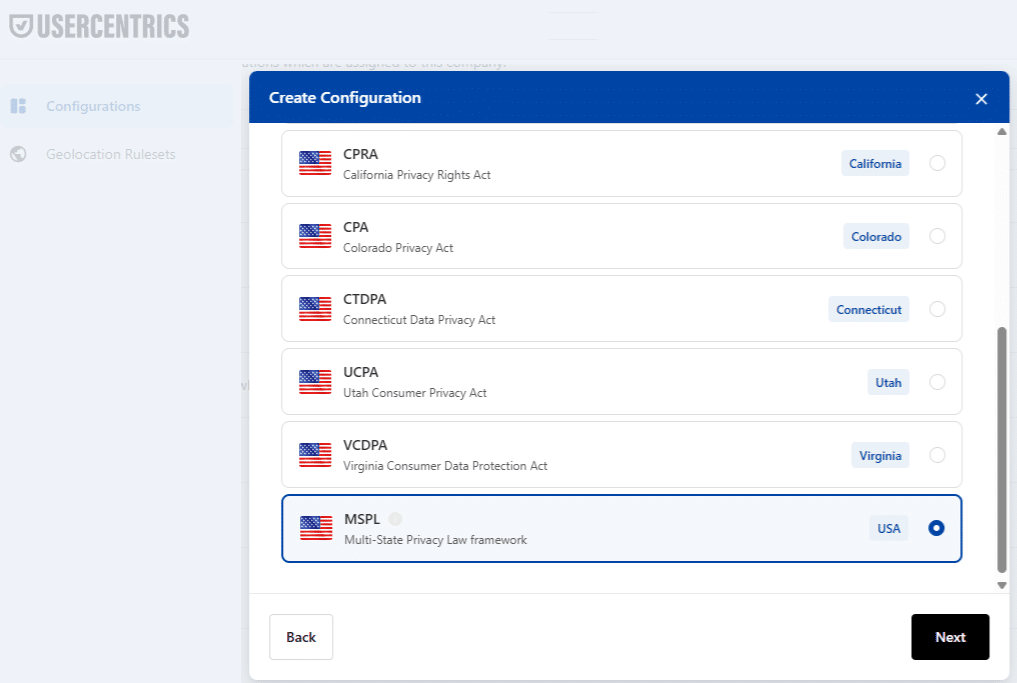
We don’t recommend setting up an individual banner for each state. States will likely introduce new legislation – you don’t want to be continuously updating your banners. Instead, it’s better to use a multi-state banner.
UserCentrics, for instance, dynamically updates different states as new laws arrive.
Why do regulators claim that fines are necessary?
Regulators argue that lawsuits also reduce risk, protecting the online safety of citizens.
To put this into perspective, let’s look at another, very different example. In Sweden, drivers can be fined $13,000 for a single speeding ticket. This increase had a positive impact – 2024 was the sixth year that Sweden experienced fewer than 230 traffic-related fatalities.
In theory, lawsuits influence brands to behave more responsibly with their customers’ data.
Why do brands continue to receive fines?
Why aren’t brands doing more to prevent costly data privacy fines? The issue largely comes down to past experiences.
Once a fine has hit a business, it’s unlikely to make the same mistake twice. Most brands that receive fines have yet to be targeted by a lawsuit.
Protecting yourself from lawsuits
We’ve outlined three steps to help you avoid being hit by a lawsuit. Sticking to the following methods should ‘save your bacon’ from costly fines.
Be sure to add a floating footer banner to your website. This must contain a ‘do not sell’ option. Avoid using different colours in your banner (i.e, have one red button and one green button). This could be viewed as a ‘dark pattern’, an illegal practice that seeks to unfairly influence users into taking certain actions.
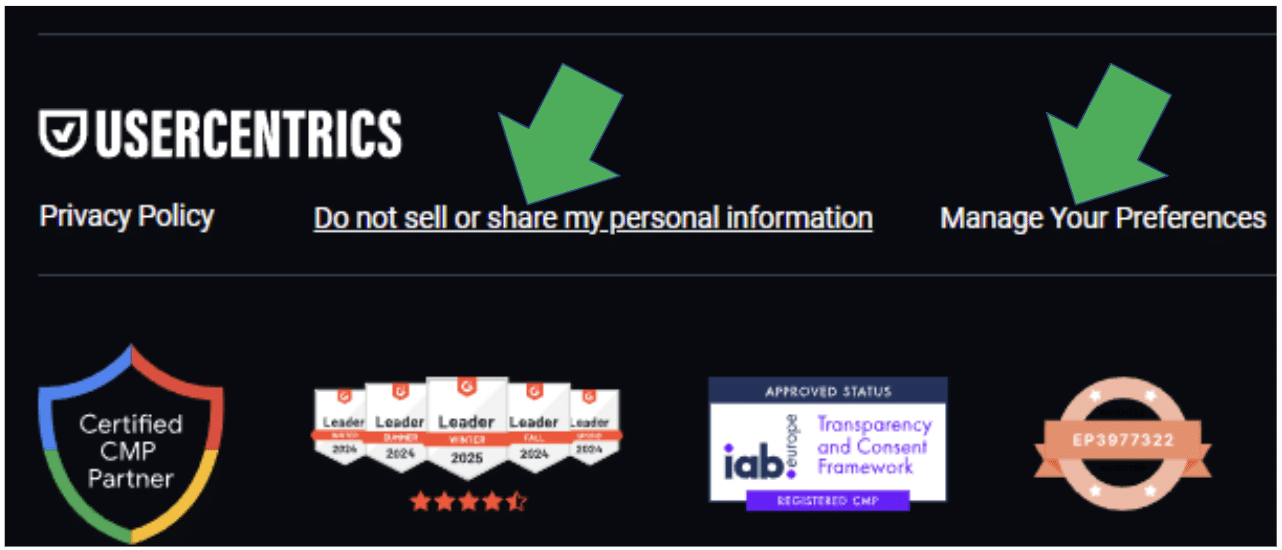
Your banner should contain a link labeled ‘cookie settings’, which should reinvoke your banner. This option should enable users to see and change their previous consent selection.
Add a second link marked ‘do not sell or share my personal information’. This should take California users to a privacy policy page containing two contact mechanisms (an email address, phone number, and/or link to a Zendesk form).
3. Make sure that your opt-out works
Make sure that your opt-out button is sending the correct signals to tags. For example, if you’ve selected deny and still see a Facebook pixel on the following page, something is going wrong.
There are plenty of reasons why your mechanism might not be working as it should. Keep an eye out for the following issues:
- You’re not following consent mode best practices.
- Your inline tracking code is placed outside consent.
- Your main site is ok, but the sub-domain is using inline code (not GTM) or using GA4/Google Ads module on Shopify / HS / BigCommerce / React.
- AutoBlock is loaded after tags have triggered.
- The default consent is missing & so consent opt-outs are ignored.
- GTM blocking rule is not working due to the use of the wrong eventName (should be event = .* ).
- The GTM activation rule is not working due to the use of the wrong eventName (should be event consent_updated et al, not “All Pages” rule).
- The inline code is missing a comma, causing a broken dataLayer.
- Your dataLayer is too big, causing dataLayer updates to fail.
What to do if it’s too late to fix
Firstly, you need to decide which category you fit into. Let’s look at the different scenarios
- You’ve not been detected yet – If you’ve yet to be identified by a class action lawyer, it’s time to ‘pull your socks up’. Address the errors on your site before it’s too late.
- You’ve received a demand or summons letter – If you’ve received a demand letter, you have a small window (until the second working day after the postmarked date, excluding weekends and holidays) to correct an issue. If this is the case, act quickly.
If you receive a demand letter
Received a demand letter? The following steps will help as a quick fix.
- Add a Consent Management Platform via Google Tag Manager.
- Use a one click to fix consent mode mistakes in GTM via CMM.
- Fix any non-functioning blocking rules or activation rules.
- Inject a footer link in all pages via a GTM custom script.
- Inject the Cookie table and two opt-out methods for California users on the privacy page via GTM.
Negotiating a settlement
If you’re unable to fix the issues in time or receive a summons letter, you’ll go into settlement mode. The first stage is to determine the sort of lawsuit that you’re involved in. To do so, start a correspondence with your class action lawyer and ask for the evidence file.
The evidence file lists the targeting technology that you have wrongfully used on your site. It will be one of five buckets.
- Ad network – Adwords/FB/TikTok.
- Session Recording – Hotjar/Clarity.
- Email or CDP – Mailchimp/Klaviyo.
- LiveChat – Zendesk.
- Affiliate cookies.
Negotiating tactics
There are several negotiating tactics you can deploy to reduce the amount of your settlement. Consider some of the following tactics
- Delaying – Is there a problem with the way a lawyer submitted their summons?
- Holes in evidence – With a full understanding of a lawyer’s accusation, you can begin to look for mistakes with their evidence.
- Credibility of URL reference in docket – Are the URLs listed non-existent or out-of-date?
- Credibility of expert witness (if person known) – If you know who the witness is, you may be able to discredit their evidence.
Holes in evidence examples
Here are some real-life examples of mistakes contained in the evidence file
- A user visited mailchimp.com, then visited the brand`s website (this is not standard user behaviour, and discredits the evidence).
- GA4 cookie timestamps can be used to identify the user
- and there are no opt-in signals in the past 12 months.
- You can see which pages a user visited and if they are from the GEO-IP state of California.
- The evidence file listed code to collect a user’s email, but this was inactive JavaScript code and only triggered after a newsletter opt-in (i.e, not collected automatically).
Beware of a ‘double-tap’
If you decide to settle, be careful to avoid a ‘double-tap’ lawsuit. This is where you sign a settlement agreement, make the same mistake, and get hit by another lawsuit. To avoid this, you have two options:
- Pay for past and future fines.
- Pay for past fines only and get real-time monitoring tools (A CMP web scanner, a TMS scanner, and introduce server-side settings) to prevent you from being caught again. This option is generally cheaper.
Avoid copy-cat lawyers
Copycat lawyers will submit the same summons to the same brand. If this happens, you may receive multiple summons at once for the same fault.
Settlement rates by consent management platform
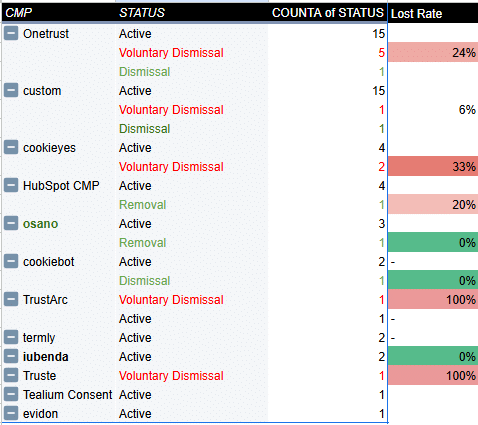
Some CMPs have better win rates than others. The image below shows our small sample measuring CMP performance. OneTrust has the highest volume of voluntary dismissals. Cookiebot and Osarno, on the other hand, fared well, with a lower volume of dismissals.
Note: Simply changing CMPs will not improve your compliance level. You still need to know how to use your CMP effectively.
Preventative measures
Use the MeasureMinds Consent Mode Monitor
Unsure about consent on your site? Our Consent Mode monitor will scan your domain for tags with missing or incorrect consent. You can even fix any issues identified at the click of a button.
Run a risk assessment
To reduce the risk of a class action, it’s important to run regular risk assessments. Use the following checklist when doing so.
- Have you hosted California sessions from Chrome or IE on desktop since 1st Jan 2023?
- Have you committed a single or multiple violations?
- Is your Revenue $25 million+ per annum, and is your HQ based in the US?
- Is your privacy policy more than 12 months old?
- Are you in a sensitive vertical (Health data, Children data, Financial data, Political data)?
- Do you have an active CMP and cookie banner?
- Do you have a broken opt-out or targeting cookies in the wrong category?
- Have you settled publicly for any lawsuit in the past (i.e, are you on the last of the “known settlers” list)?
- Has a competitor recently been targeted?
Finding your competitors by visiting this site. Then, run a docket/lawsuit search.
One-time fixes
You can also try the following one-time fixes.
Inline
- Add a ‘cookie settings’ footer link and ‘do not sell’ footer link.
- Load your CMP outside GTM (with the GEO-IP countryCode & state exposed).
- Add meta no referrer params header tag.
- Add “no keystroke tracking” attributes to CVC and other sensitive fields.
- Update robot.txt to disallow ia_archiver and email info@archive.org to remove cache.
GA4
- Use privacy features of GA4; Tick the box to prevent future Email param capture, and use a data deletion request to remove past emails in URLs
- Add manual UPD dataLayer and then untick automatic UPD.
GTM
- Add a param whitelisting template variable (or param removal within SGTM).
- In SGTM, change the hostname to Stape with the hashing IP enabled (as IPs are considered personal).
In summary…
Not yet received a demand letter and have revenue over $25 million? While this is great news, it doesn’t mean you should be complacent; run our checklist and identify any risk areas. If you do receive a demand letter, act quickly and address issues within 24 hours.
If you receive a settlement letter, you have at least three days before copycat lawyers start noticing. Use this time to correct any errors on your site. Remember, the negative PR can be just as damaging as the fine itself, so do everything you can to mitigate risk.
Lastly, look out for the three-state ‘privacy sweep’. California, Connecticut, and Colorado agencies have all sent out enforcement letters. Make sure you have enough tools, technologies, and techniques to counteract any claims.
Ultimately, it’s not too late. Take preventative measures now!