How to Run a Cookie Audit: Examples and Tools

Data privacy is a topic that isn’t going away. If you’re running a business, it’s something you’ll need to get on top of sooner rather than later. A comprehensive cookie audit helps ensure transparency about your cookie usage. Crucially, it also helps you stay in line with global data privacy regulations.
Here, we’ll guide you through running your cookie audit. First things first, though…
A cookie audit assesses the cookies placed on a website. At the end of an audit, you’ll have a complete list of all the cookies on your site and their intended purposes. You can answer crucial questions such as ‘How long are cookies stored for?’ and ‘Do cookies protect personal data securely?’
A crucial part of data privacy legislation such as GDPR is ensuring that users are ‘informed’. You need to explain exactly why and how you are collecting user data. Your Consent Management Platform (CMP) should also provide users with a complete list of all the cookies you use.
For this, you need a strong understanding of cookies used on your website. The best way of gaining this understanding is through a cookie audit. A thorough audit also ensures that you don’t overlook any cookies in your banner.
Aside from ensuring cookie compliance, an audit helps to boost transparency with your audience. By being open and honest about data collection, you demonstrate that data privacy is a prority. You’ll boost customer trust and loyalty.
Before embarking on your cookie audit, it’s important to have a strong understanding of cookies and how they work.
In a nutshell, cookies are pieces of code that are placed on a site visitor’s browser. They collect a variety of different forms of data, relating to user behavior, website performance, and many other areas.
Cookies are grouped into various categories: first and third-party cookies, necessary and non-essential cookies, session and persistent cookies, and law-governing cookies. You’ll need to group different kinds of cookies into each category during your audit.
Let’s look at each category in more detail.
First-party cookies are created by a website. They’re primarily used for functional purposes and contain data relating to users’ browsing sessions. They ensure that users don’t have to reinput login or payment details in the future.
Third-party cookies are created by external websites mainly for marketing and analytics purposes. These cookies are often created by plugins or other third-party tools used on your website. For example, if you use an external live chat tool, it may leave third-party cookies.
It should be noted that this form of cookie is quickly becoming less relevent. In 2024, Google began the process of phasing third-party cookies out from Google Chrome. Advertisers will likely be increasingly increasingly less dependent on these tools.
A session cookie lasts for the length of a user’s session. A session begins when a user arrives on your site and ends when they leave. Session cookies act as a website’s memory. For instance, session cookies ensure that items stay in a user’s basket as they navigate your store.
Persistent cookies last multiple sessions. These cookies contain information that is needed across multiple visits to your site. This includes ensuring your website remembers a user’s login details so they don’t need to re-enter them.
All the cookies described so far can be split into two groups: necessary and non-essential cookies.
A cookie that enables your website to function correctly is dubbed ‘strictly necessary’. An example of a strictly necessary cookie would be a session cookie, used to keep a user signed in. These cookies don’t require user consent, as they don’t collect any information about users.
Non-essential cookies are used for multiple purposes, such as marketing and analytics. These cookies require user consent to be active. A user can select non-essential cookies on an individual basis if they wish.
Hopefully, you’ve got a strong understanding of the role that cookies play on your site. Now, you can get to work running your audit.
There are two methods to running a cookie audit. You can opt for a manual approach or you can run an automatic audit. Let’s look at both approaches.
Running an automatic audit
An automatic audit is the simplest approac as you don’t need to categorize all the cookies on your site yourself. A tool will scan your website and produce a list of all the cookies contained on it. This includes categorising cookies into groups, as required for GDPR compliance.
Alongside this, a tool can carry out a variety of other functions. Some solutions will generate a cookie policy for you and implement a cookie banner.
The exact auditing process will vary depending on your chosen solution. Usually, the process is as simple as entering your website’s URL and choosing ‘Scan’’. Your chosen solution will do the rest of the work for you.
Running a manual audit
A manual cookie audit is a longer, more involved process involving several steps. We’ve outlined these below.
The process begins by identifying all the cookies that are present on your site. The simplest method is to head to your website browser. For this example, we’ll demonstrate using both Google Chrome and Mozilla Firefox.
Note: Test on incognito mode to avoid any cookie blockers that are native to your browser.
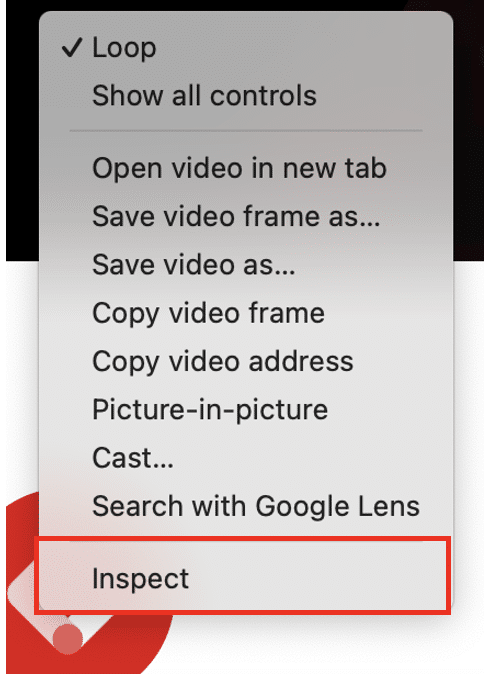
Start by right-clicking on any page, and choosing ‘Inspect’. This enables you to access all the HTML and source code on your website.
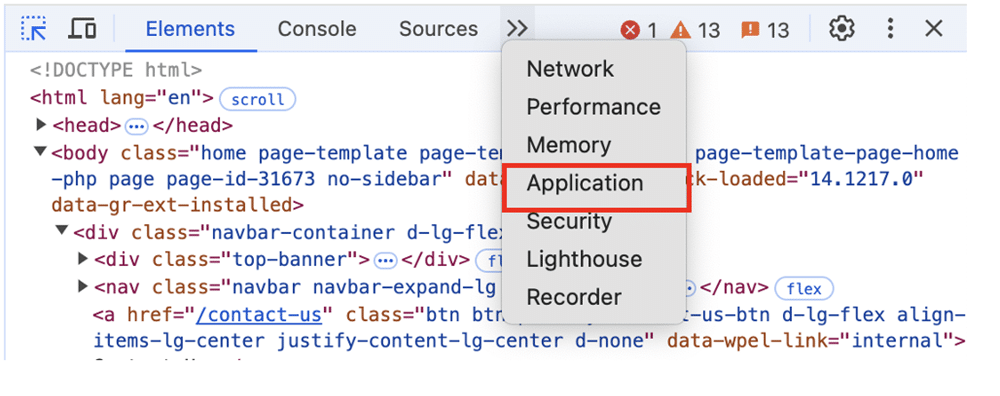
From the top of the page, you should see an option titled ‘application’. If not, click the arrows to expand the menu (as shown below).
Now, from the left-hand menu, choose ‘Cookies’ and select your website from the list. This will produce a complete list of all the cookies on your site.
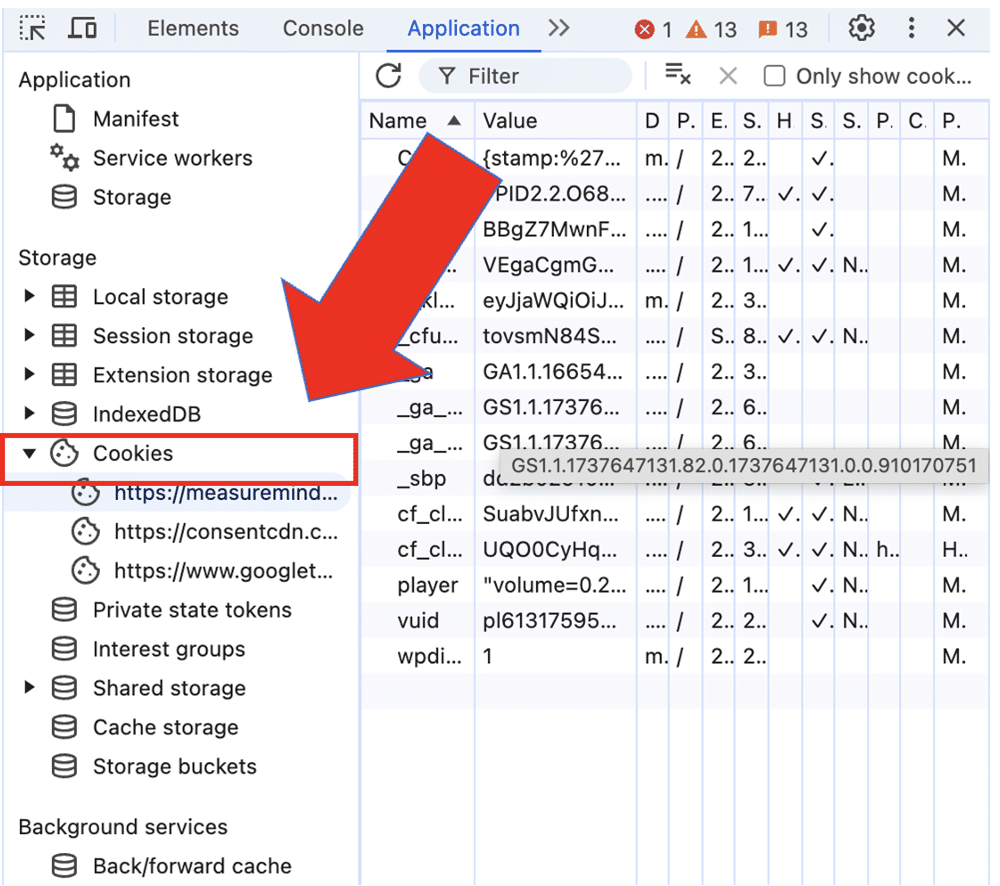
Note: It’s worth repeating this process for multiple pages on your website to make sure you have a complete list of cookies. It’s also important to test on multiple devices and using different browsers.
Right click on any webpage on your site, from a Firefox browser. Then, choose ‘Inspect’.
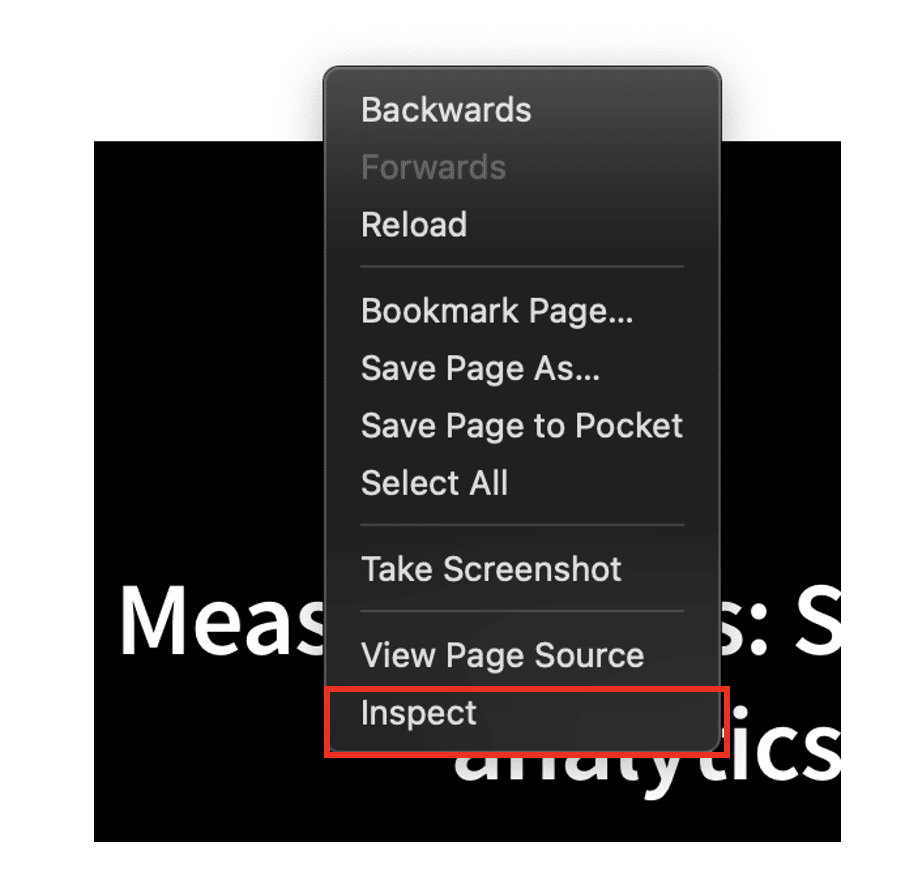
As with Chrome, this will open a window displaying all the HTML code on your site. Choose ‘Storage’ from the top window then select an option labelled ‘Cookies’.
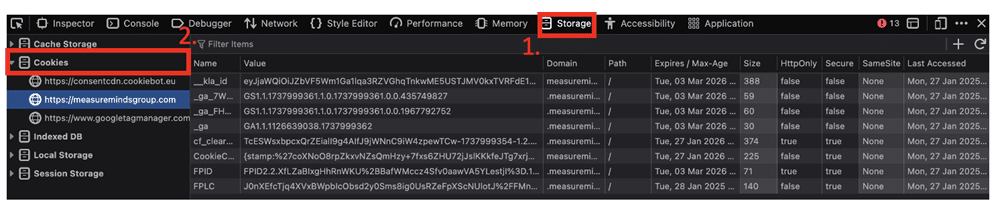
This will bring you to a table that displays all the cookies on your website. This will also reveal the storage location of each cookie, its category, and whether it is secure or not.
Now that you have a full list of all your cookies, you need to analyse them. You’ll look at each cookie and learn what data it contains and how you collect, store, and use this data.
During this process, you’ll examine at the following areas via your web browser:
- The name of the cookie – If you’re ever unsure about the identity of a cookie, you can copy its name into Google. You should quickly find all the information you need.
- Expiry date – Cookies aren’t stored on a user’s browser indefinitely. As mentioned, session cookies only last while a user is on your site. Your browser should list the storage duration for non-essential cookies.
- Size – Some cookies have a larger storage size than others. Make sure that no cookies exceed 4,096 bytes – this is the maximum size allowed by Google Chrome.
- Domain – The domain that a cookie relates to. First-party cookies will have your domain, while third-party cookies will have the domain of external websites.
- Security – Some cookies will be marked as secure. This means that they’re only sent via a secure HTTPS connection.
Once cookies have been analysed, you’ll need to place them into specific groups. Cookie groups are separated based on different functionalities. These include:
- Security cookies – These cookies bolster the security of your website in several ways. For instance, a security cookie might be used to verify a user’s identity when they log in. They help to detect and prevent malicious users.
- Advertising cookie – As the name suggests, this form of cookie supports advertising on your website. Advertising cookies collect information relating to how users interact with ads, helping marketers improve their materials.
- Analytics cookies – These cookies are designed to help website owners understand how users behave on their sites. They send data to external tools such as Google Analytics, delivering actionable insights.
- Personalisation cookies – Personalisation cookies learn about the preferences of individual users. They help build personised experiences on your site, such as suggesting products that a user might enjoy.
Group your cookies carefully. Mistakes, such as placing cookies in the wrong groups can prevent users from being able to opt in or out. This could lead to a faiure to comply with data privacy legislation.
You’ll need to evaluate how your cookie usage might impact data privacy regulations. There will be different regulations based on the regions that you operate in. Each will have different requirements and will need a different approach to data privacy compliance.
Remember, just because you don’t operate from a certain country, state, or region, doesn’t mean you’re exempt from its laws. If you receive traffic from an area, you must provide cookie consent options.
It’s always best to seek professional help to ensure compliance. In general, though, avoid using cookies that store information but don’t have a clear purpose. When explaining your cookie usage, always opt for clear and concise language.
During this process, you should also make sure that you have enabled Google Consent Mode (we’ll talk about this tool in more detail later). You can use our Consent Mode Monitoring Tool if you’re unsure about your implementation. This scans your GTM setup and provides a list of tags with missing or incorrect consent.
Step 5 – Conduct regular audits
Your privacy audit shouldn’t be a ‘one and done’ process. Try to carry out an audit at least twice per year to avoid encountering any new compliance problems. Privacy laws will change and new legislation will arrive. It’s important that you can adapt to these changes effectively.
Alongside a regular audit, make sure to update your cookie policy when you introduce new cookies on your site (we’ll guide you through the process of creating a policy in the next section).
Equally, consider how you can adapt to changes that impact cookie usage. For instance, with first-party cookies going away, many businesses are looking to GTM Server-side for implementing a cookieless strategy.
What eprivacy laws impact me?
There are many pieces of data privacy legislation globally that are constantly being updated. What’s more, new regulations frequently arrive on the scene. Understanding the laws that impact your business is crucial for staying in line with the law.
Listed below are some of the biggest global data privacy laws.
- General Data Protection Regulation (GDPR) – The European Union’s (EU’s) data protection law was introduced in 2018. This regulation demanded that all users provide consent before any data collection could begin. GDPR also ensures that businesses create clear documentation of how cookies, are used, collected, and stored.
- California Consumer Privacy Act (CCPA) – Introduced in 2020 in California, CCPA bears many resemblances to GDPR. CCPA enables customers to request any personal information that businesses hold about them. They can ask that their data not be used for sales, or for information to be deleted.
- Colorado Privacy Act (CPA) – Another US data privacy law that was enacted in 2020. CPA only applies to organisations that collect data from more than 100,000 Colorado residents OR if they collect data from more than 25,000 residents and gain revenue. As with CCPA, people can request access or deletion of personal data.
- Personal Information Protection and Electronic Documents Act (PIPEDA) – PIPEDA originally became law in Canada in 2000, but has since been updated significantly. This law obligates all businesses to appoint a privacy officer, who is in charge of ensuring that data is properly safeguarded.
Addressing compliance issues
At the end of your audit, you should understand how your website’s cookies operate and any problems you may have with your setup. Now it’s time to address compliance and other issues you may have identified.
The following steps can help strengthen your compliance.
A cookie policy is a crucial document both for compliance and transparency. Once you’ve gathered a strong understanding of cookies, you can get to work creating your cookie policy.
You have two options: write a cookie policy yourself, or work with an external tool to help you.
Working with an external tool
Working with an external tool is the easiest option. Cookie management platforms (CMPs), such as Cookiebot, will categorise all the cookies on your site and generate a policy based on them.
If you’re interested in a CMP, you can use our exclusive Cookiebot discount.
Writing your own cookie policy is a more complicated option. A cookie policy is comprehensive. It should detail all the data you collect on your site, what you do with it, and how you maintain it. Most importantly, it should explain how users can opt in or out of data collection, or ask for their personal data to be deleted.
Listed below is a general structure for a cookie policy.
- An introduction – Begin by explaining the different cookies used on your site. This is an opportunity to underline that your business values data privacy. Include a couple of lines illustrating why transparency is important to you.
- Cookie details – Go into further detail about your cookie use, and provide a full list of all cookies on your site. This should include their name, category, and any other relevent information.
- Consent options – Explain how users can accept or reject cookies on your site. Outline how users can change their preferences where needed.
- Additional updates – Explain how you will update users about any changes to your cookie policy. Inform them about who they can contact within your organisation about privacy-related questions.
Again, a cookie policy is a complex document. Mistakes could mislead users and result in fines and other non-compliance issues. To avoid these issues, make sure you have the right expertise in your team to assist you.
A cookie consent mechanism collects consent preferences from your CMP. It then ensures that tags, triggers, and variables operate based on a user’s consent preferences.
As mentioned earlier, Google Consent Mode V2 is a popular example. This tool also utilises a feature called ‘Consent Modelling’ which seeks to fill that data gap from users that don’t consent. This feature uses industry benchmarks to upscale data for a continued flow of user insights.
Consent Code also comes with two variations: Basic and Advanced Consent Mode. With Basic Consent Mode, all cookies are disabled by default.
Advanced Mode offers more control. You can alter the default behavior for different groups of users. This is particularly useful if you have users in different regions with varying data laws. Advanced Mode also uses cookieless pings for more accurate upscaling.
Educate your team about compliance
Your business might ‘talk the talk’ about compliance, but it should also act the part. Employees should know how to handle sensitive data in a way that is both safe and above board.
Build compliance into every part of the employee journey – beginning at the very start. Compliance onboarding is a process that helps new employees understand the rules that govern your organisation. It’s a tried and tested process, with an average success rate of 80%.
Carrying out regular compliance training can also be valuable. Regulations change over time, so employees must know how legislation impacts their day-to-day work.
Above all, try to enforce a culture of continuous learning. Equip your team with materials to learn ‘on the go’. Fill your LMS with resources to help them freshen up on topics relating to compliance. Interactive materials such as quizzes are most likely to engage employees.
Ensure compliance today!
Cookies are valuable assets that power your data collection and marketing efforts. However, they need to be used carefully. With so many data regulations globally, it’s not hard to see how a simple mistake can lead to big consequences.
A cookie audit can ensure your data collection methods are above board. The easiest route is to use a automated software solution from a reliable source. If not, we’ve explored how you can carry out an audit in a few steps. Make sure your team has the skills and expertise before embarking on a manual audit.
Remember, you can always contact MeasureMinds if you’re worried about compliance. We offer comprehensive GDPR compliance services. From tracking user interactions to turning data into meaningful business interactions, we’ll ensure everything is GDPR & cookie-compliant.
So, why not get a free quote today?
FAQ
In general, if you use cookies for marketing or analytics purposes, a cookie audit is advised. Data laws such as GDPR require users to be ‘informed’. An audit helps you have a full understanding of first-party and third-party cookies on your site. This way, you can give website users a clear description of your use of cookies.
To carry out an automatic cookie audit you’ll need a reliable software solution. A strong user base and favorable reviews are always positive signs.
Should I carry out a manual or an automatic audit?
Manual audits provide greater control over each stage of the auditing process. Automatic audits are quicker and simpler. Unless you have a team with the right skill set and knowledge, an automatic audit is usually recommended.