Facebook (Meta) Pixel Consent Mode: What You Need to Know

With more and more global data privacy regulations emerging, remaining compliant is more crucial than ever. Facebook Pixel Consent Mode is a tool that helps you stay on the right side of the law while continuing to collect data. Here’s a rundown of Consent Mode and how it can help you.
What is Facebook Pixel Consent Mode?
Facebook Pixel Consent Mode (also known as Meta Consent Mode) stops the Meta Pixel from collecting data before a user has consented. It adjusts tracking behavior alongside a user’s consent preferences.
Facebook Consent Mode is installed by adding a small piece of code to your pixel. Luckily, this is a fairly straightforward process. We’ll explore it in more detail later.
Why is Facebook Consent Mode important?
To understand why Facebook Consent Mode is important, it’s useful to look at the wider data privacy landscape. Since 2018, data laws governing how businesses collect, manage, and maintain data have been cropping up.
In the UK and EU, we have GDPR; in Canada, there is PIPEDA; and in India, there is the PDPB. Although the scope of these laws differ, they all focus on the same concept: consent. Users must provide permission before you can collect any data.
Breaking these laws can have big consequences for businesses. With GDPR, for instance, there is a maximum fine of up to £17.5 million or 4% of annual global turnover (whichever is greater). It’s important to remember that you don’t need to operate in a certain region for laws to apply to you. If you market to users in certain areas, you must comply with their laws.
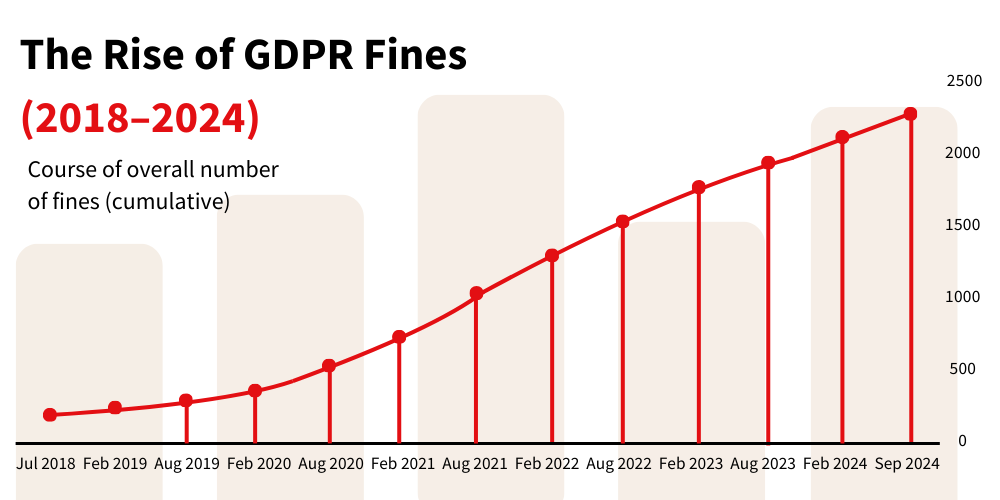
This is why Facebook Pixel Consent Mode is so useful. It ensures your collecting consent in your marketing activities and minimizes the risk of non-compliance.
Of course, it isn’t just about staying on the right side of the law. It’s also about respecting the wishes of your customers. By making consent a prority, you demonstrate that you care about their data privacy.
How Facebook Consent Mode works
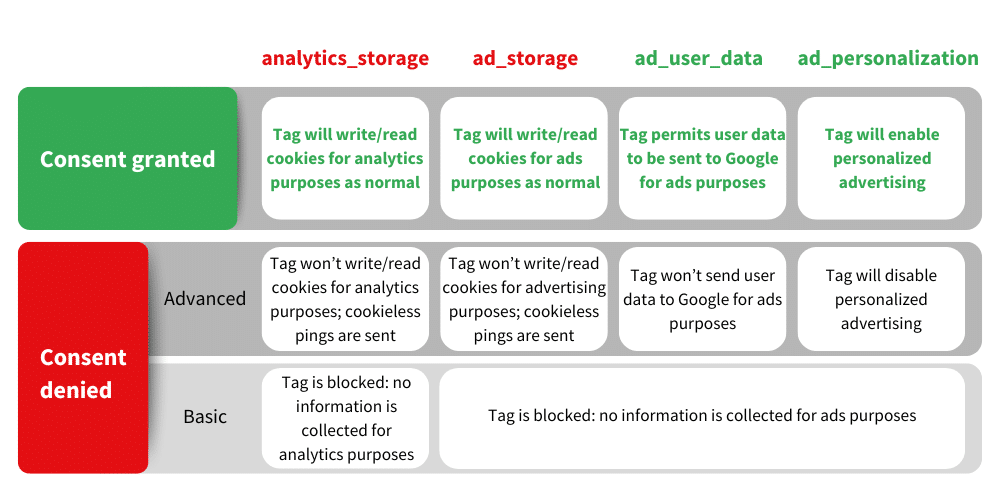
Facebook Consent Mode operates in different ways depending on a user’s consent choices. These different functionalities include:
- No consent – When a user withholds consent. When this occurs, no user information is sent to the Meta servers.
- Limited consent – When a user provides consent to certain data collection activities but not all. For example, they might consent to performance cookies but not personalised advertising. Here, only performance tracking would be activated.
- Full consent – A user agrees to all tracking. In this instance, all forms of tracking would be activated.
Installing Facebook Pixel Consent Mode
Now, let’s explore how you can activate Facebook Pixel Consent Mode. There are several methods for achieving this. One option is to implement Consent Mode via a consent management platform (CMP) that supports it.
The second option is to edit the pixel code in your website header or in Google Tag Manager. Let’s look at this method in more detail.
Editing the Facebook Pixel code
Open your site header or GTM container to find the pixel code. It should look something like this:
!function(f,b,e,v,n,t,s) {if(f.fbq)return;n=f.fbq=function(){n.callMethod? n.callMethod.apply(n,arguments):n.queue.push(arguments)}; if(!f._fbq)f._fbq=n;n.push=n;n.loaded=!0;n.version='2.0'; n.queue=[];t=b.createElement(e);t.async=!0; t.src=v;s=b.getElementsByTagName(e)[0]; s.parentNode.insertBefore(t,s)}(window, document,'script', 'https://connect.facebook.net/en_US/fbevents.js'); fbq('init', '{your-pixel-id-goes-here}'); fbq('track', 'PageView');Add the following code before the init call in your Meta Pixel code:
fbq('consent','revoke');When added correctly, your code should look like the example below (we’ve highlighted the section with added code).
!function(f,b,e,v,n,t,s) {if(f.fbq)return;n=f.fbq=function(){n.callMethod? n.callMethod.apply(n,arguments):n.queue.push(arguments)}; if(!f._fbq)f._fbq=n;n.push=n;n.loaded=!0;n.version='2.0'; n.queue=[];t=b.createElement(e);t.async=!0; t.src=v;s=b.getElementsByTagName(e)[0]; s.parentNode.insertBefore(t,s)}(window, document,'script', 'https://connect.facebook.net/en_US/fbevents.js'); fbq('consent', 'revoke'); fbq('init', '{your-facebook-pixel-id}'); fbq('track', 'PageView');Set your CMP to respond to consent choices
The last step in setting up Consent Mode is ensuring that your CMP responds correctly to consent choices. For this, you’ll need to add the following code:
function handleConsent(hasConsent) { fbq(“consent”, hasConsent ? “grant” : “revoke”); }
Benefits of using Facebook Consent
You now know what Facebook Consent Mode is and how to implement it. We’ve also looked at why the tool is important for ensuring data privacy. Now, let’s explore some of the other factors that make Consent Mode a valuable tool.
It’s free
With factors such as legal advice and CMPs often being expensive, businesses will be pleased to hear that Facebook Consent Mode can be activated for free.
Continued data collection
Legislation such as GDPR requires that data collection is denied by default. Without a tool to adjust Pixel behavior in line with a user’s consent choices, you wouldn’t legally be able to collect any data.
With Pixel Consent Mode you can continue collecting data as long as you have user permission. You can carry on offering personalisation features that improve the user journey and increase conversions.
Enhanced user trust
Data privacy is high in the public consciousness. As many as 38.4% of online users in the UK care about how companies use their personal data. A strong focus on user consent increases transparency and helps allay user concerns.
Efforts to respect data privacy won’t go unnoticed by your audience. They’ll feel more loyalty towards your brand and ultimately spend more money. You’ll be seen as a trusted source by prospective customers and pull in more leads.
Other factors needed for compliance
Facebook Pixel Consent Mode alone isn’t enough to ensure compliance for your business. Instead, it should work alongside a series of other consent-related elements.
Make sure you don’t overlook the following factors in your approach to data privacy.
A consent management platform (CMP)* – Consent Code gathers a user’s compliance preferences from a CMP. It then communicates these to the tags on your website. Consent mode won’t work without a CMP in place.
A privacy/cookie policy – A key part of compliance is ensuring that users are informed. For that, you’ll need privacy and cookie policies. These should list each of the cookies that you use and explain how you use them.
Knowledge of compliance legislation – New data privacy laws are constantly arriving. What’s more, existing laws are frequently modified introducing new requirements. Staying up-to-date with legislation can be difficult, and you may need to enlist additional help.
*MeasureMinds has a partnership with Cookiebot. If you’ve yet to set up a CMP, you can make use of our exclusive 20% Cookiebot discount.
Get started with Facebook Pixel Consent Mode
Whether it’s maintaining customer trust or avoiding expensive legal fines, obtaining user consent is essential. Facebook Consent Mode is a useful tool, helping you gather consent while continuing to collect valuable data.
What’s more, as we’ve shown, the tool can be implemented in a few simple steps. One thing is certain: the consent issue isn’t going away. So, why not get started? Protect yourself and your audience by implementing Consent Mode today.
If you’d like to learn about the importance of data consent, you can check out our blog on Consent Mode fines.
FAQs
How is Facebook Consent Mode different to Google Consent Mode?
Both Google Consent Mode and Facebook Consent Mode are designed for the same purpose: to ensure that tracking behavior on your advertising campaigns align with your user’s consent Preferences. Both tools will only enable tracking after receiving some form of user consent.
The difference between the tools is that Google Consent Mode controls data sent to Google Analytics and Google Ads. Facebook Consent Mode ensures that the Facebook Pixel is only used for marketing and analytics after receiving consent.
Is Facebook Tracking Pixel illegal in the EU?
According to a recent announcement by the Austrian Data Protection Authority (DPA), the use of the Facebook pixel without prior consent directly violates GDPR. That’s why using Facebook Pixel Consent Mode is essential for registering consent and ensuring compliance.
Is Consent Mode set up correctly on my site?
If you’re unsure whether you’ve implemented Consent Mode correctly, you can use our Consent Mode Monitor tool. In three simple steps, you can scan your GTM container for tags with missing or incorrect consent. If any issues are identified, you can correct them with a single click of a button.