Google Analytics 4 Attribution Models | GA4 Guide

Understanding Google Analytics 4 (GA4) Attribution Models
SaaS companies during their first years often spend 80% to 120% of their annual revenue on sales and marketing. That’s why it’s really important to understand which elements of your marketing are providing the best ROI. That’s where attribution modelling in Google Analytics comes in.
As of recent updates, GA4 now supports only two cross-channel attribution models natively:
- Data-driven attribution (default)
- Last-click attribution
However, with BigQuery you can create your own custom attribution models, including:
- First-Click Attribution
- Linear Attribution
- Time-Decay Attribution
- Position-Based (U-Shaped)
Let’s break these different attribution models down and understand how they impact your marketing analysis.
Data-Driven Attribution
Data driven attribution uses machine learning algorithms to evaluate both converting and non-converting paths. The resulting data-driven model learns how different touchpoints impact conversion outcomes. The model incorporates factors such as time from conversion, device type, number of ad interactions, the order of ad exposure and the type of creative assets.
Using a counterfactual approach, the model contrasts what happened, with what could have occurred to determine which touchpoints are most likely to drive conversions. The model attributes conversion credit to these touchpoints based on this likelihood.
For Example
Say you have 3 forms of google ads, Search, Display, and Video. When a potential customer sees all 3, there’s a 6% chance of them converting (or rather, causing a “key event”). When they don’t see the Video ad, the probability drops to 4%. Therefore, the Video ad drives a +50% key event probability.
All-in-all this allows you to optimise your user journey in GA4 due to you having richer data to work from.
Benefits:
- More accurate and personalised insights
- Reflects actual conversion paths
- Continually improves over time as more data is collected
Limitations:
- Requires sufficient data to be reliable
- Less transparent than rule-based models
Last Click Attribution
The last-click model gives 100% of the credit for a conversion to the final touchpoint before the conversion, regardless of earlier steps.
When should a Last Click Attribution model be used?
A last click model is useful for when you have very low traffic or conversions, which may cause Data Driven Attribution to be less reliable. Data Driven Attribution is also less transparent than rule-based models, so it’s not ideal if you need to clearly explain every attribution decision to stakeholders.
How to Change Your Attribution Settings in GA4
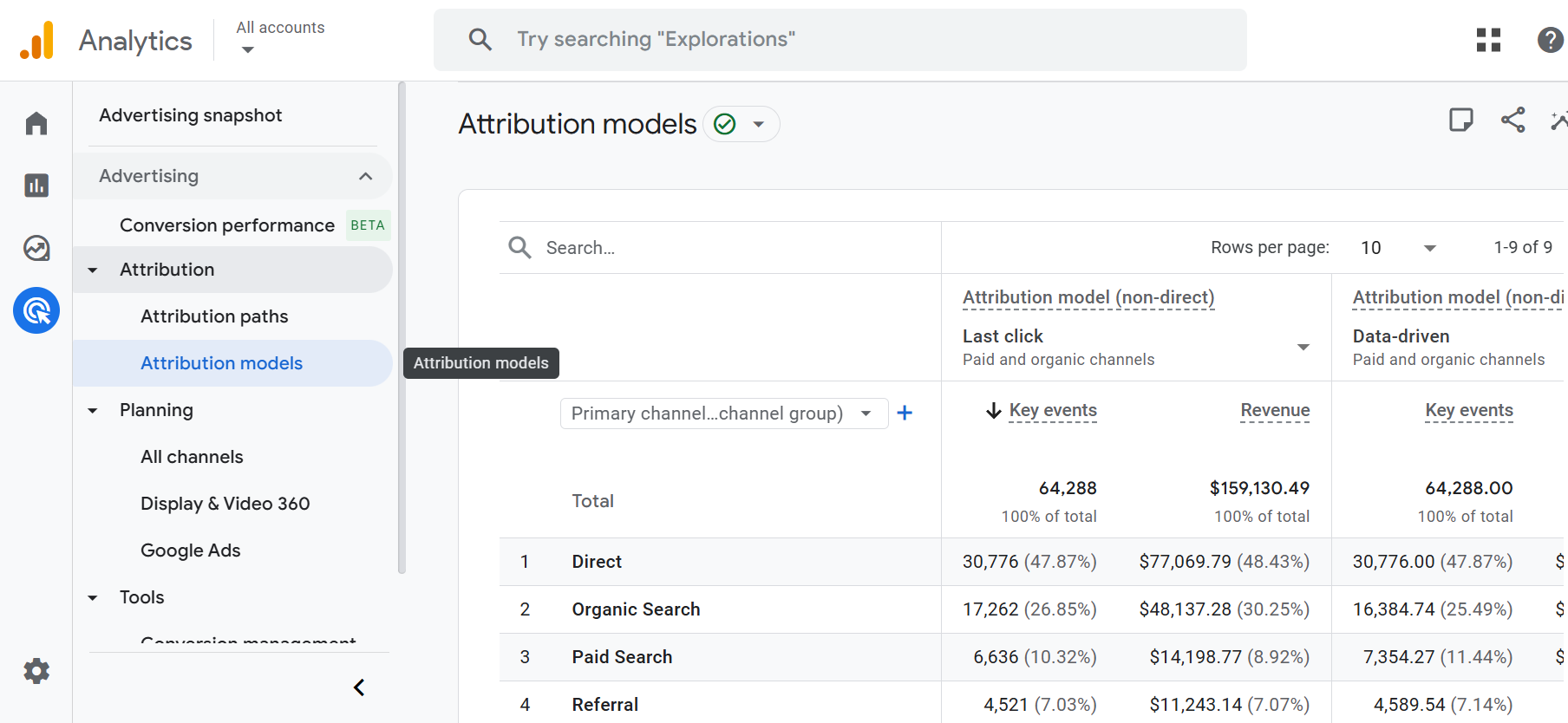
You can view and compare the different models in GA4 via:
Advertising → Attribution → Attribution Models
There, you can analyze how conversions and revenue differ when switching from data-driven to last-click attribution. This model comparison helps you understand which channels are under or overvalued depending on the model used.
But what happens when these options aren’t enough? Enter BigQuery.

BigQuery with Google Analytics 4
GA4 allows users to export their raw, user-level event data to Google BigQuery, a powerful cloud-based data warehouse. This opens the door to custom attribution modeling beyond what GA4’s UI supports.
With BigQuery you can:
Analyse Complete Conversion Paths
GA4’s UI shows simplified conversion paths. In BigQuery, you can:
- Reconstruct the full sequence of user events and sessions.
- Track all traffic sources involved in a user path.
- Filter by user segments, devices, campaign types, and more.
This visibility is crucial for understanding how users move through your funnel and which interactions are actually driving value.
Leverage Machine Learning for Predictive Attribution
For advanced teams, BigQuery supports integrations with:
- BigQuery ML: Build predictive attribution models directly in SQL.
- Vertex AI: Train machine learning models on your GA4 data.
- Looker Studio: Visualize attribution trends across custom models.
This can help you identify not just past performance but also future channel value, helping inform budget allocation and strategy.
Create Custom Attribution Models
With raw GA4 data in BigQuery, analysts can create custom logic to assign credit for conversions based on their unique business needs. Let’s look at the most popular models now, with some examples of when you would want to use them.
First-Click Attribution
Credit goes to the user’s initial interaction with a marketing channel.
Brand Awareness Campaigns
If your primary marketing objective is to drive brand discovery, you want to know which channels are best at attracting new users. First-click attribution highlights the initial entry point, helping answer which channels are most effective at generating top-of-funnel traffic.
Examples:
- You’re running a display or YouTube campaign targeting new audiences.
- You’re testing influencer partnerships and want to measure their role in brand exposure.
- You’re analysing PR or social buzz impact.
Customer Acquisition Focus
If you’re trying to acquire new customers, not just conversions, first-click attribution helps identify which marketing sources bring net-new users into your ecosystem.
This is especially relevant for:
- Startups measuring early growth.
- Subscription businesses tracking first impressions leading to sign-ups.
- SaaS companies analysing content or search channels driving initial engagement.
Long Sales Cycles / Considered Purchases
In industries where buyers take time to research, like real estate, B2B software, or automotive, first-touch attribution helps identify what initially sparked interest in the journey.
This can guide top-of-funnel strategy and content development.
Channel Testing / Entry Point Optimisation
If you’re experimenting with new channels or campaigns, first-click models help isolate the effectiveness of those initial touchpoints, without the noise of retargeting or branded search.
Use cases:
- Testing new ad platforms (e.g., TikTok, Reddit Ads).
- Launching new landing pages or lead magnets.
- A/B testing different audience segments in prospecting campaigns.
First-click attribution is rarely used alone. Instead, it’s best to compare it against other models (like last-click or data-driven) to understand how different touchpoints contribute at various stages.
For example:
- First-click may show Facebook introduced the user.
- Last-click shows that Google Search closed the conversion.
- Data-driven attribution might show both channels contributed.
Linear Attribution
Equal credit to every touchpoint.
You Want a Fair and Balanced View
Linear attribution is useful when you believe every interaction plays a meaningful role in the conversion journey, and you don’t want to overemphasize first or last clicks.
Multi-Channel / Full-Funnel Strategies
If your marketing strategy spans multiple channels linear attribution helps you:
- Understand cross-channel collaboration
- Justify investment across both awareness and conversion-focused channels
Example: You’re running upper-funnel content on social media and nurturing with email, linear attribution acknowledges both contributions.
You’re Analysing Customer Journeys, Not Just Conversions
When your goal is to understand how users behave across the funnel, linear attribution avoids bias toward either end. It treats each step — discovery, research, consideration, decision — with equal importance.
This is useful for:
- Mapping user journeys
- Identifying common channel combinations
- Designing assist-driven marketing strategies
You Want Simplicity + Transparency
Unlike data-driven attribution, which uses machine learning and can be opaque, linear attribution is:
- Predictable: same logic every time
- Easy to explain to stakeholders
- Good for auditing multi-touch paths
Time Decay Attribution
Touchpoints closer to the conversion get more credit.
Short Buying Cycles or Fast Decision-Making
If customers convert quickly after interacting with your brand — like in e-commerce, local services, or promotions — then recent touchpoints tend to have more influence.
Remarketing and Retargeting Campaigns
Time-decay attribution is ideal when you want to evaluate the effectiveness of retargeting, because it gives more value to those late-stage nudges.
Example: A user first clicks a Facebook ad, but doesn’t convert. A week later, they see a retargeting display ad and convert the same day.
Time-decay gives more weight to the display ad, reflecting its recency and potential impact.
Flash Sales or Limited-Time Offers
When running urgency-driven campaigns, time-decay helps highlight which channels helped seal the deal.
You’re promoting a 3-day sale, and want to credit the final touchpoints that triggered action — time-decay captures that influence.
Post-Consideration Decision Phases
In B2B or high-consideration B2C environments, time-decay is useful when:
- Early research matters, but the final push is decisive.
- The last few touchpoints reflect intent and readiness.
For example, organic search may start the journey, but direct visits and email might push the lead to submit a form.
Time-decay rewards those last, decision-stage interactions.
Position-Based (U-Shaped) Attribution
Emphasis on first and last touchpoints.
You Value Both Brand Introduction and Conversion Triggers
Position-based attribution is ideal when you believe two key moments matter most:
- The first touchpoint that brings a user into your funnel
- The last touchpoint that convinces them to convert
You Want Simplicity + Relevance Without Machine Learning
Unlike data-driven attribution, which is a black box to many marketers, position-based is:
- Easy to explain
- Rule-based, yet better than first- or last-click alone
- Reflective of common-sense marketing journeys
This is great for teams needing attribution that’s transparent and stakeholder-friendly.
How to Get Started
You can link your GA4 to BigQuery by following our in depth guide here. It covers all the steps required, including writing your own SQL.
Final Thoughts
GA4’s simplified attribution models make reporting more consistent, but they also limit flexibility. If your business needs a more tailored view of the customer journey, BigQuery is essential. It gives you the tools to design attribution models that align with your marketing strategy.
By combining the structured power of BigQuery with the behavioral insights from GA4, you gain complete control over how marketing performance is measured, understood, and optimised.