How to Increase ROAS by Measuring Purchase Intent

Are you ready for the holiday season? We’re expecting a 12.6% increase in digital ad spending, correlating with an 8.4% yearly rise in online shopping in the 2024 Holiday Season. That amounts to $240 billion in the United States alone.
This is an exciting time for businesses, but how can you make the most of this trend? Here are three crucial skills to work on.
This is a write-up of Alex’s webinar: How to Measure Purchase Intent in the Holiday Season. Here you can find the slides and the video below:
Skill #1 – How to use Purchase Intent
What is purchase intent?
Purchase intent answers the question ‘Are people showing interest and consideration?’. The term encompasses any customer journey activity that signals a visitor’s interest in a product or offer. This includes interactions demonstrating intent and that serve as indicators for conversion likelihood.
The duration of a customer’s interest and consideration will vary depending on the product. People spend longer deciding when looking at more expensive offerings. That’s why, as we discuss purchase intent throughout this article, think in the context of your business. How do potential customers tend to consider your products?
Set up GA4 events
Before we can begin understanding purchase intent, you need to set up events in Google Analytics using Google Tag Manager.
When people compare GA4 vs Universal Analytics, they often point out flaws in the newer iteration. Events are one of the major plus points in GA4, however, which replace UA’s goals. Previously (unless you were to pay for GA360), users were restricted to just 20 goals. But in GA4 everything is an event.
This means that every single event can be associated with a user’s source. For example, you can see a list of campaign sources and mediums leading to an ‘add_to_cart’ event. This opens up lots of opportunities for users wanting to learn more about user intent.
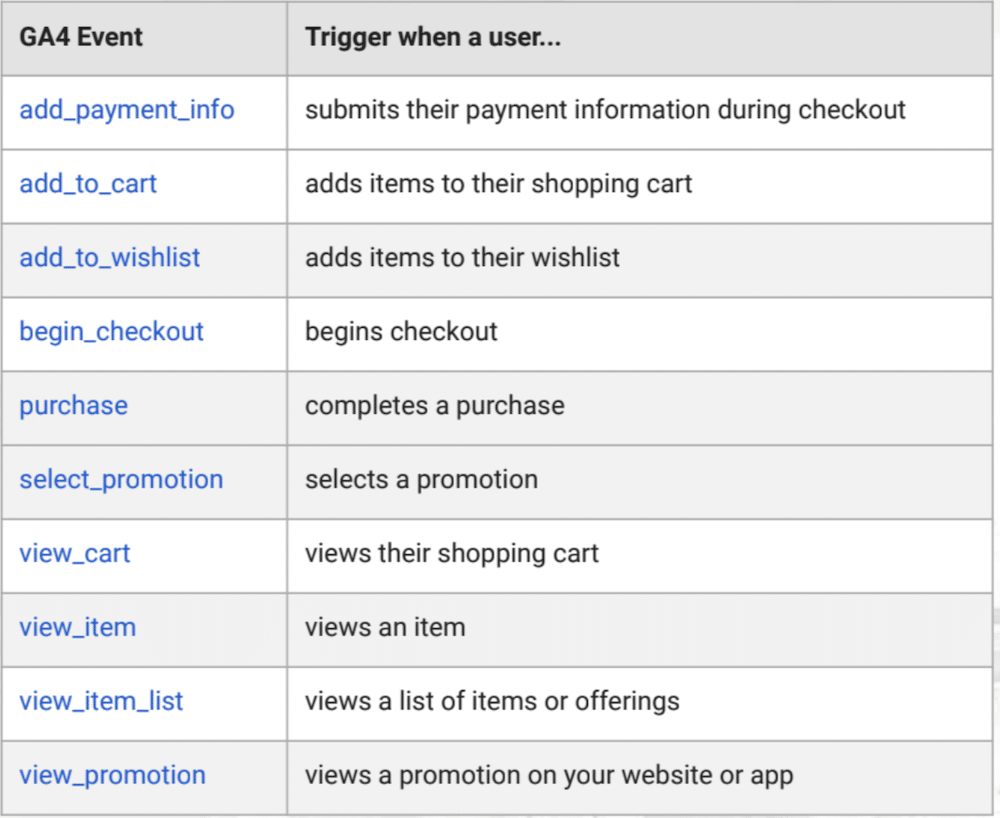
But which events indicate purchase intent for your online store? Shown below is a table created by Google. All the events listed can be used to signify purchase intent.
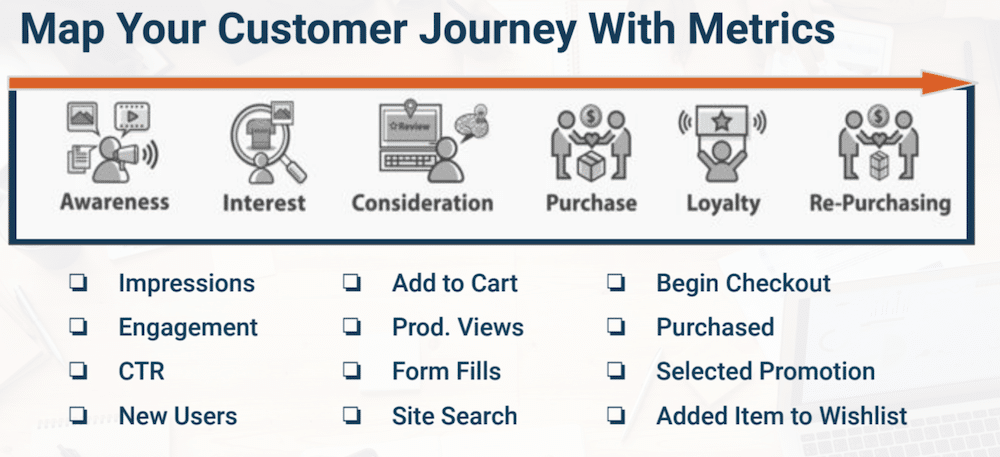
Map your customer journey with metrics
Think of your customer funnel from the awareness stage through to the re-purchasing stage. Now, map metrics for each stage of the funnel.
Not all events in your funnel will occur on your website. For example, impressions, CTR, and new users are all examples of events driven by external factors. As users arrive on your site, however, further indicators of purchasing intent start to emerge. These include add to cart, form fills, and site search events.
Remember, each tool has a unique purpose and use case. Imagine a shed filled with equipment. Each tool has an intended purpose; you wouldn’t use a hammer for every job. Similarly, GA4 isn’t a single source of truth to learn about purchase intent. You should also look at Google or Facebook Ads to optimise user journeys before they land on your site.
Skill #2 – Scaling ROAS & conversion rate with purchase intent
Understand how metrics work together
The below image shows an example of how metrics can work together. If you look at the far left of the image you’ll see your input: one dollar. On the far right is the output: five dollars. The goal of every marketer is to optimise this process to gain the maximum amount of ROAS.
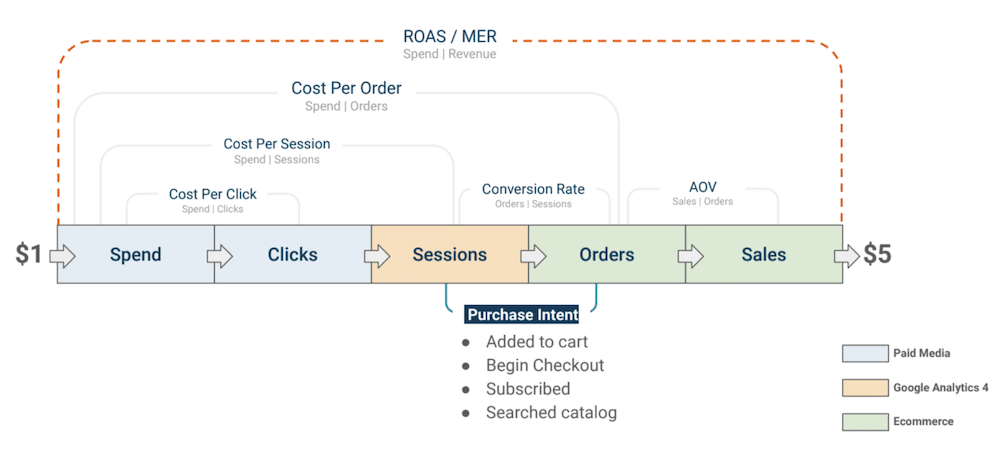
Between every step of the model are different ratios. Draw your attention to the conversion rate, where we have orders and sessions. This is where purchase intent will come in particularly handy for conversion rate optimization.
Pro tip: use the 100X rule – Ask your team, if we 100X this event, will we improve the outcome
we are looking for? If you 100X the number of people that carry out a begin checkout event, will it improve the outcome? It’s easy to get caught up in data and things that don’t matter. Always do the 100X rule as a litmus test of what matters.
Using purchase intent
The other strategic decision you’ll have to make is deciding on use cases for individual events. Lots of businesses have long lists of events set up, but they don’t mean anything. That’s why it’s important to review all the events you have and eliminate any that you don’t need.
Equally, it’s important to know how you will group events, as this is a key part of purchase intent. Businesses have several options when grouping events. One option is to group according to where an event took place in the customer journey. For example, if you are running a bottom-of-funnel campaign, look at bottom-of-funnel events.
Or, If you’re trying to bring in new people to your site, you might associate traffic with user behaviours (did a customer look at a product or search on your site?). In this instance, it may be more relevant for top-of-funnel campaigns to have more top-of-funnel events that show interest.
These are strategic choices that businesses must make. By making the right calls, GA4 segmentation can help further your understanding of purchase intent.
Calculating purchase intent
If you have all your events selected, you’ll receive a total. You can then divide the number of events by page views to understand the purchase intent rate.
Skill #3 – Configuring tools to measure PI
Case study #1: The DB Method
Pen Path worked with The DB Method to improve the company’s ROAS by 24% in three weeks. At the beginning of the project, the organisation’s ROAS was extremely volatile. They needed to improve performance and be less reliant on Meta, which was too unpredictable.
To achieve this, the company invested 10% of its budget in YouTube ads as a new channel. They then looked at all the available attributions, including First Touch, Linear, and Last Touch. Each said the same thing: 0X ROAS was available for YouTube Ads.
The company also used a multi-touch attribution tool that reported 1.8X ROAS claimed. They needed a leading indicator metric to validate the MTA claim for ROAS. This was the perfect time to look at purchase intent.
Pen Path reviewed the data and found that organic search had a 23% purchase intent baseline. They found that branded search was at 17%, whilst Facebook and YouTube were at 2% and 4% respectively.
Based on this information, DB decided to diversify its budget to Reddit and TikTok and didn’t scale to YouTube.
Case study #2: Miniature Market
Pen Path’s work with Miniature Market resulted in achieving double ROAS while increasing spending by 243%. To achieve this, Pen Path helped the company with the following steps:
- MM set up GA4 events.
- The company made sure they were working.
- They cleaned the campaign naming structure (using UTMs).
- Used Top of funnel/Middle of funnel/Bottom of funnel nomenclature.
- Use the Pen Path dashboard to see how TOF campaigns indicated shopper interest.
- When ROAS or CVR were below baselines, MM checked purchase intent.
- They set up retargeting audiences for select BOF events in Meta and Google.
- Cut low-performing TOF campaigns.
Case study #3: Hamilton Beach
Thanks to Pen Path, Hamilton Beach improved its orders from email by 22%. Here are the steps that helped them to achieve this:
- HB set up an email subscriber form to fill GA4 conversion event using Klaviyo.
- Utilised Pen Path Dashboards (seen below) to identify revenue sources.
- After realising that email was a major drive, the company launched a TOF Meta campaign: focusing on email subscription conversions.
- They built lookalike audiences using an email list which increased transactions.
- They launched email flows and newsletters.
- These steps resulted in an Increased email conversion rate (called transaction rate in GA4) by 20%.
UTMs track purchase intent signals
The table below is a nomenclature. We have a medium, source, and some example campaign names. You’ll notice that all the campaign names contain ‘PR’. This stands for ‘prospecting’. Here, the aim is to reach new audiences.
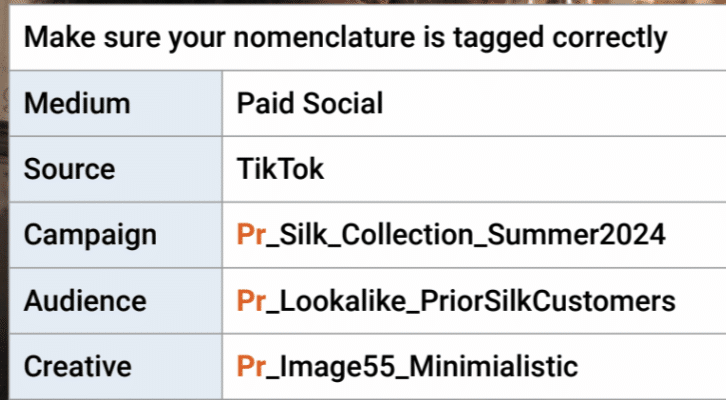
By grouping PR campaigns, we could learn that they account for 12% of our customers. We might also learn that 82% of this traffic viewed items and that the overall bounce rate was 44%. But to gain this sort of information, you first need a UTM strategy that’s set up for success.
Purchase intent segmentation from UTMs
By group purchase intent signals, we can glean valuable information. This is demonstrated in the table below.
| Organic vs. paid | How did organic search perform? |
|---|---|
| Specific campaigns | How did branded search perform? |
| Prospecting vs. retargeting. | How did prospecting efforts perform? |
| BFCM | How did holiday season efforts perform? |
Remember, when segmenting ensure you include and exclude accordingly with relevant data.
Recapping
Hopefully, you now realise why measuring purchasing intent can be so useful. As we wrap up, let’s quickly recap some of the key points from this article:
● Make sure you have events set up in GA4 and GTM
● Do an audit to make sure your event tags are working as expected.
● Use Purchase Intent to diagnose and control metrics like ROAS and conversion rate.
● Use the 100X rule with Purchase Intent and any metric you are looking to scale.
● Have a campaign naming and UTM strategy.
● Segment by traffic source when analysing purchase intent.
About Alex Cruz
Alex is the CEO and founder of PenPath, a leading business intelligence platform for enterprise and DTC brands. His leadership experience spans both high-growth startups and Fortune 100 companies.