Matomo vs Google Analytics: How to Measure Website Traffic While Staying GDPR-Compliant

With the rise of international data privacy laws such as GDPR, remaining compliant is essential. If you’re using a data analytics tool, you’ll need to consider the ways you measure website traffic. Matomo is a tool that helps make the compliance process easier.
Here, we’ll explore the different compliance measures you can take in Matomo vs Google Analytics. We’ll look at affordable, GDPR-friendly steps that incur minimal data loss.
Before we jump into that, Most of the insights in this article are drawn from Diogo Abrantes Da Silva’s session from Privacy4Marketers. Watch his talk to learn actionable tips on implementing GDPR-compliant tracking with Matomo and Google Analytics:
Matomo vs Google Analytics: what’s the difference?
If you’re reading this article, you might be weighing up Matomo vs Google Analytics. Let’s explore the similarities and differences between the two tools.
What is Matomo?
Matomo, previously known as Piwik analytics, is an open-source web analytics platform designed to tell you everything you need about your website visitors and marketing campaigns. Thanks to a large, highly committed community, the platform is constantly innovating, bringing newer, more detailed ways to deliver insights.
The problem with web analytics
Before the advent of GDPR, collecting data via tools such as Google Analytics was easy. A user would arrive at your site, and you could collect information about their visit.
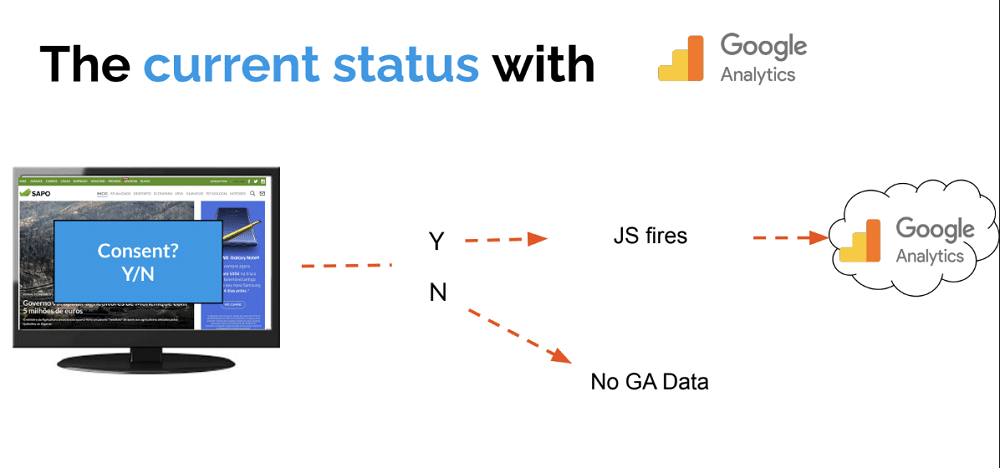
Since GDPR, we now have modes for handling consent within GA. You can apply a blanket approach to all users so that
- When no consent is registered, no data is collected.
- When consent is registered, GA collects data in line with a user’s choices.
But this approach is limiting. You won’t know exactly how many users arrived on your site and what they did there. This can skew your data, preventing you from getting the insights you need.
The second approach is to use Consent Mode V2. Here, when a user accesses your website, JavaScript sends events from non-consenting users to GA and BigQuery, while IP addresses are sent to third parties. You may also have modelled data.
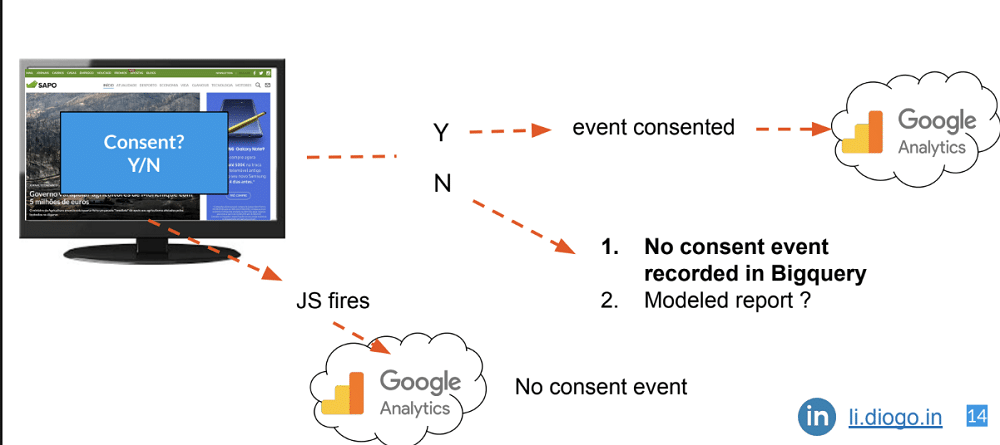
Data being sent to BigQuery isn’t ideal. You’ll pay a price depending on the number of users you record. Marketers must also have the skills to create SQL queries. Lastly, you’ll have to create a dashboard to see the data of non-consented users. It’s a lengthy process that does not provide a clear picture of user data.
Similarly, modelled data also presents a problem. When GA has enough data from non-consented users, it will try to replicate their behaviour in your reports. There are several prerequisites for this process to work, however, including
- The property must collect at least 1,000 events per day with analytics_storage=’denied’ for at least 7 days.
- The property must have at least 1,000 daily users sending events with analytics_storage=’granted’ for at least 7 of the previous 28 days.
- It may take more than 7 days of meeting the data threshold within those 28 days to train the model successfully; however, it’s possible that even the additional data won’t be sufficient for Analytics to train the model.
Server-side GTM doesn’t solve these problems. It follows the same process as modelled data for non-consenting events. You’ll still be paying Google Cloud and managing a complex tagging system.
How Matomo helps
As we’ve explored, traditional analytics approaches bring lots of challenges. Matomo gives users complete control over data, making it much easier to stay on the right side of GDPR.
The table below compares Matomo vs Google Analytics to show the differences in approach.
| Issue | Legislation | Google Analytics | Matomo |
|---|---|---|---|
| Setting cookies | ePrivacy Directive Art. 5(3) | Google Analytics sets non-essential cookies | No cookies (or only strictly necessary ones) |
| Collecting personal data | GDPR Art. 4(1) (personal data definition) | Personal data (IP addresses, unique IDs) are collected | IP addresses anonymized (masking at least 2 bytes) |
| Third-party involvement | GDPR Art. 44–49 (data transfers) | Data is sent to third parties (Google) | Data processed on-premises (no data transfer to third parties) |
| Tracking across sessions and devices | GDPR Art. 22 (automated decisions/profiling) | Users are tracked across sessions and devices | No cross-session/device tracking (no profiling) |
| Transparency | GDPR Art. 5(1)(a) | You must inform users clearly and up front about what data is collected and for what purposes | Information must be provided to users via a privacy policy. |
| Handling consent | GDPR Art. 7 (conditions for consent) | Consent must be granular and revocable | Minimal impact and easy opt-out |
Configuring Matomo
To ensure compliance, Matomo must be configured correctly. We’ll give a rundown of the different steps to take.
Firstly, you need to force tracking without any cookies. This can be done by simply ticking a box. Head to Motamo settings>Privacy>Anonymise data.
Note: Keep in mind some metrics might be affected, like unique visits, days since last visit, etc.
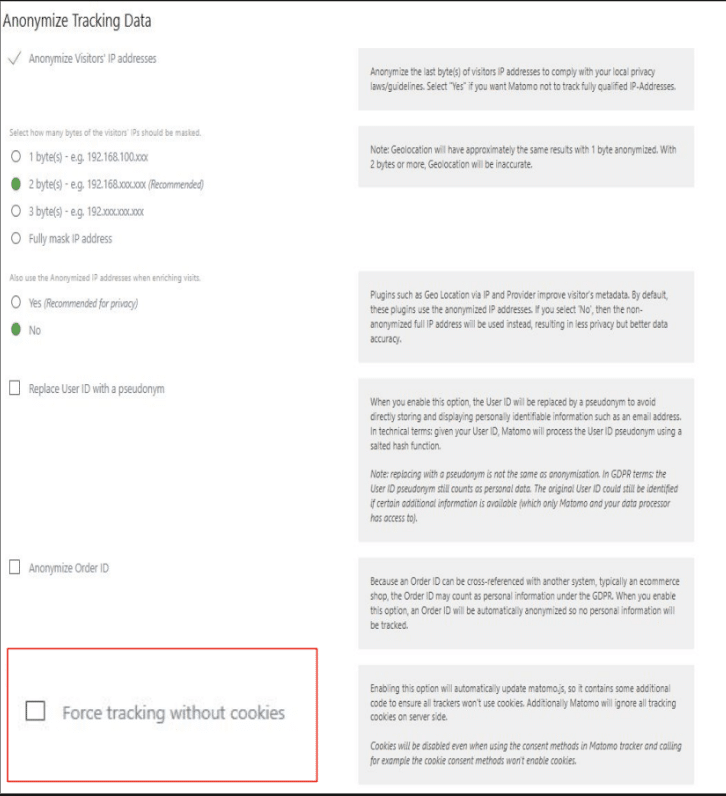
Anonymize data
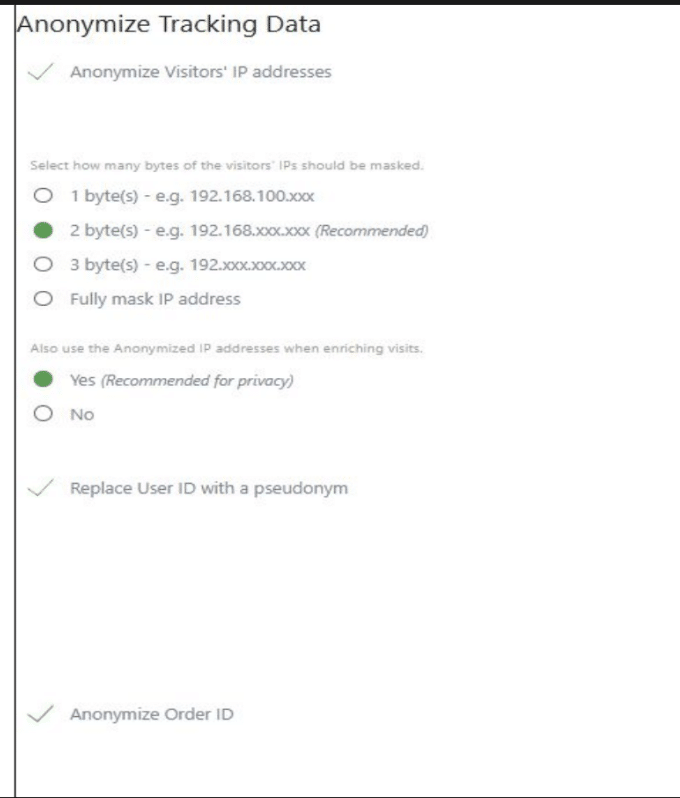
Make sure you anonymise IPs and user data. You should replace User IDs with a pseudonym and anonymise Order IDs so that users can’t be tracked later. This can be done from the same menu as the previous step.
Install Matomo on your server
The WordPress plugin version of Matomo is limited. For greater functionality and control, make sure you install Matomo on your server.
Matomo Tag Manager
It isn’t advisable to use Matomo with Google Tag Manager. Instead, use Matomo Tag Manager. The tool is less likely to be impacted by ad blockers, and you’ll remove the risk of involving a third-party service in your data stack.
Adblock protection
If you want to go the extra mile, you can add an Adblock protection so that blockers aren’t able to block you. As many as 35% of users use ad blockers, which can have a real impact on your reporting.
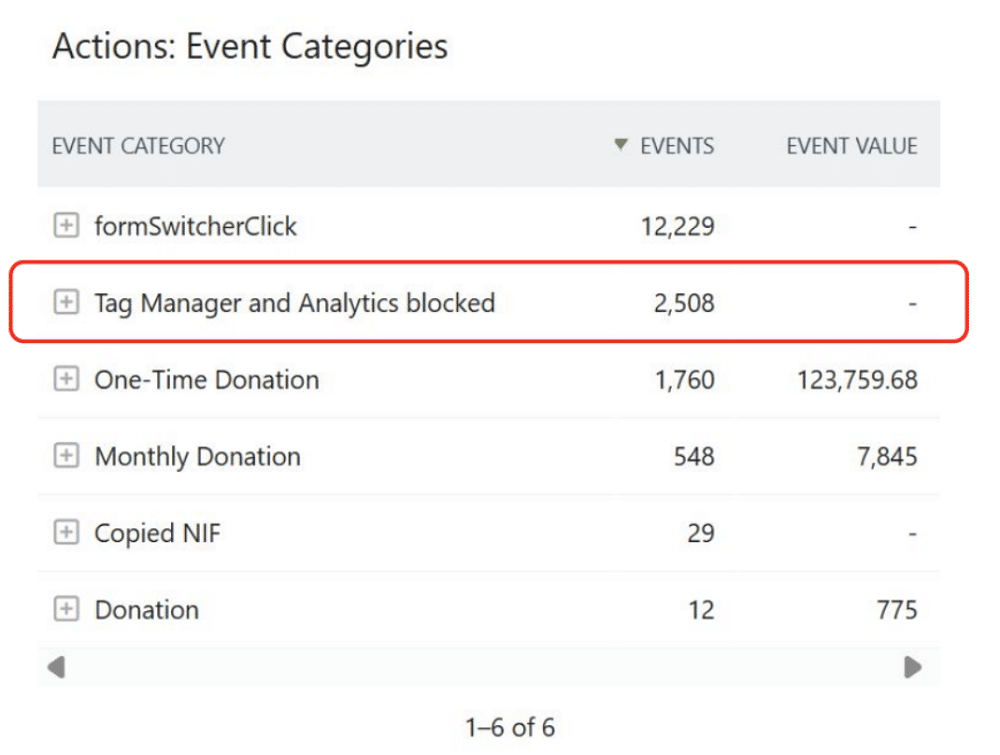
Track consent and analytics blockers
You can use Matomo to track how many times analytics was blocked. You can do so by setting up an event that triggers each time a block occurs.
FYI
Data is stored on your server. If you have more than five thousand visits per day, your server may take longer to provide information. If you have less than 5.000 visits per day, you should
be fine.
Can GA4 and Matomo run together?
You don’t need to choose between Matomo vs Google Analytics. Both can run at the same time, so you’ll gain insights from both platforms. You can compare the two and gain a more comprehensive flow of data.
There are several benefits to this approach. For instance, Matomo is unable to tell you about the gender of your website users, its reports are more standard (similar to Universal Analytics). You gain access to plugins that enhance the Matomo experience, but you’ll need to pay.
By running Matomo and GA in tandem, you retain the advantages of both platforms.
Get started!
The issue of data privacy isn’t going away. Using a tool like Matomo, you can get the information you need in a compliant way. So, why not give it a try?
Want to learn more about handling consent on your website? Check out our GDPR checklist.
Diogo Abrantes Da Silva
Diogo Abrantes da Silva is a digital marketing expert with over a decade’s experience in SEO, SEA, CRO and analytics, and holds degrees in Marketing Management and Sustainability & ESG Reporting. He collaborates with NGOs like Greenpeace and UNICEF, teaches digital marketing, and advocates de-growth marketing for sustainable communication.