12 Reasons for a High Bounce Rate & What to Do About it

If you’ve ever wondered why your visitors seem to leave your website almost as soon as they arrive, you’re not alone. Many website owners, digital marketers, and SEOs face this challenge. A high bounce rate can feel like a mystery, especially when you’ve invested time into your site’s content and design.
What is Bounce Rate?
Bounce rate is the percentage of users who leave your site after viewing only one page without taking any action, like clicking a link or filling out a form.
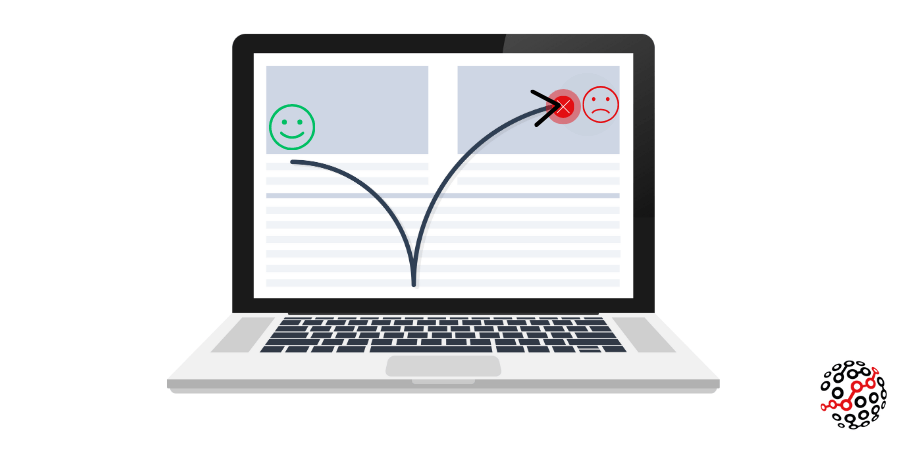
A bounce can happen for several reasons:
- Visitors might click the back button to return to search results.
- Enter a new URL to navigate away.
- Users stay on the page without interacting until their session times out (usually around 30 minutes in Google Analytics).
While a high bounce rate can sometimes point to issues like slow loading or unclear content, it isn’t always negative. It’s actually a signpost that helps you understand what’s working and what isn’t.
Knowing why visitors leave can be the first step toward making significant improvements and offering a more engaging website. A high bounce rate can be expected for some pages, like those providing quick answers or contact details.
Difference between bounce rate & exit rate
Bounce rate and exit rate may sound similar, but they tell different stories about user behaviour. While bounce rate is the percentage of visitors who leave after viewing only one page, exit rate refers to the percentage of users who leave your site from a particular page, regardless of how many pages they viewed before.
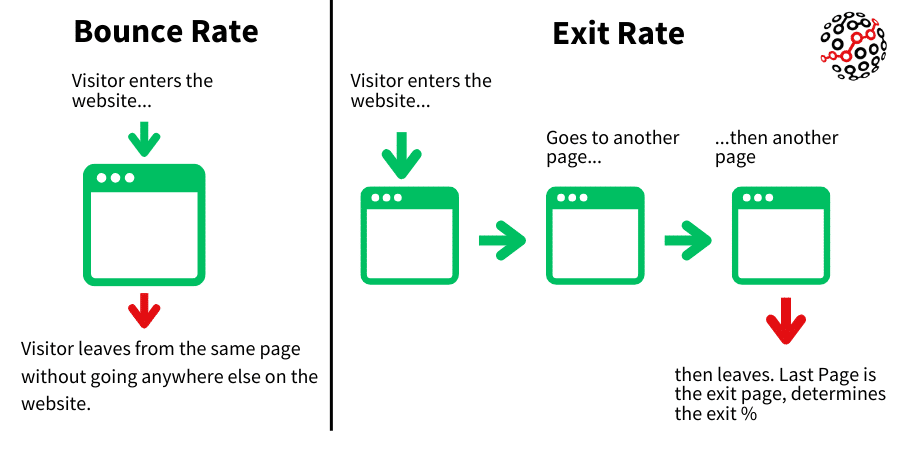
A high bounce rate could mean that users couldn’t find what they expected or that the page’s content isn’t aligned with their needs. On the other hand, a high exit rate might not always be a problem. It often just means that users completed their journey. For example, if a visitor navigates through multiple pages and exits on a “Thank You” page, that is typically a positive outcome.
Understanding these metrics’ differences helps you identify whether to improve the initial engagement or refine how users complete their journey.
What is a good bounce rate?
You might be surprised to see that even some of the most well-known brands experience bounce rates ranging from 50% to 80% or higher. Perhaps your site shows similar numbers, which may be entirely expected depending on your industry. The definition of a “good” bounce rate varies based on the type of website, traffic sources, and industry standards.
What’s the average bounce rate?
Industry analysis by Siege Media shows an average bounce rate of around 50.9%, calculated across millions of sessions.
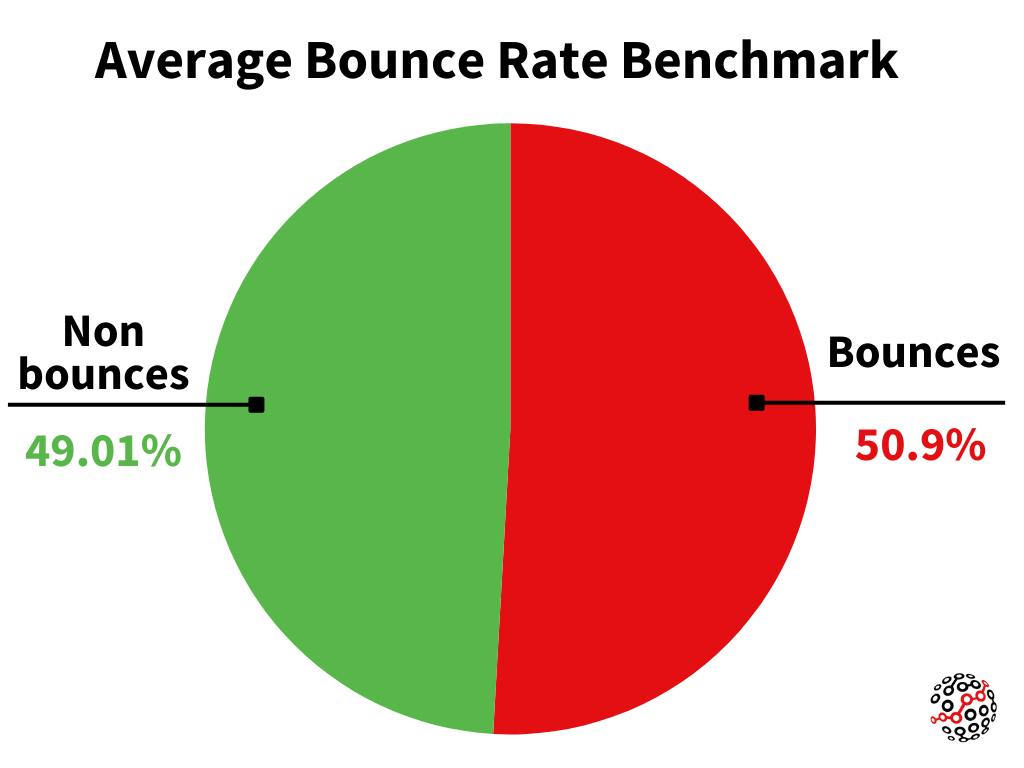
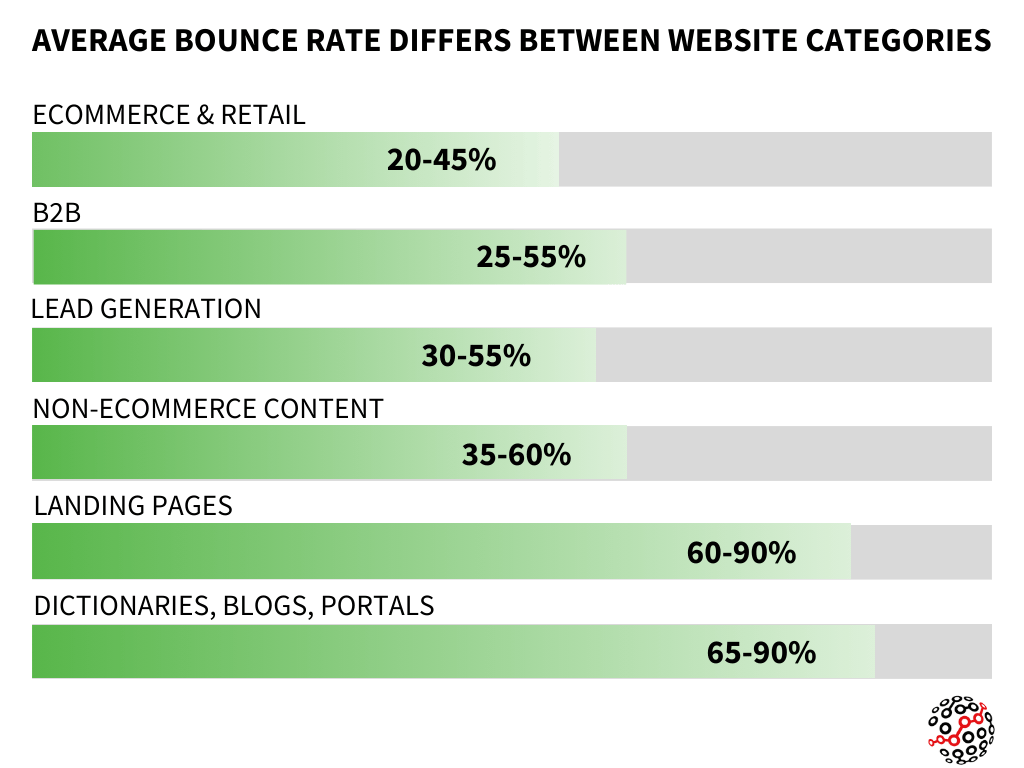
However, what is considered a typical bounce rate can depend heavily on the type of site and its content. Below is a breakdown of the average bounce rate across various industries.
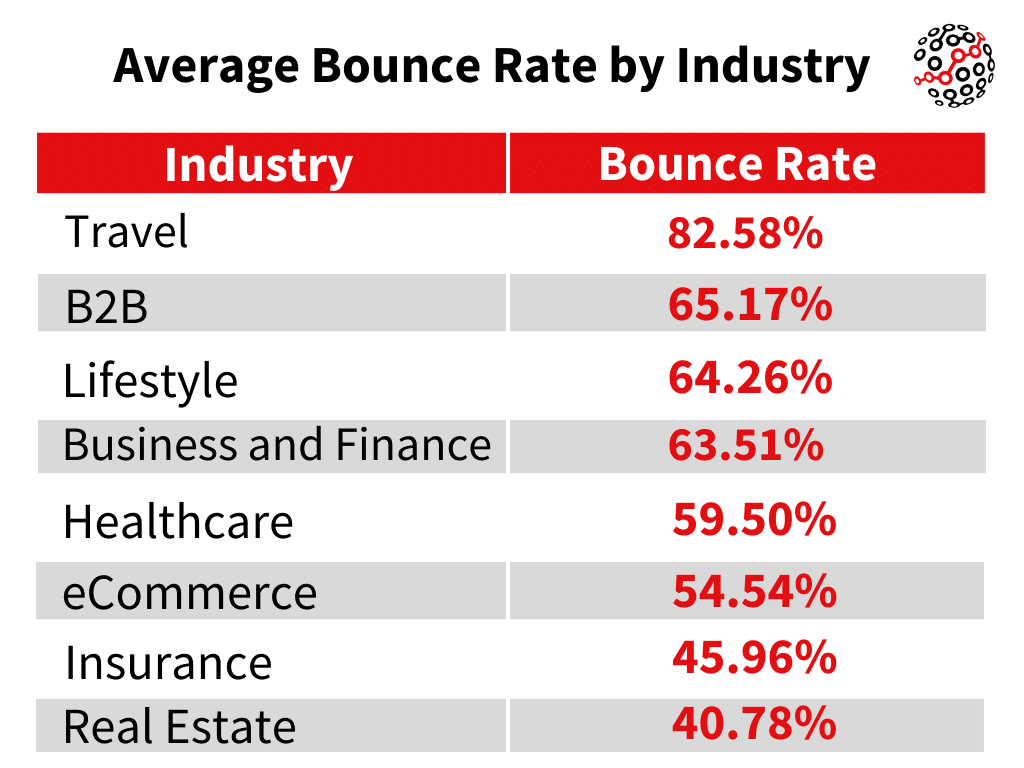
The type of website also plays a crucial role in determining what constitutes a standard bounce rate. For instance, e-commerce websites generally have lower bounce rates (20-45%), as visitors are more likely to explore multiple pages, while blogs and informational sites can see bounce rates as high as 90%.
Traffic sources further impact bounce rates. According to research by CXL, email and referral traffic typically have the lowest bounce rates, while display ads and social media traffic often result in higher bounce rates.
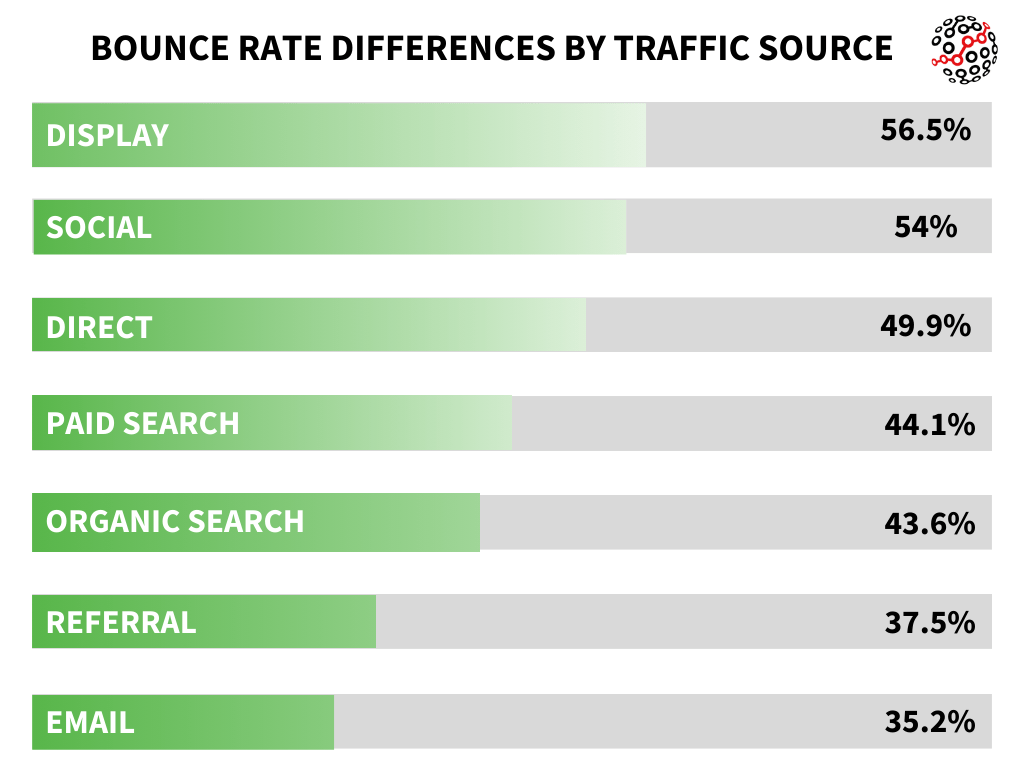
When determining a reasonable bounce rate for your site, benchmark against similar websites in your industry and consider the intent of users arriving from different traffic sources.
How bounce rate works in GA4
The way bounce rate is measured has changed significantly with the introduction of GA4. Unlike Universal Analytics, which focuses solely on user interaction, GA4 calculates the bounce rate as the percentage of sessions that were not considered engaged.
Bounce Rate = 100% − Engagement Rate
A session is classified as engaged if it meets any of these conditions:
- The session lasts more than 10 seconds.
- The user completes a conversion during the session.
- The session has at least two or more page or screen views.
If none of these criteria is met, the session is labelled unengaged, contributing to the bounce rate. Essentially, the bounce rate in GA4 is the opposite of the engagement rate.
Common reasons for a high bounce rate
A high bounce rate can signal that your website isn’t meeting user expectations, leading visitors to leave without interacting further. Identifying the reasons behind a high bounce rate is the first step toward improving. Below are 12 common causes for a high bounce rate, followed by ways you can fix those.
Poor quality or unoptimised content
Content that doesn’t engage or provide value is one of the leading reasons for a high bounce rate. If visitors arrive on your page and find that the content doesn’t answer their questions or feels irrelevant, they’re likely to leave and look elsewhere. Low-quality content can be vague, lack depth, or simply fail to match user intent.
Visitors want informative, trustworthy information that directly addresses their needs without unnecessary filler or overly promotional language. So, it’s crucial to ensure that each piece of content is well-researched and focused on providing real value to your audience.
How to improve content quality
Conduct thorough audience research to understand their preferences and pain points. Then, create content that genuinely addresses the research findings. Here are some ways to improve content quality:
- Address search intent: Make sure your content aligns with the questions or problems your audience is trying to solve.
- Content structure: Use clear headings, subheadings, and bullet points to make the text easy to read.
- Use multimedia: Include videos, infographics, and images that enhance understanding and engagement.
- Interactive elements: Add quizzes, polls, or embedded videos to make the content more engaging and encourage visitors to stay longer.
- Write clearly: Write using easy words and follow a simplified sentence structure. Alternatively, paraphrase your content using tools like AI rephraser to automatically improve its clarity.
Focusing on these aspects can make your content more engaging while reducing bounce rates and improving user experience.
Slow page load times
Slow-loading pages are a significant reason for high bounce rates. Users expect quick access to information, whether on mobile or desktop. If a page takes too long, visitors lose patience and leave. Google also values site speed for user experience, making it a critical ranking factor.
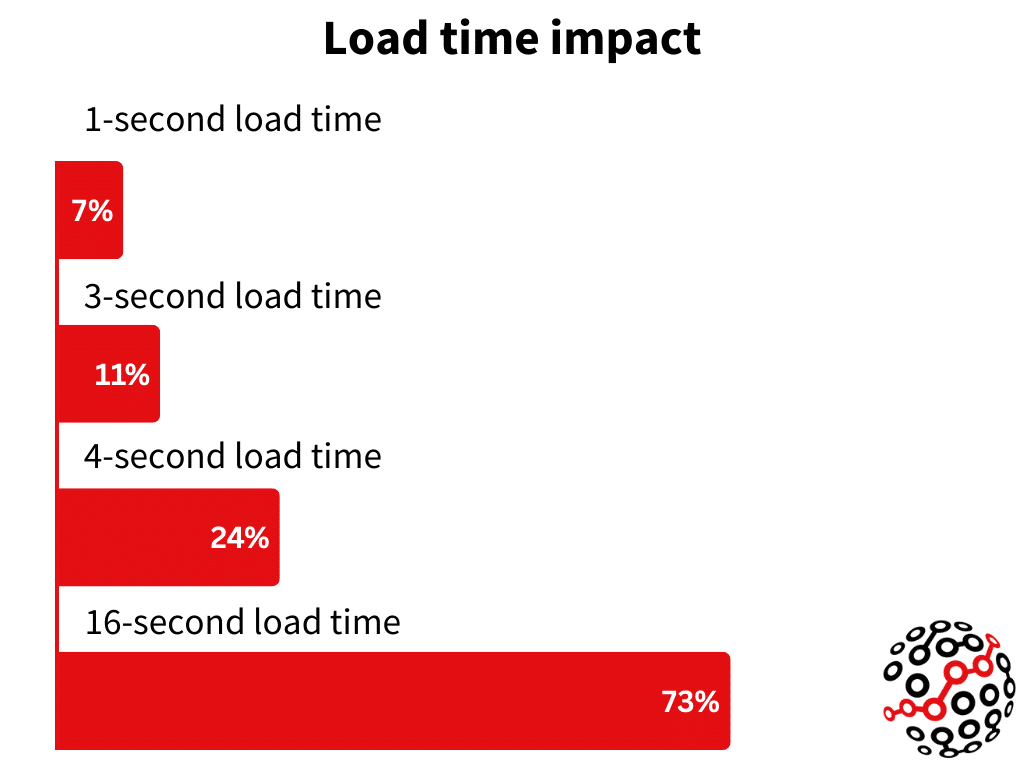
Users may get frustrated and leave if your page takes more than 2.5 seconds to load. Improving page speed is essential for keeping visitors engaged and reducing bounce rates. The image above shows the average percentage of people who leave after a page load time of 1, 3, 4, and 16 seconds.
How to fix slow page speed
Fast websites keep visitors engaged. Speed up your website with these battle-tested optimisation techniques:
- Use speed testing tools: Analyse your page speed using tools like Google PageSpeed Insights, GTmetrix, or Lighthouse. These tools provide actionable insights and recommend fixes.
- Optimise images: Compress images to reduce file sizes without losing quality. Use tools like TinyPNG or Optimizilla for quick fixes.
- Use a Content Delivery Network (CDN): CDN’s use a network of servers to serve users web data from a closer physical location reducing load time. Most CDNs allow you to serve images in WEBP which can massively reduce load time.
- Minimise scripts and plugins: Reduce the file size of heavy third-party scripts and unnecessary plugins. Implement async/defer loading for non-critical scripts and minify javascript code files.
- Leverage browser caching: Enable browser caching to store certain elements on users’ devices, reducing the load time when they revisit your site.
- Focus on Core Web Vitals: Pay attention to metrics like “Interaction to Next Paint,” which highlights how quickly users can interact with your site. To improve INP, minimise JavaScript execution time, and use web workers for heavy computations.
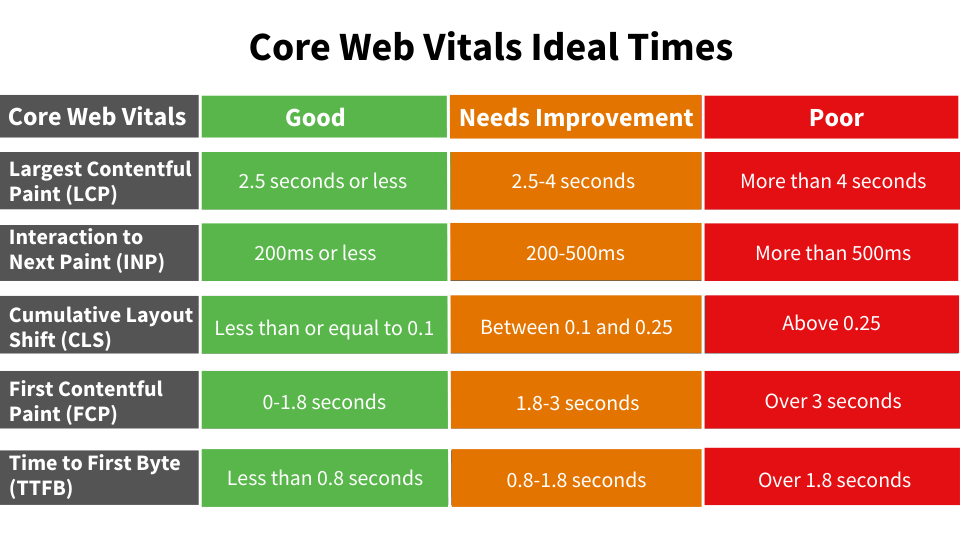
By following these tips, you can improve page speed and provide a better experience for your users.
Lack of mobile-friendliness
Having a mobile-friendly website is no longer optional—it’s essential. Despite Google switching to mobile-first indexing back in 2016, many sites today still aren’t optimised for mobile devices. Pages that aren’t mobile-friendly are hard to navigate, slow to load, and often provide a poor user experience.
Even if your site uses responsive design, it doesn’t always mean it’s effectively optimised for mobile users. Important content can get pushed below the fold, or navigation can become cumbersome, making visitors leave before they engage with your page. If your bounce rate is high, it’s worth checking how your website appears and functions on different mobile devices.
How to fix mobile-friendliness issues
Improving mobile-friendliness can go a long way in reducing bounce rates. Here are some things you can do to make websites more mobile-friendly:
- Responsive design: Use responsive layouts that adapt automatically to different screen sizes, which will ensure the content fits without requiring horizontal scrolling.
- Speed optimisation: Compress and optimise images for mobile, use lazy loading for visuals, and minimise JavaScript execution to improve load times.
- Touch-friendly design: Make sure touch targets are easy to click, ideally 44×44 pixels or larger, with adequate spacing to prevent accidental clicks.
- Content presentation: Use fonts that are easy to read on small screens, prioritise important information above the fold, and avoid lengthy content without proper formatting.
- Navigation design: Implement efficient navigation like hamburger menus & ensure all navigation elements are touch-friendly.
Regular testing is essential. Use tools like Lighthouse and test on real devices (both Android and iOS) to find issues. Focus on optimising performance for the best mobile experience to prevent a high bounce rate.
Technical errors or blank pages
If your bounce rate is unusually high and users spend only a few seconds on the page, it may be due to a blank page or technical error. This can happen if the page returns a 404 error, fails to load properly, or has broken elements.
Issues like incompatible browser versions, JavaScript failures, or database connection problems can all result in partial or incomplete content. Sometimes, CDN errors can prevent essential resources from loading, leaving users with a broken page. Such issues lead to quick exits as users cannot interact with the content they were expecting.
How to fix technical issues
To resolve technical errors and reduce bounce rates, consider the following actions:
- Perform regular technical audits: Use tools like Search Console and Screaming Frog to spot broken links, missing images, and other issues. Check 404 error logs to address missing pages quickly.
- Check across browsers and devices: View your pages using popular browser and device combinations (e.g., Chrome, Safari, Android, iOS) to replicate users’ experiences and find potential issues.
- Optimise server settings: Monitor server response times, fix database issues, and ensure your CDN is properly configured to prevent loading failures.
- Debug javascript: Regularly test and debug javascript code to prevent execution errors and make sure all scripts work properly across different browsers.
- Provide custom 404 pages: If a page can’t load, make sure your 404 error page helps users find their way to other useful content instead of leaving the site.
These issues can be quite technical, and it’s often best to seek professional help. Consulting a technical SEO agency can be a great way to prevent your site from losing valuable traffic.
Deceptive title tag or meta description
A misleading title tag or meta description can be a major cause of high bounce rates. If the title or description promises content that doesn’t match the page, users will likely leave quickly. This can often result in “pogo-sticking” behaviour, where users quickly return to search results to find a more relevant option.
Misleading meta information not only results in users leaving within seconds but also sends negative signals to search engines about the relevance of your page. Title tags are your first impression in search results, and when they don’t align with user expectations, they can harm your credibility and decrease trust. If search engines detect this pattern, they rewrite your title tags to improve user experience, negatively impacting your click-through rates.
To ensure your meta title and meta description tags are accurate, consider the following:
- Align titles and content: Ensure your title accurately represents the page’s content. Use clear, specific language that tells users exactly what they can expect.
- Optimise meta descriptions: Write descriptions that match the content and include relevant keywords naturally. Keep it concise and avoid over-promising or using misleading terms.
- Content validation: Review your content regularly to confirm it delivers what the title and meta description promise. Avoid exaggeration like “ultimate guide” if the content is basic.
- Regular Monitoring: Use tools like Screaming Frog to crawl & review performance and identify misleading meta information. Test and adjust meta tags every few months to ensure accuracy and relevance.
Writing meta tags that align well with your content is key to gaining user trust and keeping them on your page rather than bouncing back to search results.
Poor user experience (UX)
A bad user experience can quickly drive visitors away, causing a high bounce rate. Are users bombarded with pop-up ads, subscription prompts, or intrusive call-to-actions? Overwhelming users with too many marketing elements can be off-putting, leading them to leave your site almost immediately.
Google’s Core Web Vitals emphasise the importance of a smooth user experience, impacting search rankings and visitor satisfaction. A site with confusing navigation, hard-to-find content, or buttons that are difficult to click, particularly on mobile, can frustrate users and prompt them to look for a better alternative.
It’s crucial to remember that what might seem intuitive to us as website owners may not be user-friendly to visitors. Research shows that users snap judgments about a website’s design in milliseconds. If faced with ad clutter, autoplay media, or an overwhelming layout, they’re more likely to bounce back to search results.
How to improve user experience
To reduce bounce rates caused by poor UX, consider the following improvements:
- Optimise navigation: Use clear, intuitive menus that users can easily navigate. Avoid complex dropdowns or hidden options.
- Simplify content layout: Break content into smaller paragraphs and use headings and subheadings to simplify scanning.
- Limit ads and pop-ups: Reduce the number of pop-ups and ads and ensure any calls-to-action are placed thoughtfully. Avoid overwhelming users with too many prompts.
- Improve visual design: Use clean fonts, maintain consistency in colour schemes, and ensure enough contrast for readability.
- Remove auto-playing media: Disable auto-playing videos or audio that can annoy visitors. Allow users to choose when they want to engage with media content.
A well-thought-out UX not only keeps visitors engaged but also builds trust in your brand.
Bad links from referral sites
Even if you’re doing everything right, you might still see a high bounce rate from referral traffic. This often happens when referring sites send unqualified visitors or use misleading anchor text. Sometimes, links are placed incorrectly due to sloppy copywriting or mistakes, leading to traffic that doesn’t match your content.
Misaligned links can cause users to leave when they find the content isn’t what they expected. Links pointing to outdated content, irrelevant topics, or non-relevant industry sites can all contribute to high bounce rates. Additionally, referrals from sites in different languages or with mismatched audience demographics can lead to quick exits as users struggle to understand the content.
How to fix bad referral links
To address bad referral links and reduce bounce rates, consider these strategies:
- Contact publishers: Reach out to the author or site editor to update misleading anchor text or fix link context. Request link removal if it doesn’t fit your content.
- Traffic filtering: Use analytics tools to exclude spammy or irrelevant referral sources from your data. Implement redirects for outdated or incorrect URLs to ensure users are in the right place.
- Monitor referral traffic: Regularly track your referral sources in analytics, review anchor text, and analyse bounce rates by source.
Managing the impact of bad referral links can keep visitors on your site longer and improve overall user engagement.
Single-page site/affiliate landing page
For affiliate landing pages, a high bounce rate might not be a problem. In fact, it could indicate that your page is doing its job. Affiliate landing pages are designed to send users away to a merchant’s site, meaning a higher bounce rate often makes sense.
Similarly, single-page sites like portfolio pages or landing pages for digital products also tend to have high bounce rates. These sites usually fulfil a single purpose, such as showcasing work or capturing leads, leaving no additional pages for users to explore. In these cases, users may complete an action (like clicking an affiliate link or downloading an ebook), which means the session was successful.
It’s common for these types of pages to see bounce rates between 70-90%. The key thing to check is if high bounce rates here are paired with positive user actions, such as spending time on the page or completing the intended action.
Optimising affiliate and single-page sites
For affiliate and single-page websites, the goal should be to optimise performance rather than reduce bounce rates. Here are some ways to do this:
- Focus on conversion metrics: Instead of worrying about bounce rates, focus on metrics like key events, engagement time, and click-through rates to merchant sites.
- Use event tracking: Set up ga4 custom events for tracking key user actions, such as affiliate link clicks or form submissions.
- Optimise page layout: Place important information above the fold to capture users’ attention quickly. Use compelling CTAs and strategically place buttons to maximise engagement.
- Add interactive content: Include videos, interactive tools, or exit-intent popups to encourage user actions.
High bounce rates are often part of the equation when these types of pages serve their intended purpose effectively, so make sure you’re tracking the right performance metrics.
Asking too much information
If you’re asking users for too much information too soon, it’s a surefire way to increase your bounce rate. Imagine landing on a website and immediately being met with a request for personal details like credit card numbers or even just a large pop-up demanding your email address; you might be tempted to leave right away. And many users do.
Visitors, especially new ones, are often wary of providing personal information due to privacy concerns and the prevalence of scam websites. Asking for sensitive details before building trust can trigger hesitation and cause users to abandon your site quickly. This effect is particularly pronounced on mobile, where users are even less likely to fill out extensive forms.
How to build trust before asking for information
To reduce bounce rates caused by asking for too much information too soon, consider these strategies:
- Establish trust first: Provide value upfront by offering helpful content or tools before asking for details. Show social proof like testimonials, reviews, and trust badges to establish credibility.
- Optimise timing: Delay pop-ups or requests until users are more engaged. Wait at least 30 seconds or after they’ve viewed some content. Use exit-intent pop-ups instead of immediate prompts.
- Keep content accessible: Make essential content easily available without gates. Show previews of lead magnets before requesting information.
- Privacy transparency: Be transparent about why you’re collecting data and how it will be used. Clearly communicate your privacy policies and provide simple opt-out options.
Focusing on building trust and providing value before making requests will lead to better engagement and reduce bounce rates.
Content lacking depth
When your content lacks depth, visitors are likely to leave your site after finding only surface-level information. While Google’s featured snippets and knowledge panels can provide quick answers, users often seek a more comprehensive understanding of topics.
Shallow content that doesn’t fully address user queries or fails to explore interconnected subtopics can lead to quick exits. Users want rich, informative content that covers their questions thoroughly. When content lacks meaningful context or skips over related topics, visitors are more likely to bounce back to search results, seeking more valuable sources of information.
How to add content depth
Ensure your content is thorough and compelling. Here are some strategies:
- Add context and subtopics: Go beyond the main topic by exploring related subtopics and providing context that gives users a complete understanding.
- Include internal links: Provide relevant internal links to other pages on your site that expand on key points. This encourages users to explore more of your content.
- Create a summary: Add an overview at the beginning for users who want quick answers. This way, you cater to both audiences—those seeking depth and those in a hurry.
- Improve quality: Include credible sources and citations. Add expert insights and unique perspectives where they make sense.
By providing detailed, well-structured content, you can keep users interested and establish authority effectively.
Self-sufficient content
Sometimes, your content may be so effective that users get exactly what they need and leave. This type of “good bounce” indicates that your page fulfilled its purpose perfectly, providing users with the exact information they were looking for.
For instance, tools like calculators, currency converters, or specific how-to guides can be self-sufficient. Visitors may engage with the content and leave satisfied because they found the answer they were looking for. This is especially true for landing pages designed for a single action, like completing a form or accessing specific information.
How to optimise self-sufficient content
To ensure self-sufficient content performs well, focus on engagement rather than bounce rates. Here are some strategies:
- Track engagement metrics: Use scroll depth tracking and engagement time metrics to understand user engagement.
- Set up web tracking: Configure your web analytics tools to track key user actions, such as clicking on buttons or completing forms.
- Add follow-up opportunities: For users who complete an action quickly, offer suggestions for related content, like a link to a blog post or a relevant video.
- Quality of engagement: Set up custom events to look beyond bounce rates and focus on actions that indicate the content fulfilled their needs.
With self-sufficient content, success isn’t about reducing bounce rates but about ensuring users are engaged and leave satisfied after finding what they came for.
Few pages skew your bounce rate
A few pages on your site might be responsible for disproportionately affecting your overall bounce rate. This often happens with pages designed for quick actions, like landing pages with single calls-to-action or pages that provide concise information. While these pages may contribute to higher bounce rates, it’s not necessarily a negative sign if they fulfil user intent effectively.
If these high-bounce pages achieve their purpose and other content keeps users engaged, you’re likely in a good position. Google is smart enough to recognise the intent behind different pages and understands when high bounce rates indicate satisfied users rather than poor performance.
How to analyse high-bounce pages
To determine whether high bounce rates are an issue or expected behavior, you need to explore your analytics tool.
If you are using GA4, then log in to your Google Analytics account and navigate to Reports > Engagement > Landing Page.
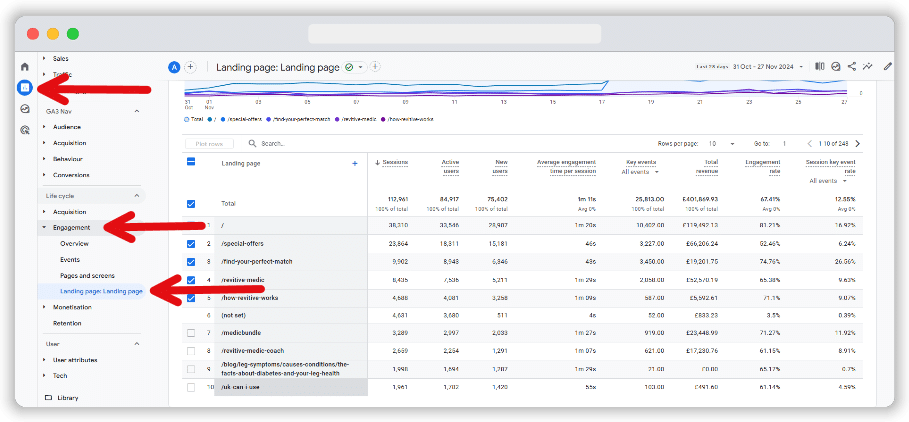
Sort by engagement rate (the opposite of bounce rate in GA4) to get a clear picture of user interactions.
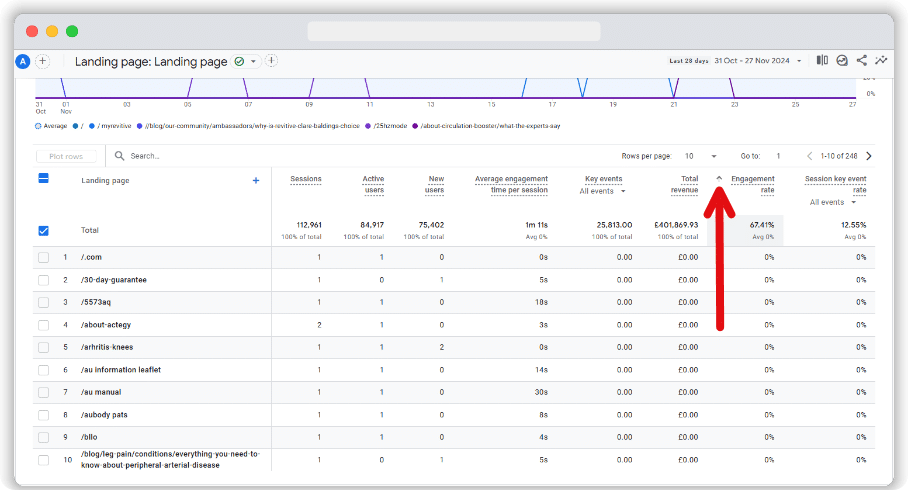
Set a minimum threshold for inspection that makes sense for your site, like 100 or 1,000 sessions, to focus on pages with significant data.
Look at whether these high-bounce pages are achieving their intended purpose. If they’re meant for quick actions and users are completing those actions, high bounce rates might not be an issue. However, if users are leaving without engaging, consider optimising the content or call to action.
Conclusion
Bounce rates are one of several measurements that show how well your website is doing. Rather than only trying to lower these rates, you should know what they tell you about the experience users have on your site.
Look at your bounce rate with other numbers to find ways to get better. Our discussed approaches can help you see where to improve based on bounce rates.