Custom GTM Client Templates

Wondering about the importance of clients within Server-side GTM? Perhaps you’re even thinking of building your own client. In either case, this blog is here to help you! In this article, we’ll give a deep dive into custom GTM client templates.
This is a webinar write-up of Markus Baersch’s talk at GTM4ward V2. Find his slides here and a YouTube recording of his session below:
What is a client in Server-side GTM?
A client builds standard event models from incoming requests in Server-side GTM (ssGTM). Tags are then triggered in GTM and send data to other platforms such as Google Analytics or Facebook.
Clients differentiate users who have set up server-side from those who use client-side GTM. Often, a user will only have two or three clients on the go at once.
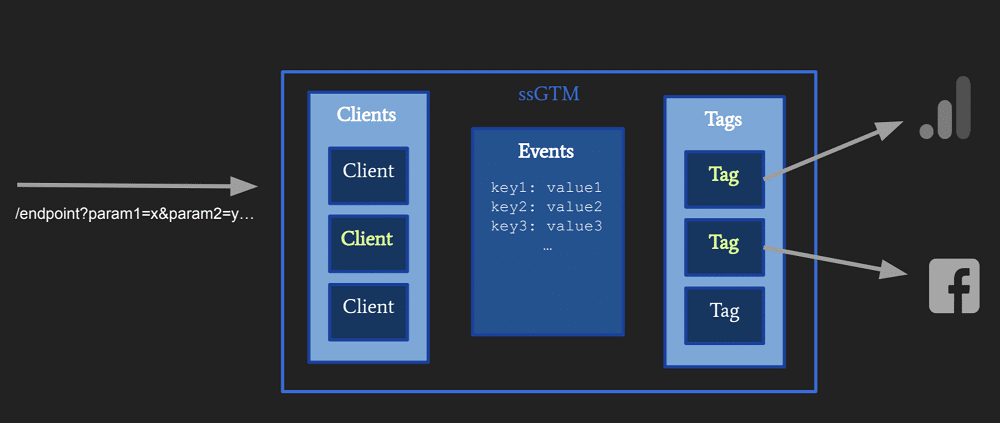
Client tasks can be split into three common categories. These are:
- Receive requests – different endpoints or the same endpoint and different priority (first to “claim” wins).
- “Decouple” tags 2 from raw requests – Create event data or run a container to trigger tags.
- Respond – Process (response) data from tags and send server response.
When adding a new client, users only have three options out of the box. They can choose Google Analytics, the GTM web container, and the measurement protocol. Clients are also not part of the community template gallery – Google wants us to use GA4 requests as an incoming signal for server-side GTM.
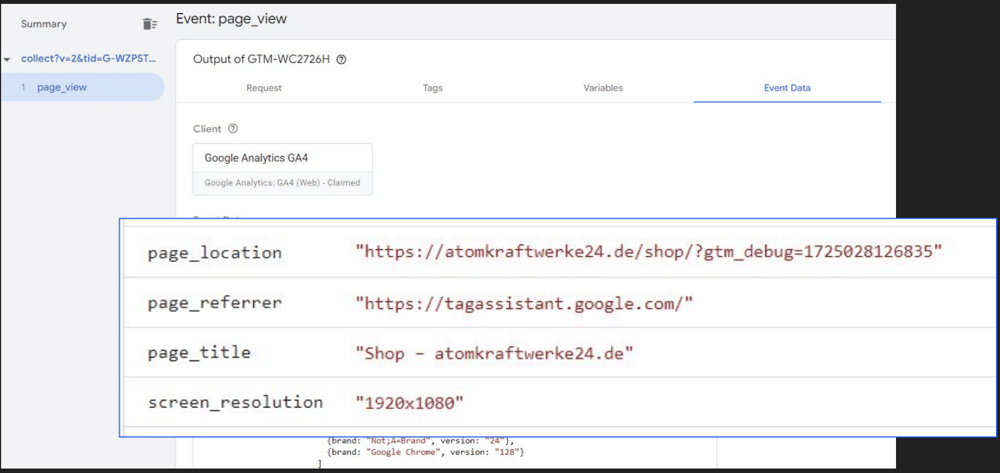
Pictured below, is an example of event data in GTM. Here, a collect request has been received that contains a page_view. The client then creates a page_view event and other event data.
The event model contains four elements (shown below). These elements are all that are needed to fire plausible and other tags.
Comparing GA4 requests
Do GA4 requests remain the same when they pass Google Tag Manager?
The simple answer is no. This is because certain incoming parameters (the client ID, for example) are only meant for ssGTM.
Follow this link If you’d like to learn more about the differences in incoming and outgoing GA4 requests.
What if GA4 adds new parameters?
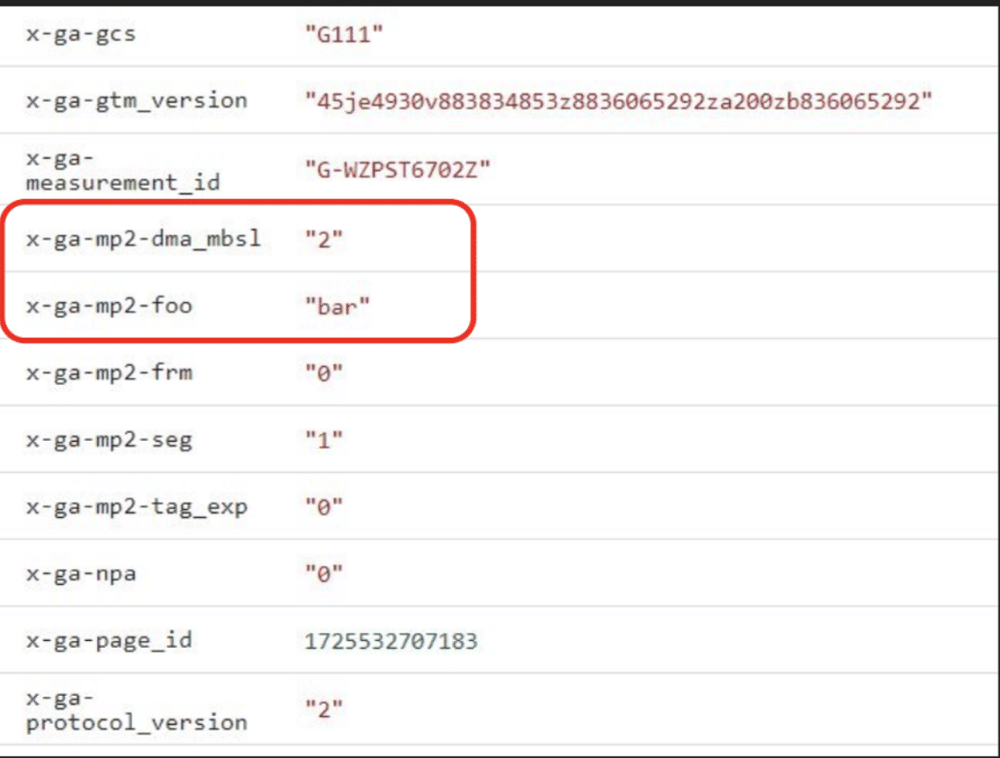
Google is adding new GA4 event parameters all the time. So, what happens to these new parameters if you’re using an older version of the client? We tested this scenario and found that the outgoing request simply repeats the parameter without knowing why they are needed.
So, even incoming Google Analytics requests are transformed into event data. They are then changed from a GA4 tag and back into a GA4 request.
You’ll also probably find “x” fields in your outgoing requests. These relate to parameters that are unique to your business. These are processed by the client and usually leave the server in an unchanged form.
Building client templates
The good news is that building a custom client is quite easy – you won’t need much coding for a functioning client.
In the first five rows of the table below, you’ll see a lot of imported APIs.
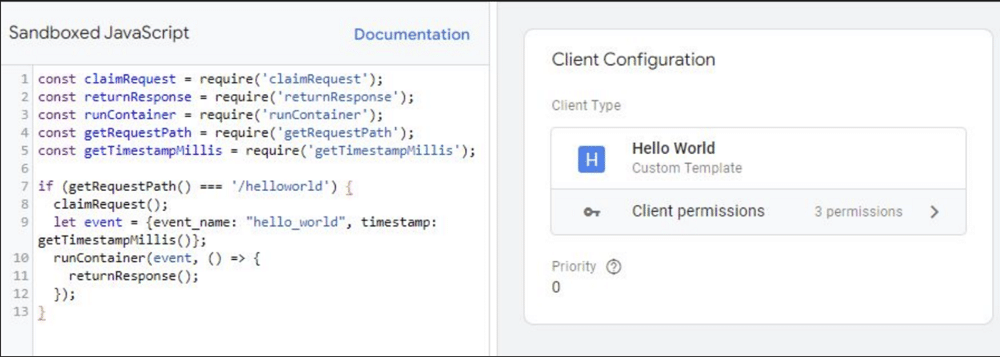
APIs are needed to carry out tasks in the GTM sandbox, but they sometimes need permissions. We need to be able to claim a request whenever the API hits an endpoint. In this instance, the endpoint is ‘helloworld’.
If the request path is ‘helloworld’, we can claim the request and build a simple event consisting of an event name and time stamp. We can then run the container by calling another API, before returning a response.
This is everything that is needed to have a client that listens to the endpoint and acts upon it.
What if you want to forward all parameters as event data?
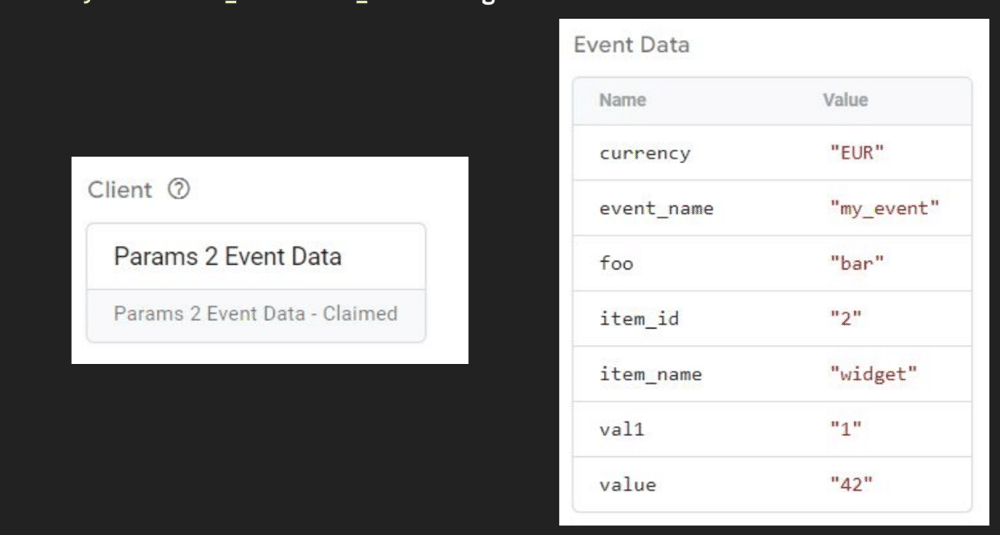
What if you wanted to make an event model consisting of all the different parameter keys and values? Luckily, this requires even less code than our earlier example. We’ll take another endpoint address (eg. param_demo), and claim the request. We’ll then gather all the request query parameters using a simple API call, before running the container and populating the event model.
Now, when we call the example URL, the client claims the result. The event data now holds all the information we sent as parameters.
GA4 requests / client alternatives?
If building a client is easy, why are there problems removing Google Analytics as a feeding request format? In Universal Analytics, we could build tracking from wherever we wanted, which could be compared to a web session.
Nowadays, though, we have the GA4 measurement protocol. Using the protocol alone isn’t always feasible, as it needs the help of web sessions and is notoriously clumsy.
Unfortunately, replacing incoming requests with something other than GA4 requests is not that simple. This is because the browser controls everything in GA4. It knows when a session starts, the session count, and many other factors. What’s more, the parameters constantly change; when something new occurs, gtag knows what to do even if the user doesn’t.
Differences in GA4 event data
On the face of it, GA4 event data looks very familiar vs universal analytics. We have events such as screen_resolution, page_title, and ip_override.
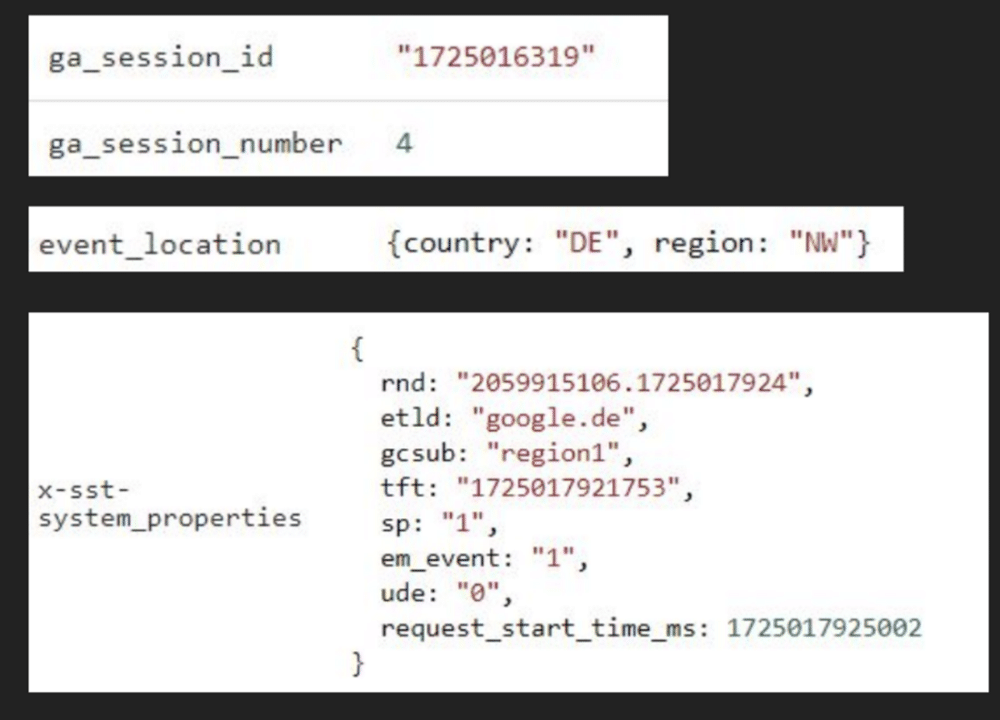
If we dig a little deeper, however, we start to notice some differences. For example, the ga_session_id must be a timestamp, otherwise GA4 will have difficulties processing the data. We also have the session number, which forces us to count sessions on the browser (every other tool counts sessions on the server).
The event_location poses another issue. We now need to specify a country and a region when sending information that is similar to a GA4 request.
Lastly, there are server-side tracking system properties. To mimic these, you need to keep an eye on real incoming requests. If you spot any changes, you’d also have to implement these into your client.
Available options
You have two options available. You can live with these restraints, feeding GA4 with incoming requests from another source. If you opt for this choice, however, don’t expect data to be suitable for advertising. You’ll be missing dimensions and metrics will be misleading.
Your second option would be to mimic gtag in the browser and use a standard GA4 client. But as we’ve explored this option isn’t easy. Alternatively, you could use options such as walkerOS or the Stape data tag to receive requests. Lastly, you could choose not to use GA4 at all, and use all incoming requests.
Which option should you pick?
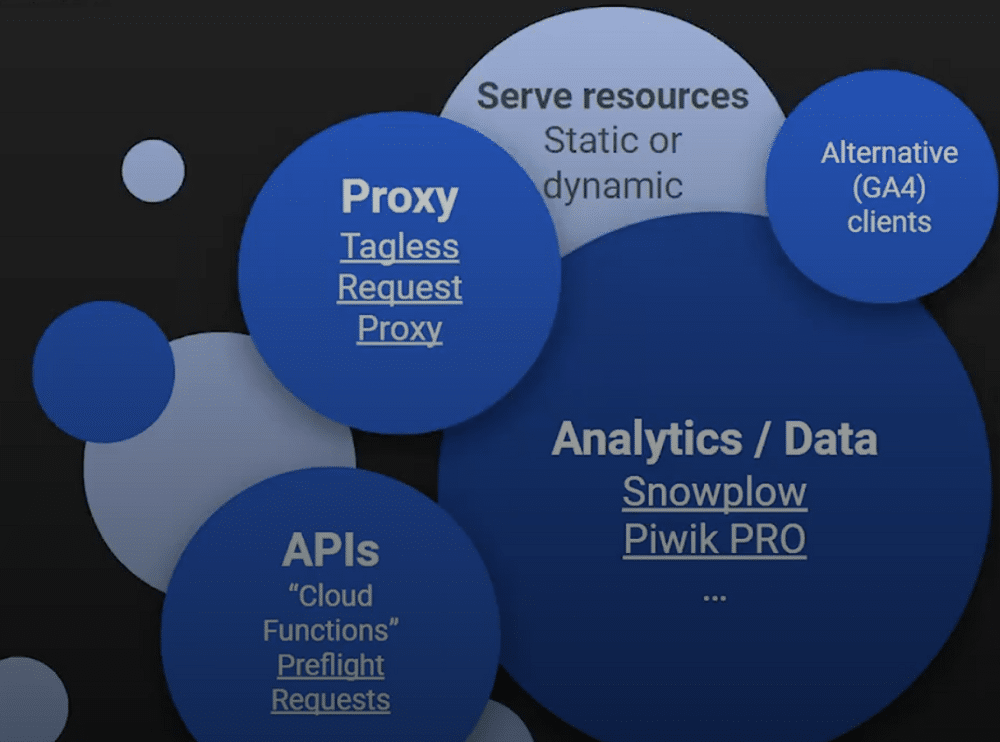
Our advice is to use custom clients for any other tasks. This might include any of the examples listed in the image below. You can find these templates on platforms such as GitHub and Gist.
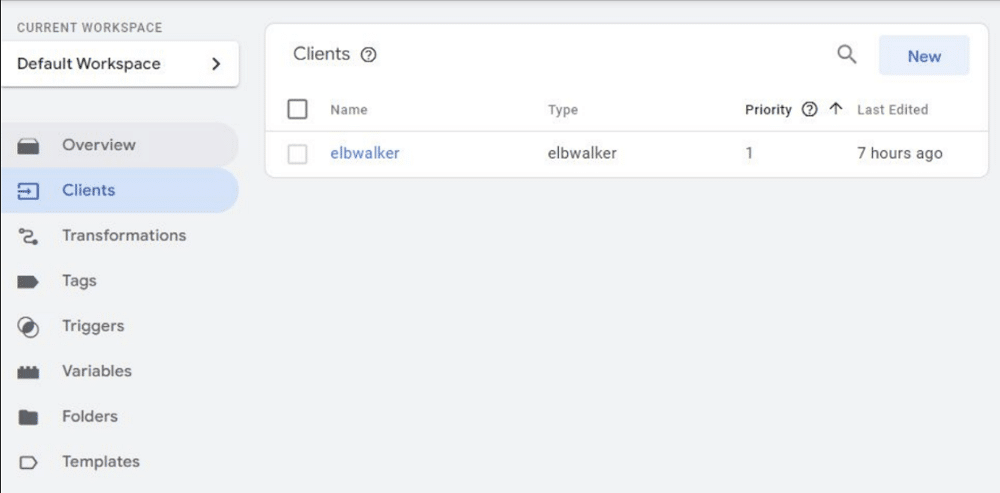
You may even use a template as a basis for building something that can receive your requests. Pictured below is a very simple example of how this might work. This is an elbwalker client built within walkerOS. This includes a proprietary format for incoming requests that don’t mimic GA4.
On the other side, we have a Piwik Pro tag. This adds a single transformation to translate incoming eCommerce event names into Piwik Pro event names.
In this way, we’ve been able to feed Piwik Pro without having Piwik Pro or GA4 on the website. This means we can now process incoming requests with or without consent. We can store these directly within BigQuery, without feeding GA4 in a meaningful manner.
Server-side: custom client tips
Before we wrap up, let’s quickly reflect on a few custom client top tips. When building a client remember:
- It’s always a good idea to return a response. There is more to consider than just the status code. Think of a GA4 tag that wants to instruct the browser to send a third-party request. This wouldn’t be possible without the client returning the response.
- Running a container is optional. You can have a client that receives a request, processes it, and creates storage space but doesn’t create an event model and run the container. This is because clients use all the same APIs as tags.
- Requests can contain multiple events.
If you decide to use more than the standard GA4 clients, bear the following points in mind.
- Check your trigger conditions. Make sure you only trigger tags when the correct client is the source of the event container.
- You can use transformations whenever clients and/or tags don’t even allow redaction. For instance, in the standard GA4 tag, you can override views. There are, however, tags for other services that don’t allow this.
Build your client
A custom client can be a powerful tool. Why not build your own client and see how it can help you?
About Markus Baersch
Markus Baersch is Managing Director at gandke in Mönchengladbach, Germany. In addition to SEM, his main focus for several years has been on robust and reliable digital analytics implementations. His favorite disciplines are client- and server-side tag management + data quality. Co-host at (German) web analytics podcast “beyond pageviews” since 2016.