How to do a Google Analytics 4 Audit & Mistakes to Avoid

We all know that Google Analytics audits are important. Sometimes, however, things don’t go to plan. When this happens, what should you do? Let’s explore some of the most common GA4 audit errors, and methods for correcting them.
This is a webinar write-up of Alan K’necht’s talk at GA4ward V5. Find his slides here and a YouTube recording of his webinar below:
Why audit your GA4 property?
Lots of people look at their GA4 properties and see the data that they need. They ask themselves, ‘Why do I need a Google analytics audit?’
Ultimately, we’ll never get 100% precision with our data. Blips, issues with consent, and cookie-tracking errors can all harm the reliability of our data. We do, however, need a strong enough data sample to support business decision-making.
To win the support of stakeholders, we need to prove that our data is both accurate and reliable. This is why we need a GA4 audit.
An audit can help to answer the following questions:
- Is any key information missing from my data?
- Are all required dimensions and metrics reporting correctly?
- Are my data collection practices legally compliant with laws such as GDPR?
- How secure is my account?
- Do I have high-quality data?
10 most common Google Analytics audit issues
Do you feel your audit could be handled more effectively? Here are some of the most common Google Analytics audit issues.
1. No measurement plan
Do you have a data measurement plan? GA4 is a lot less forgiving than its predecessor, Universal Analytics. With UA, you could set up your property and get access to everything you needed. In GA4, you need to utilse customisation features to get the information you want.
You need to define your conversions. Have you set up calculated metrics? If not, you might not be reporting on them. Do you need to create custom events to be creative? A measurement plan can help clarify these areas.
The image below is an example of what an average measurement plan looks like. At the top of the image, we have our business objectives and strategies. These are supported by a series of tactics, each of which needs to be carefully measured to ensure success. These KPIs should go into reports and segments to give us easy access to the information we need.
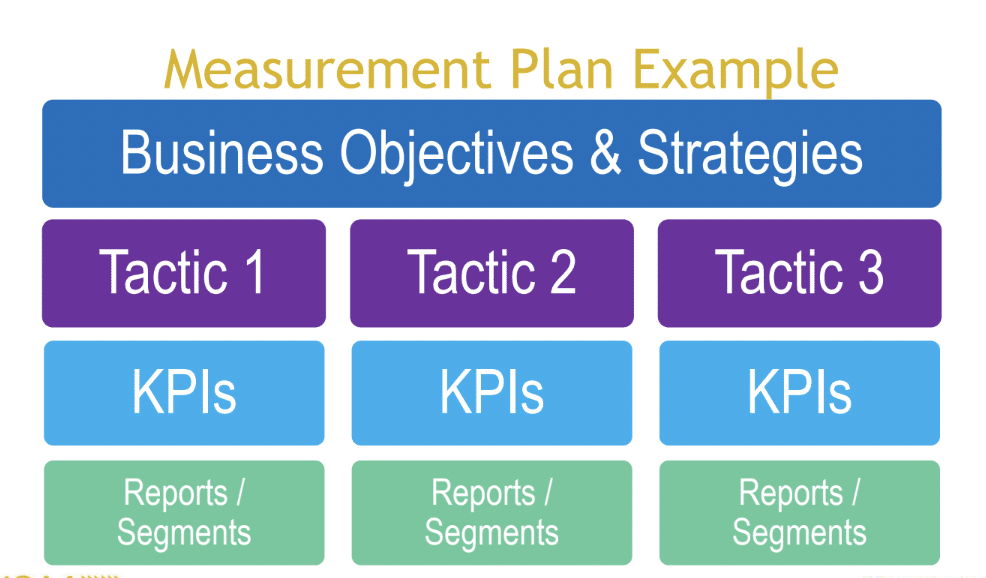
You shouldn’t carry out your GA4 implementation without a measurement plan in place. If you’ve already gone ahead, however, an audit can tell you if your data is in line with your needs. You’ll need to create or update your measurement plan as a result of audit findings.
When new requirements arise, you need to refresh your measurement plan and change your GA4 setup to match this.
2. Poor GA property integrity
Too often, only one person within an organization has access to its Google Analytics property.
This brings several problems. What if something happens to them? You’d be locked out of your data. If that person is at an agency, it means that the agency owns your data.
To avoid this problem, provide at minimum, Admin level access to at least two people in your organization. The admin of your property must also be an internal employee.
On the other hand of the scale, there are organizations with 50-60 employees accessing their property. Whilst this might make sense for some large-scale organizations, have you considered who is included? For instance, ex-employees or people in different departments, who no longer need access to your data.
Without strong data integrity, there’s potential for data leaks, stolen data, and organization sabotage. Your Google Analytics audit must prioritise this issue.
Many people implemented GA4 whilst also running Universal Analytics, or ‘auto migrated’. They may still have active UA tags within their source code.
This provides no benefit, as UA hasn’t been active for some time. It could also potentially slow your website, harming your SEO approach, and potentially causing data loss. To avoid this problem, make sure you disconnect your GA4 from UA.
4. Not enough detail for content sites
Some people run sites hosting massive amounts of content. Unfortunately, ‘out-of-the-box’ GA4 doesn’t provide much functionality to content sites.
If you want to know how whether users are engaging with your content, you need a more detailed breakdown. This can help you define your editorial policy. For instance, you might learn that longer pieces of content have higher abandonment rates.
These sites may also need to break content into groups. For example, a food blogger might have meat, vegetarian and vegan recipes. They might want to know how each category is performing. Unfortunately, content groups aren’t as easy to set up within GA4.
Scroll tracking – granular data
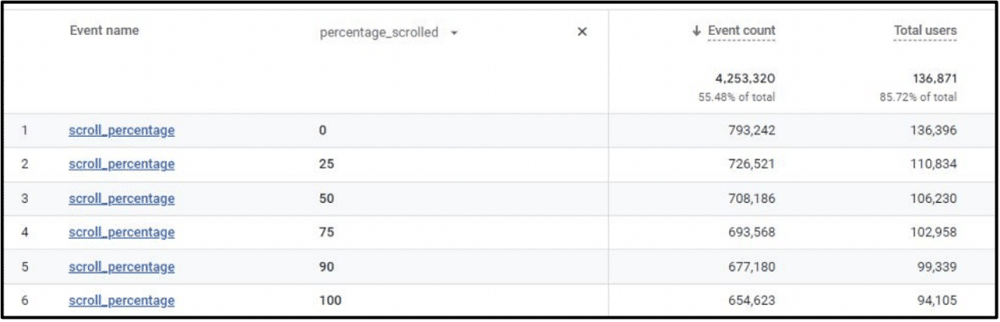
When auditing your work, it’s important to look at reports that are being utilized the most. You might see some ugly examples like the scroll tracking report set up within GTM seen below.
Think again about your measurement plan. You might want to view events, not just by total users and counts, but by percentages. For example, maybe you want to ensure that 70% of blog post readers view at least 90% of each article.
To measure success towards these goals, you should create calculated metrics and assign key performance indicators.
5. Not confirming all set-up options
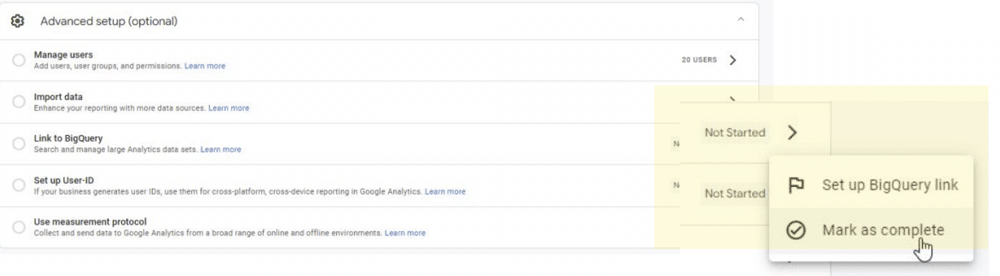
Have you logged into your GA4 account and received a message similar to the example below? If so, this is because you haven’t confirmed your ‘advanced setup’ options. You must confirm these, even if you choose not to implement them.

To confirm these settings, select ‘Mark as complete’ from the advanced setup page. Clicking dismiss will only clear the issue until your next session.
6. Not all pages are tagged
You might not have included GTM or the Google Analytics snippet on every page of your site. There may be good reasons for this – you might not be interested in reporting on a certain page.
In other instances, though, you might be missing key data from important pages on your site. There are several ways of finding untagged pages. These include:
- Use a crawler to scan the entire site to ensure that 100% of pages are tagged
- Using a tool. A good free example is statsglitch.com.
- From within GTM, go to ‘Admin’ > ‘Tag Coverage’. From here, you can view a ‘Tag Coverage’ report. If you using this method, it’s important to use ‘Tag assistant’ to verify errors.
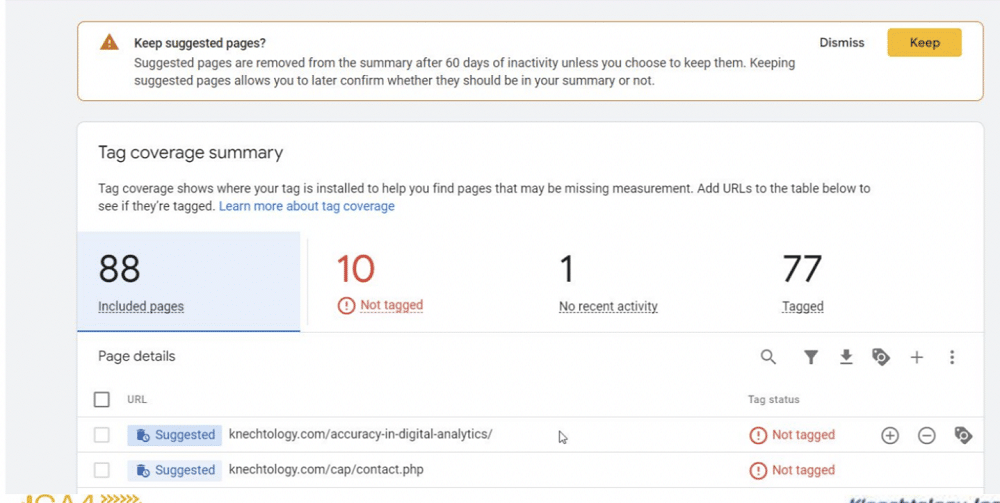
Caption: An example report ‘Tag Coverage’ summary in GTM. Lists all pages that are not tagged on your site.
7. Ecommerce errors
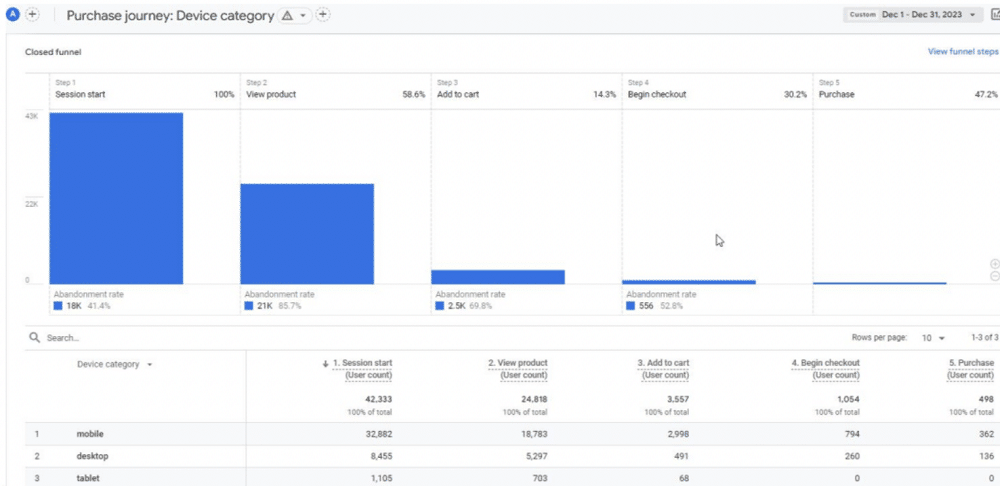
If you’re using an eCommerce platform such as Shopify or Woocomerce, you must use naming conventions to name your events. If you fail to do this, your reports will look similar to the image below.
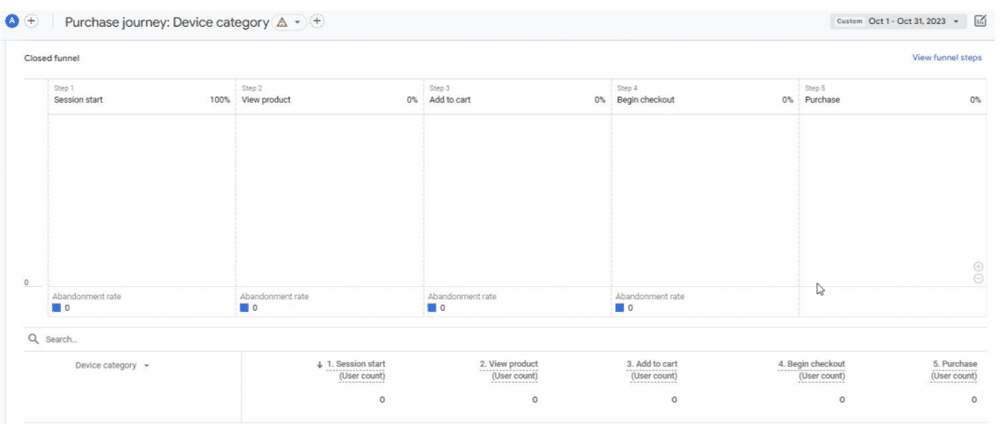
Don’t rely on basic configurations. You will need to meet the exact event requirements by event definitions. When naming conventions are entered correctly, your reports should look similar to the image below.
8. Errors in the use of UTM parameters
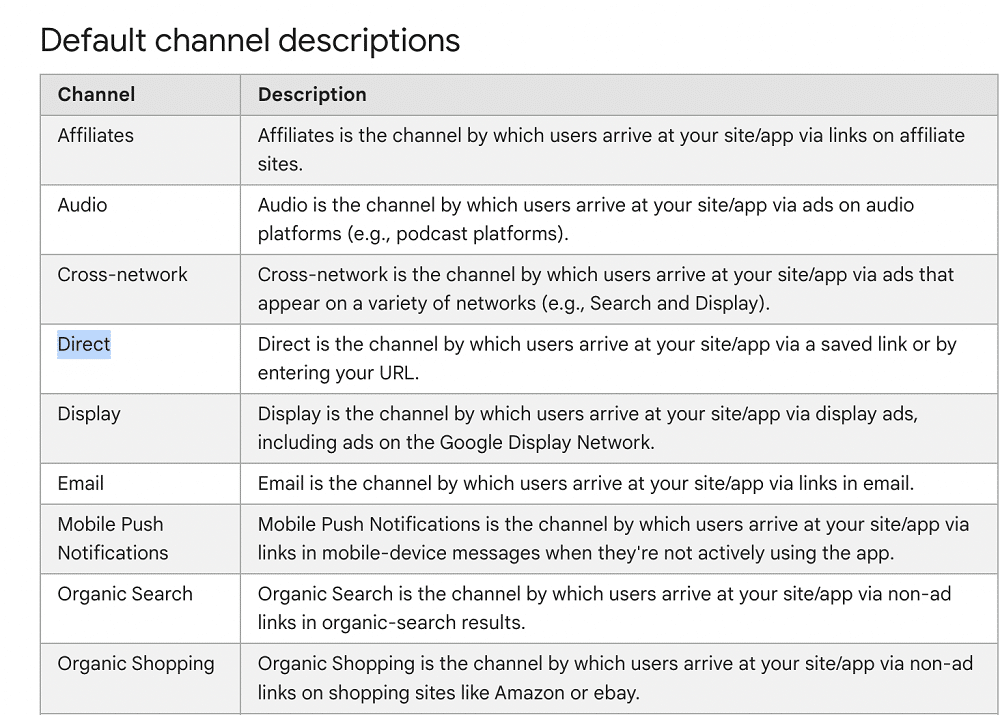
Some people like to make up values for UTM sources and mediums across their marketing. This can cause an ‘unassigned’ channel to appear in GA4.
Google has become far more restrictive about UTM parameters, To avoid this problem, you need to keep an eye on the GA4 default channel group. Google updates this regularly, and it can help keep your marketing teams up-to-date on UTM parameters.
9. Missing or insufficient privacy policy
Your privacy policy must address your use of GA4 cookies. It should also clarify your use of other tracking tools, such as HotJar or Microsoft Clarity. This applies, not only to GDPR compliance, but also to CCPA, PIPEDA, and other data laws.
To avoid legal issues, make sure that your document also references consent. Having a cookie banner isn’t enough, it should link your policy. Remember, just because you’re based in a different country, doesn’t mean that foreign data laws don’t apply. If you sell to users in different jurisdictions, then you must follow their data laws.
Your privacy policy must also be easily findable by users. A visitor shouldn’t have to click through menus to find the information they need.
10. GA4 dimensions are properly configured
Some users turn on ‘Site search’ in the GA4 setup but don’t add the event parameters to be reported. Make sure that the events that you are tracking are defined and added.
Equally important, be careful to avoid duplicates. You may find your tracking an interaction through GTM and GA4 if you don’t disable it first in GA.
Audit today!
If you haven’t already, now might be the time to carry out a Google Analytics audit. When doing so, remember the common errors that we’ve discussed today. Avoid these, and you’ll get an accurate and reliable audit.
About Alan K’necht
Alan K’necht, a digital analytics veteran with over 25 years of experience. For the past 25+ years he’s provided consulting services ranging from web development, analytics, SEO and social media marketing to fortune 500 companies, government departments, military and small & medium size businesses. For the past several years, K’necht is purely focused on analytics, primarily in the world of Google Analytics through his consulting company K’nechtology.